
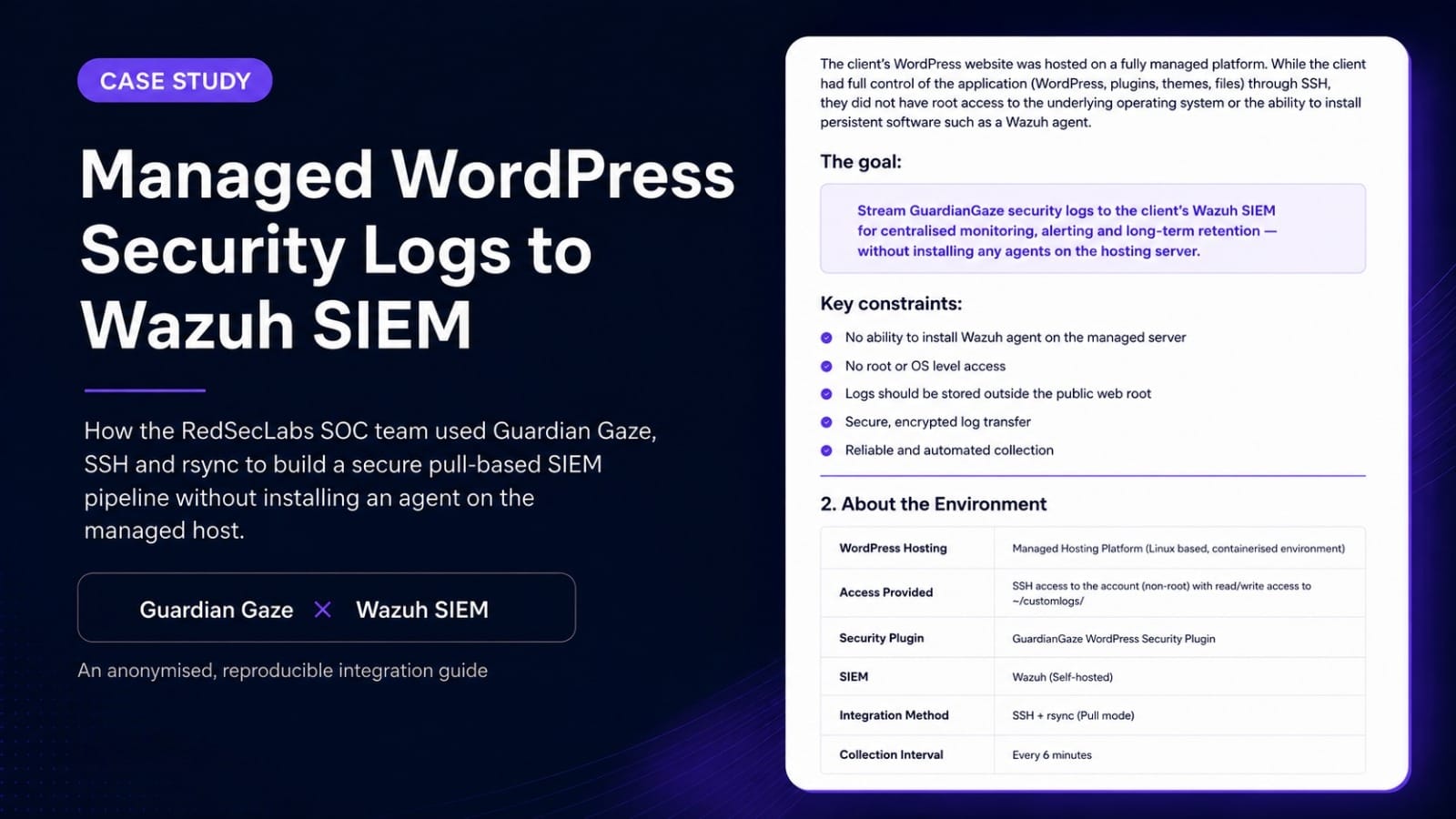
During a Guardian Gaze SOC integration, the RedSecLabs (RSL) team needed to bring WordPress security telemetry into an existing Wazuh SIEM. The WordPress estate was hosted on a fully managed, containerised platform. The client controlled the application, but not the underlying operating system, web server or PHP containers. The provider did not permit a Wazuh agent on the managed host, but it did provide a restricted SSH account whose accessible filesystem scope was limited to a persistent custom-log directory outside the WordPress document root.
The initial design was to have the managed host push the Guardian Gaze log to an external collector over SSH and rsync. During validation, however, the team encountered the kinds of constraints that often appear in managed hosting: controlled egress, platform-owned container lifecycle, firewall dependencies and ambiguity around which environment would originate outbound SSH.
The solution was to reverse the trust direction. Rather than asking the managed host to initiate a connection into the SOC environment, the RSL collector authenticated to the provider-approved restricted SSH account and pulled the persistent Guardian Gaze log from the non-public custom-log directory using rsync. The private key remained on the collector, while the matching public key was authorised for the restricted hosting account. The local copy was then monitored by a Wazuh agent and processed as structured JSON.
The resulting pattern is useful for teams that need managed WordPress telemetry in Wazuh but cannot install persistent security software on the web host. It keeps the hosting platform managed, leaves collection scheduling and private-key custody under the security team’s control, and avoids exposing the security log through the public website or an HTTP download endpoint.
| Objective | Constraint | Resolution |
| Centralise Guardian Gaze security telemetry in Wazuh | No Wazuh agent allowed on the managed WordPress host | Write to a persistent non-public log, then pull it to an external Wazuh collector |
| Automate collection | Container lifecycle and provider-controlled scheduling | Run the schedule from the SOC-owned collector |
| Protect transport | No public download URL for logs | Use SSH key authentication and rsync |
| Make events searchable | Application telemetry needs structured fields | Collect single-line JSON and use Wazuh’s JSON log format/decoder |
| Keep the method reusable | Client and provider specifics vary | Use placeholders, least privilege and a provider-supported SSH account |
Outcome
RSL established a repeatable managed WordPress-to-Wazuh pipeline without installing a Wazuh agent on the hosting platform and without requiring the hosting provider to connect into the client’s SIEM network.
Contents
- The SOC integration challenge
- What RSL found in the managed hosting environment
- Why the standard Wazuh agent model did not fit
- The first design: push from managed hosting
- The design change: pull from the SOC collector
- Final architecture and security model
- Detailed implementation guide
- Wazuh configuration and example detection rules
- Validation, troubleshooting and failure modes
- Operations: rotation, monitoring, retention and scale
- Lessons learned and reusable decision framework
- CMS publishing metadata and references
Who this guide is for
SOC engineers, WordPress platform teams, managed service providers, agencies, security architects and Wazuh administrators who need application-level WordPress telemetry but cannot install an agent on the production hosting platform.
1. The SOC Integration Challenge
The integration began as part of an RSL SOC engineering exercise. Guardian Gaze was being used to provide WordPress-aware security telemetry while the client’s wider security operations were already centralised in Wazuh. The goal was not to replace either platform. It was to connect the application context from Guardian Gaze with the central correlation, alerting and investigation workflow in Wazuh.
On a conventional Linux server, the simplest path would be to install a Wazuh agent next to the application, configure Logcollector to watch the Guardian Gaze file and forward events to the Wazuh manager. That assumption failed as soon as the team mapped the actual hosting model.
The WordPress workload sat on managed hosting. The provider controlled the host operating system and container lifecycle. The client could manage WordPress and had controlled shell access through a provider-supplied account, but that account was intentionally restricted to the persistent custom-log area rather than exposing the general host filesystem. The environment could not be treated as a general-purpose VM.
The core question
How can a security team get reliable WordPress security logs into Wazuh when it cannot install or persist a Wazuh agent on the managed WordPress server?
1.1 Requirements RSL set before choosing a method
- The Guardian Gaze log must persist across normal application/container lifecycle events.
- The log must live outside the public web root wherever the hosting model permits it.
- No security log should need to be exposed through an HTTP endpoint.
- The transport must use authenticated, encrypted access.
- The collection job must run automatically and fail non-interactively.
- A failed collection cycle must be observable by the SOC.
- The design must not require unsupported changes to the managed hosting platform.
- The local copy must be usable by Wazuh Logcollector and suitable for JSON decoding.
- All client, host and provider-specific details must be replaceable with generic configuration values.
2. What RSL found in the managed hosting environment
The key breakthrough came from treating the hosting platform as a service with explicit interfaces rather than as a server that happened to run WordPress. RSL confirmed four operational facts with the hosting team.
| Discovery | Why it mattered |
| A persistent custom log directory was available outside the public document root. | Guardian Gaze could write a security log without putting it under a web-accessible WordPress directory. |
| The relevant application containers used a shared filesystem. | Multiple PHP workers would see the same persistent path instead of producing isolated per-container log files. |
| The hosting provider exposed controlled SSH access to the account. | The SOC could retrieve the log through a supported access method. |
| The managed platform, not the client, controlled container rebuilds and scale events. | Any design depending on an agent or custom daemon inside an ephemeral application container would be fragile. |
This is an important design pattern for managed hosting: first identify the durable, provider-supported interface. It may be a persistent filesystem path, SFTP/SSH, syslog forwarding, an API, object storage or another export mechanism. Build around that interface rather than trying to recreate a traditional server model.
3. Why the standard Wazuh agent model did not fit
Wazuh can monitor application log files from a Linux endpoint through the Wazuh agent’s Logcollector configuration. That is the normal and preferred pattern when the endpoint is under the organisation’s control. In this case, the managed hosting boundary made that installation model unsuitable.
- The client did not own the host operating system.
- Persistent services inside application containers could be removed by rebuild or scale events.
- Installing a host-level agent could conflict with the provider’s support model.
- The SOC did not need full host telemetry from the managed platform; the immediate requirement was the Guardian Gaze WordPress security log.
- A narrowly scoped log export created less operational coupling than introducing a new persistent endpoint agent.
Important Distinction
This is not an argument against Wazuh agents. The Wazuh agent remains the right choice for endpoints you control. The case study addresses a different boundary: managed application hosting where OS-level persistence is intentionally unavailable.
4. The first design: push from managed hosting
RSL first considered a push model. Guardian Gaze would write its log to the persistent custom-log directory and a scheduled job on the hosting side would rsync the file to a dedicated account on the SOC collector.
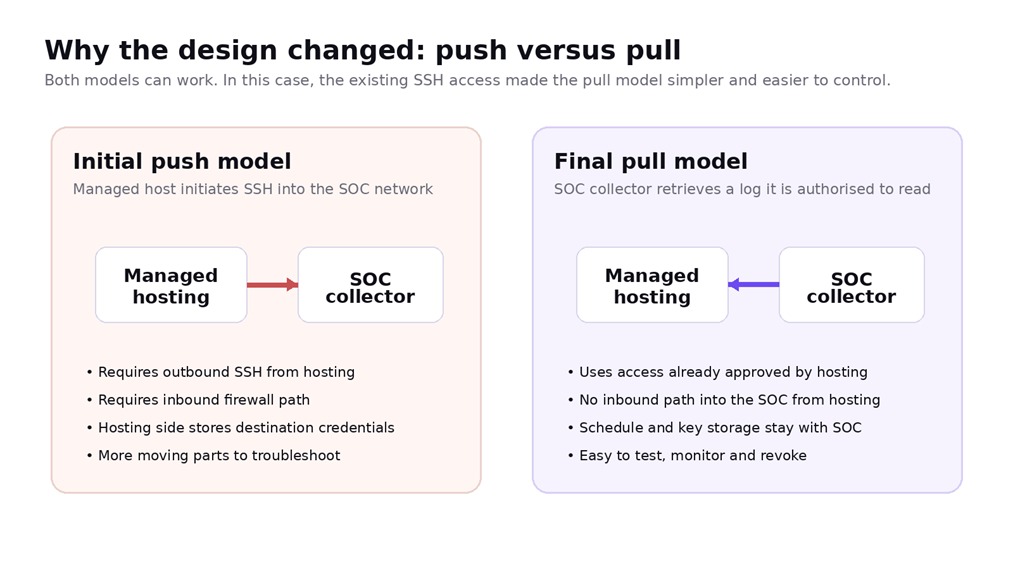
4.1 Why push looked attractive
- The hosting platform could decide when to transmit the file.
- The collector would only need to receive and store the data.
- A dedicated destination account and source-IP allow rule could be tightly scoped.
4.2 What testing exposed
The team then tested the SSH path. A connection refusal occurred before key authentication. That observation mattered: the problem was not the ED25519 public key, the destination user’s password or the contents of authorized_keys. The TCP connection itself was not being accepted from the environment that originated the test.
Managed platforms may have different egress addresses for application traffic, interactive shell access and scheduled jobs. They may also restrict outbound SSH. A push design therefore depends on details that are often owned by the provider rather than the customer.
Troubleshooting lesson
When SSH returns “Connection refused”, solve the network/listener path first. Do not rotate keys or change authorised_keys until the client reaches the SSH authentication phase.
5. The design change: pull from the SOC collector
The managed hosting team had already provided a controlled SSH account with read/write access limited to the persistent custom-log directory outside the WordPress web root. It offered no general host filesystem access, so RSL reversed the connection direction.
The SOC collector initiated SSH to that restricted account and used rsync to retrieve the Guardian Gaze log locally. The collector retained the dedicated private key; only the matching public key was authorised remotely. A Wazuh agent then monitored the local copy, leaving the managed host outside the SIEM inbound trust boundary.
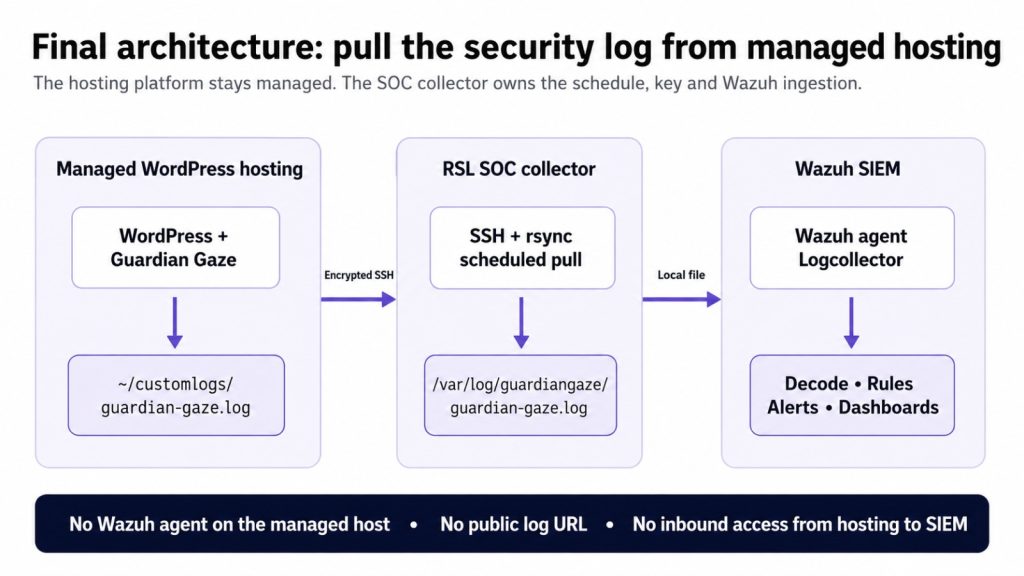
5.1 Why pull was the better fit in this case
- The access method already existed and had been approved by the hosting provider.
- No inbound SSH rule from the managed hosting platform into the SOC network was needed.
- The SOC controlled the collection interval, private-key storage, job logs and retry behaviour.
- The hosting side only needed to maintain the persistent log and the authorised SSH account.
- Revocation was straightforward: remove or rotate the dedicated SSH credential.
- The design remained compatible with container rebuilds because the log lived on persistent shared storage.
The managed WordPress host remained without a Wazuh agent. This differs from Wazuh’s native Agentless monitoring feature: the pattern in this case retrieves an application security log to a SOC-owned collector, where a standard Wazuh agent performs local-file collection.
6. Final architecture and security model
The final data path separates four responsibilities. WordPress produces application activity. Guardian Gaze converts relevant activity into security telemetry. SSH/rsync transports the file to a collector under RSL or client control. Wazuh performs central collection, decoding, rules, alerting and investigation.
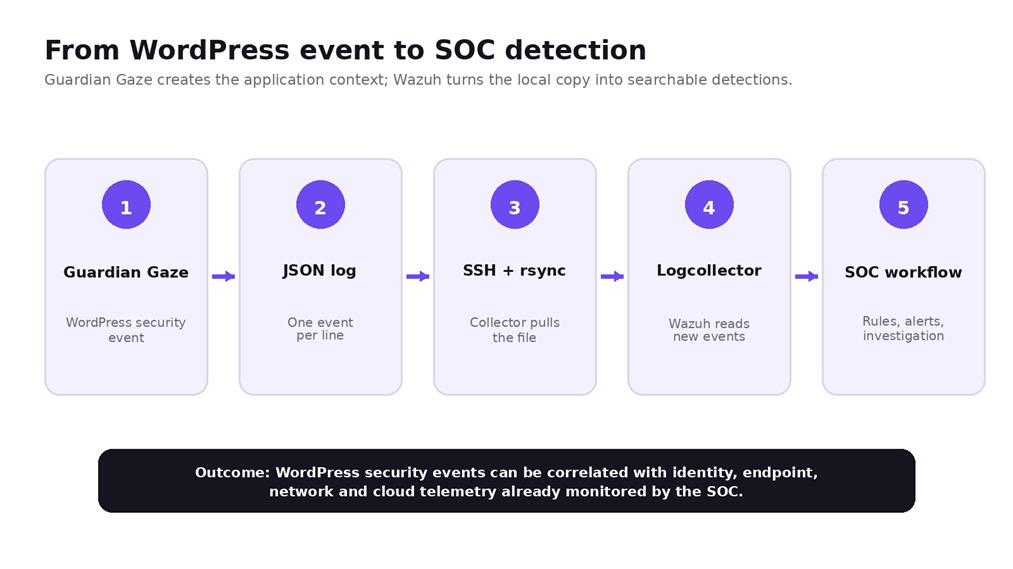
6.1 Trust boundaries
| Boundary | Recommended control |
| Managed host → persistent log | Write to a non-public path; minimise file permissions; use one JSON object per line. |
| SOC collector → managed host | Dedicated SSH identity, provider-approved account, known-host verification and least privilege. |
| Local collector filesystem | Dedicated directory; restrict write permission to the sync service account; allow Wazuh to read. |
| Collector → Wazuh manager | Use the organisation’s normal Wazuh agent transport and certificate/key controls. |
| Operational monitoring | Log rsync exit codes, alert on stale data and test the pipeline after hosting changes. |
6.2 What should never be copied into a public guide or ticket
- Production IP addresses and private hostnames.
- Real SSH usernames where they identify a customer or hosting account.
- Private keys or passphrases.
- Contents of authorized_keys if the key is still active.
- Client domains, site IDs, container IDs or provider-internal paths.
- Raw security events containing customer personal data unless they are sanitised.
7. Detailed implementation guide
The following procedure is deliberately generic. Replace every value inside angle brackets with values supplied or approved for your environment. Test in a non-production path first.
7.1 Define your variables
Example variable model
# Managed hosting details
REMOTE_USER=”<managed-host-log-reader>”
REMOTE_HOST=”<managed-host-ssh-endpoint>”
REMOTE_LOG_DIR=”/home/<hosting-account>/customlogs”
REMOTE_LOG_FILE=”${REMOTE_LOG_DIR}/guardian-gaze.log”
# SOC collector details
SYNC_USER=”gg-sync”
LOCAL_LOG_DIR=”/var/log/guardiangaze”
LOCAL_LOG_FILE=”${LOCAL_LOG_DIR}/guardian-gaze.log”
SSH_KEY=”/var/lib/gg-sync/.ssh/managed-host-ed25519″
Do not copy placeholders literally
The managed provider may expose a different path, username or SSH endpoint. Use the provider-supported values. The key principle is a persistent source path outside the public web root and a narrowly scoped destination path on the collector.
7.2 Confirm the hosting-side prerequisites
- Ask the managed hosting provider for a persistent custom-log directory that survives normal application/container lifecycle events. In this case, the provider supplied a dedicated directory outside the WordPress document root.
- Prefer a path outside the site’s document root so the log is not web-discoverable. If a provider can only supply a web-root path, require an explicit web-server deny rule and verify that direct HTTP requests cannot retrieve the file.
- Confirm whether all relevant PHP/application containers share the persistent directory. If they do not, each container may need a separate collection strategy.
- Obtain a provider-supported SSH account whose filesystem access is restricted to the custom-log directory and which supports rsync over SSH. In this case, the account had read/write access to that directory only. A pure SFTP-only account is a different transport model and should not be described as equivalent to rsync over SSH.
- Confirm how the hosting platform and Guardian Gaze rotate, truncate or replace files in that directory before choosing the rsync update mode.
7.3 Configure Guardian Gaze logging
In the deployment used for this case study, Guardian Gaze Pro was configured to write security events to the persistent custom-log directory agreed with the hosting provider. For a Wazuh-friendly pipeline, write newline-delimited JSON: one complete JSON object per physical line.
Representative source file
/home/<hosting-account>/customlogs/guardian-gaze.log
A representative event is shown below on one physical line because the Wazuh JSON log format expects each event to be a complete JSON object on a single line. The exact Guardian Gaze schema should be taken from the version deployed in your environment; the field names below are intentionally generic.
Representative JSON event (illustrative field names)
{“timestamp”:”2026-08-08T01:42:15Z”,
“source”:”guardian-gaze”,
“event_type”:”file_modified”,
“severity”:”high”,
“site”:”example-wordpress-site”,
“path”:”/wp-content/plugins/example/example.php”,
“message”:”Unexpected PHP file modification detected”}
7.4 Create a dedicated local sync account
On the SOC collector, avoid running the scheduled pull as root unless there is a specific operational reason. A dedicated local service account makes key custody and file permissions easier to reason about.
Create the collector-side service account and directories
sudo useradd –system \
–create-home \
–home-dir /var/lib/gg-sync \
–shell /usr/sbin/nologin \
gg-sync
sudo install -d -o gg-sync -g gg-sync -m 0700 /var/lib/gg-sync/.ssh
sudo install -d -o gg-sync -g gg-sync -m 0750 /var/log/guardiangaze
7.5 Configure the dedicated SSH key pair
Use a dedicated SSH key pair for the log-collection workflow. Keep the private key on the SOC collector (or in an approved secrets mechanism) and authorise only the matching public key on the provider-supplied restricted SSH account. Never place the private key on the managed WordPress host and never reuse a general administrator key when a dedicated integration identity is available.
Store the private key with restrictive permissions
sudo install -o gg-sync -g gg-sync -m 0600 \
<path-to-dedicated-private-key> \
/var/lib/gg-sync/.ssh/managed-host-ed25519
Key handling
A private key used by the collector must remain on the collector (or in an approved secrets mechanism). Do not paste it into tickets, chat channels, documentation or source repositories. If a temporary key was exchanged during troubleshooting, rotate it before production.
7.6 Pin and verify the SSH host key
Do not solve first-connection prompts by disabling host-key checking. Instead, obtain the hosting SSH endpoint fingerprint through a trusted provider channel, compare it, then populate known_hosts.
Populate known_hosts, then verify the fingerprint out of band
sudo -u gg-sync ssh-keyscan -H <managed-host-ssh-endpoint> \
| sudo -u gg-sync tee /var/lib/gg-sync/.ssh/known_hosts >/dev/null
sudo chmod 0600 /var/lib/gg-sync/.ssh/known_hosts
# Review the stored fingerprint and compare it with the provider-approved value.
sudo -u gg-sync ssh-keygen -lf /var/lib/gg-sync/.ssh/known_hosts
7.7 Test non-interactive SSH access
Verify the remote directory
sudo -u gg-sync ssh \
-i /var/lib/gg-sync/.ssh/managed-host-ed25519 \
-o IdentitiesOnly=yes \
-o BatchMode=yes \
<managed-host-log-reader>@<managed-host-ssh-endpoint> \
‘ls -lah ~/customlogs/’
A successful response proves network connectivity, SSH authentication and directory visibility. If this command prompts for a password, public-key authentication has not completed successfully and should be fixed before automation.
7.8 Create and pull a harmless test file
Before pointing the collector at production telemetry, validate the path with a zero-risk test file supplied by the hosting team or created in the permitted directory.
Dry-run the rsync transfer
sudo -u gg-sync rsync -rtz –dry-run \
-e “ssh -i /var/lib/gg-sync/.ssh/managed-host-ed25519 \
-o IdentitiesOnly=yes \
-o BatchMode=yes” \
<managed-host-log-reader>@<managed-host-ssh-endpoint>:~/customlogs/test.log \
/var/log/guardiangaze/
If the dry run is correct, remove –dry-run and perform the real transfer.
Pull the test file
sudo -u gg-sync rsync -rtz \
-e “ssh -i /var/lib/gg-sync/.ssh/managed-host-ed25519 \
-o IdentitiesOnly=yes \
-o BatchMode=yes” \
<managed-host-log-reader>@<managed-host-ssh-endpoint>:~/customlogs/test.log \
/var/log/guardiangaze/
sudo ls -lah /var/log/guardiangaze/
7.9 Pull the production Guardian Gaze log
Once the test succeeds, replace the test file with the actual Guardian Gaze log. The example below assumes the active source log is append-only between rotations and uses rsync –append-verify. That mode is appropriate only when the destination already represents the same growing file. If the source can be truncated, rewritten or replaced under the same filename, do not use an append mode; use date-stamped rotated files or a rotation-aware staged transfer instead.
Production pull command
sudo -u gg-sync rsync -rtz –inplace \
-e “ssh -i /var/lib/gg-sync/.ssh/managed-host-ed25519 \
-o IdentitiesOnly=yes \
-o BatchMode=yes \
-o ConnectTimeout=20″ \
<managed-host-log-reader>@<managed-host-ssh-endpoint>:~/customlogs/guardian-gaze.log \
/var/log/guardiangaze/
Rotation warning
If the source file can be renamed, truncated or replaced during rotation, test that scenario deliberately. For higher-volume environments, date-stamped log files plus a wildcard Wazuh localfile configuration may be easier to operate than repeatedly synchronising one ever-growing file.
7.10 Wrap the transfer in a script
A wrapper script gives the SOC one place to manage locking, exit codes and operational logging.
Example /usr/local/sbin/guardiangaze-log-pull.sh
#!/usr/bin/env bash
set -u
REMOTE_USER=”<managed-host-log-reader>”
REMOTE_HOST=”<managed-host-ssh-endpoint>”
REMOTE_FILE=”~/customlogs/guardian-gaze.log”
LOCAL_DIR=”/var/log/guardiangaze”
KEY=”/var/lib/gg-sync/.ssh/managed-host-ed25519″
RUN_LOG=”/var/log/guardiangaze-sync.log”
timestamp() { date -u +”%Y-%m-%dT%H:%M:%SZ”; }
if /usr/bin/rsync -rtz –inplace \
-e “/usr/bin/ssh -i ${KEY} -o IdentitiesOnly=yes \
-o BatchMode=yes -o ConnectTimeout=20″ \
“${REMOTE_USER}@${REMOTE_HOST}:${REMOTE_FILE}” \
“${LOCAL_DIR}/”; then
echo “$(timestamp) status=success” >> “${RUN_LOG}”
exit 0
else
rc=$?
echo “$(timestamp) status=failure exit_code=${rc}” >> “${RUN_LOG}”
exit “${rc}”
fi
Set script and run-log permissions
sudo chown root:gg-sync /usr/local/sbin/guardiangaze-log-pull.sh
sudo chmod 0750 /usr/local/sbin/guardiangaze-log-pull.sh
sudo touch /var/log/guardiangaze-sync.log
sudo chown gg-sync:gg-sync /var/log/guardiangaze-sync.log
sudo chmod 0640 /var/log/guardiangaze-sync.log
7.11 Schedule the pull
For a simple deployment, cron is sufficient. The interval should reflect the organisation’s detection objective and the hosting provider’s supported access pattern. The original case used a short recurring interval; six minutes is shown only as an example.
Cron example: every six minutes
sudo crontab -u gg-sync -e
*/6 * * * * /usr/bin/flock -n /var/lib/gg-sync/guardiangaze-sync.lock \
/usr/local/sbin/guardiangaze-log-pull.sh
On modern Linux, a systemd timer provides clearer status and journal visibility. Use it if your collector standardises on systemd.
systemd service
# /etc/systemd/system/guardiangaze-log-pull.service
[Unit]
Description=Pull Guardian Gaze security log from managed WordPress hosting
After=network-online.target
Wants=network-online.target
[Service]
Type=oneshot
User=gg-sync
Group=gg-sync
ExecStart=/usr/local/sbin/guardiangaze-log-pull.sh
systemd timer
# /etc/systemd/system/guardiangaze-log-pull.timer
[Unit]
Description=Schedule Guardian Gaze security log pull
[Timer]
OnBootSec=2min
OnUnitActiveSec=6min
Persistent=true
RandomizedDelaySec=20s
[Install]
WantedBy=timers.target
Enable the timer
sudo systemctl daemon-reload
sudo systemctl enable –now guardiangaze-log-pull.timer
sudo systemctl list-timers guardiangaze-log-pull.timer
8. Wazuh configuration and example detection rules
Once the Guardian Gaze file exists on the SOC collector, the integration becomes a normal Wazuh local-file collection problem. Wazuh localfile configuration supports JSON log input and custom labels, and its JSON decoder exposes fields that can be used in rules. Validate the exact behaviour against the Wazuh version deployed in your environment, especially when testing file replacement or rotation.
8.1 Configure Wazuh Logcollector
Add the localfile block to the collector’s Wazuh agent configuration
<ossec_config>
<localfile>
<location>/var/log/guardiangaze/guardian-gaze.log</location>
<log_format>json</log_format>
<label key=”@source”>guardian-gaze</label>
<label key=”integration.type”>wordpress-security</label>
</localfile>
</ossec_config>
On Linux, the main Wazuh agent configuration is normally /var/ossec/etc/ossec.conf. Add the localfile block inside the existing ossec_config element rather than creating a second conflicting root configuration.
Validate and restart the Wazuh agent
sudo /var/ossec/bin/wazuh-logcollector -t
sudo systemctl restart wazuh-agent
sudo systemctl status wazuh-agent –no-pager
JSON requirement
Use one complete JSON object per line. Multi-line pretty-printed JSON is not the same as a single-line JSON log stream and may require a different collection strategy.
8.2 Validate that Logcollector sees the file
Useful agent-side checks
sudo tail -n 100 /var/ossec/logs/ossec.log
sudo cat /var/ossec/var/run/wazuh-logcollector.state
The Wazuh Logcollector state file is useful for confirming that the file is registered and that event/byte counters move as new lines are appended.
8.3 Inspect the real Guardian Gaze fields before writing rules
Do not write production Wazuh rules against assumed field names. Take a sanitised real Guardian Gaze JSON event from your deployed version and feed it to wazuh-logtest on the Wazuh manager.
Inspect decoding with wazuh-logtest
sudo /var/ossec/bin/wazuh-logtest
# Paste one sanitised Guardian Gaze JSON event, then press Enter.
Confirm which fields Wazuh exposes in Phase 2. Use those exact field names in custom rules.
8.4 Example grouping and severity rules
The following rules are templates only. They assume the sample fields source, severity and event_type exist. Adapt them to the fields shown by wazuh-logtest. Wazuh recommends custom rule IDs in the 100000–120000 range.
Illustrative /var/ossec/etc/rules/guardiangaze_rules.xml
<group name=”guardiangaze,wordpress,”>
<rule id=”110000″ level=”0″>
<decoded_as>json</decoded_as>
<field name=”source”>^guardian-gaze$</field>
<description>Guardian Gaze WordPress security event.</description>
</rule>
<rule id=”110001″ level=”10″>
<if_sid>110000</if_sid>
<field name=”severity” type=”pcre2″>^(?i:high|critical)$</field>
<description>Guardian Gaze high or critical security event.</description>
<group>wordpress_security,guardiangaze_high,</group>
</rule>
<rule id=”110002″ level=”12″>
<if_sid>110000</if_sid>
<field name=”event_type” type=”pcre2″>^(?i:malware_detected|backdoor_detected)$</field>
<description>Guardian Gaze malware or backdoor detection.</description>
<group>malware,wordpress_security,</group>
</rule>
<rule id=”110003″ level=”9″>
<if_sid>110000</if_sid>
<field name=”event_type” type=”pcre2″>^(?i:admin_created|role_changed)$</field>
<description>Guardian Gaze privileged WordPress account change.</description>
<group>identity,wordpress_security,</group>
</rule>
</group>
Test the rules, then restart the manager when ready
sudo /var/ossec/bin/wazuh-logtest
sudo systemctl restart wazuh-manager
Do not over-alert
The purpose of the SIEM integration is not to turn every WordPress event into a high-severity alert. Start with a small set of high-confidence use cases, then tune severity and correlation using real operational data.
8.5 Useful first detection use cases
| Use case | Suggested SOC treatment |
| Malware/backdoor finding | High-priority investigation; correlate with file changes, admin activity and web-access telemetry. |
| Unexpected PHP file creation/modification | Investigate location, hash, related plugin/theme and change window. |
| New administrator or privilege change | Validate against approved change/ticket and identity activity. |
| Repeated failed administrator actions | Correlate with source IP, WAF, reverse-proxy or authentication telemetry. |
| Plugin/theme/core change | Lower priority during approved maintenance; higher priority outside change windows. |
| Guardian Gaze collection becomes stale | Operational alert: security visibility may be degraded even if no threat alert fired. |
9. Validation, troubleshooting and failure modes
A working rsync command is not the end of the integration. RSL validated each layer independently so that a future failure could be isolated quickly.
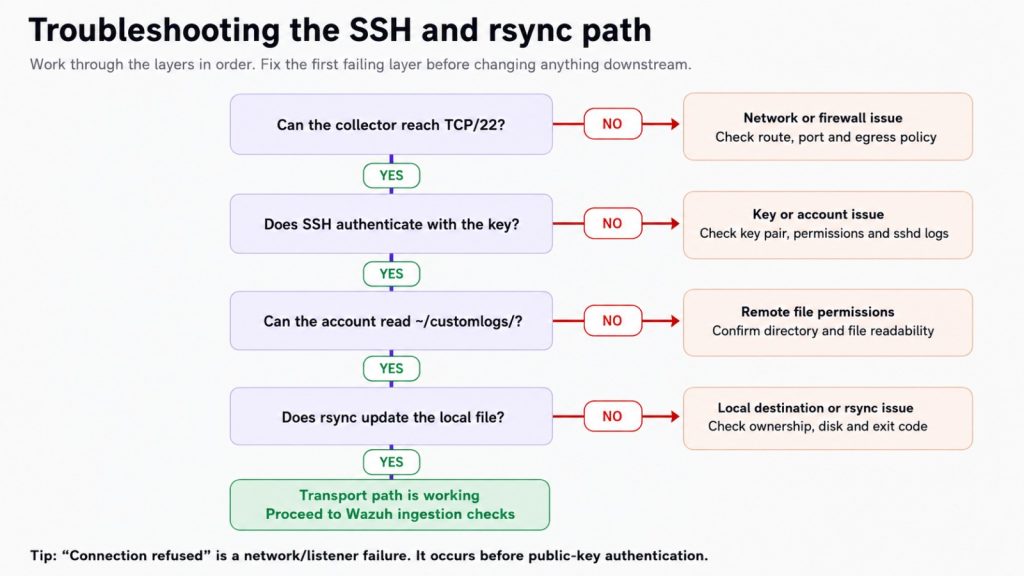
9.1 Layer-by-layer validation
| Layer | Test | Success indicator |
| Network | SSH to the managed endpoint | TCP/22 connects; no connection refusal/timeout. |
| Authentication | SSH with IdentitiesOnly and BatchMode | Public-key authentication completes without a password prompt. |
| Remote permissions | ls/cat the custom-log directory | The SSH account can read the intended file and nothing broader than necessary. |
| Transport | rsync a harmless test file | Local file appears and exit code is 0. |
| Automation | Run cron/systemd job twice | No overlap; operational log records success. |
| Wazuh agent | Inspect Logcollector state | Configured file appears and counters increase. |
| Wazuh manager | Use wazuh-logtest and dashboard | Fields decode correctly and test rule fires as intended. |
9.2 Common failure: Connection refused
Meaning: the TCP connection was rejected before SSH authentication. Check whether sshd is listening on the destination, the correct port is being used, host/cloud firewalls permit the source and the managed environment actually uses the egress path you expected.
Network-layer checks
# On a server you control:
sudo ss -lntp | grep ‘:22’
# If investigating a source-specific path:
sudo tcpdump -nn -i any ‘tcp port 22’
Do not change the public key until the SSH client reaches authentication messages such as “Offering public key” or “Server accepts key”.
9.3 Common failure: SSH asks for a password
Meaning: the network path works, but public-key authentication did not complete. Check that the correct private key is being used, the matching public key is authorised on the remote account, permissions are restrictive and the account is allowed to use public-key authentication.
Verbose authentication test
ssh -vvv \
-i /path/to/dedicated-key \
-o IdentitiesOnly=yes \
<user>@<host>
9.4 Common failure: rsync succeeds but the local owner looks wrong
Archive mode (-a) preserves more remote metadata than this workflow usually needs. In managed hosting, remote numeric UIDs may have no meaning on the collector. The examples in this guide therefore use -rtz rather than -az. Control local ownership through the collector directory and service account.
9.5 Common failure: Wazuh sees the file but not the JSON fields
- Confirm each event is one JSON object per line.
- Confirm log_format is json, not syslog.
- Paste a real sanitised event into wazuh-logtest and inspect the decoded fields.
- Check for arrays of objects or other structures that may not decode as expected.
- Avoid writing rules until you know the actual field names and data types.
10. Operations: rotation, monitoring, retention and scale
10.1 Monitor the collector itself
A silent log pipeline failure can be more dangerous than a noisy alert. Add an operational check that looks at both the rsync job status and the age of the local Guardian Gaze file.
Simple freshness check
#!/usr/bin/env bash
FILE=”/var/log/guardiangaze/guardian-gaze.log”
MAX_AGE_SECONDS=900
if [ ! -f “$FILE” ]; then
echo “CRITICAL: Guardian Gaze log is missing”
exit 2
fi
now=$(date +%s)
mtime=$(stat -c %Y “$FILE”)
age=$((now – mtime))
if [ “$age” -gt “$MAX_AGE_SECONDS” ]; then
echo “CRITICAL: Guardian Gaze log is stale (${age}s)”
exit 2
fi
echo “OK: Guardian Gaze log age=${age}s”
exit 0
Choose the stale threshold based on the collection interval and expected WordPress activity. A quiet site may not naturally produce new security events, so for high-assurance deployments consider a separate heartbeat/collection-status signal rather than relying only on file modification time.
10.2 Plan for log rotation
The source and destination need a shared rotation strategy. For this pull pattern, date-stamped files such as guardian-gaze-2026-08-08.log are often the cleanest option at scale: synchronise the rotated files and monitor them with a Wazuh wildcard or date pattern. If a single active file is truncated or replaced under the same name, stop using –append-verify for that file and use a staged/rotation-aware transfer. Test the exact rsync and Wazuh Logcollector behaviour end to end before production.
Example wildcard collection pattern
<localfile>
<location>/var/log/guardiangaze/guardian-gaze-*.log</location>
<log_format>json</log_format>
<label key=”@source”>guardian-gaze</label>
</localfile>
10.3 Decide whether to retain every event
Wazuh can analyse events and can also be configured to archive all collected logs. Retention should be driven by incident-response needs, regulatory obligations, storage cost and the sensitivity of WordPress audit data. Avoid keeping raw application telemetry indefinitely without a policy.
10.4 Scaling to many managed WordPress sites
For one site, a single pull job is straightforward. For tens or hundreds of sites, treat each source as an integration object with its own credential, remote path, site identifier and health status.
| Scale consideration | Recommended approach |
| Credential isolation | One dedicated SSH identity per customer/hosting boundary where practical. |
| Local paths | Separate site subdirectories, e.g. /var/log/guardiangaze/<site-id>/. |
| Wazuh context | Use unique labels such as tenant/site IDs that do not expose customer secrets. |
| Scheduling | Stagger timers with random delay to avoid simultaneous SSH bursts. |
| Health | Track last successful pull, bytes transferred and last event timestamp per site. |
| Offboarding | Revoke the site’s key, remove timer/configuration and follow the retention policy. |
11. Lessons learned and reusable decision framework
The most useful lesson from the RSL integration was architectural rather than product-specific: do not fight the managed hosting boundary. Identify the narrowest supported export interface and keep the security pipeline on infrastructure you control.
11.1 Decision framework
- Can you install and persist a Wazuh agent on the WordPress host? If yes, use the conventional agent model unless another requirement argues against it.
- If not, can Guardian Gaze write to a persistent non-public path? If no, solve persistence first.
- Can the managed platform push securely to a collector through a provider-supported mechanism? If yes, push can be valid.
- If push creates egress/firewall or credential-management friction, can the SOC securely pull through an existing provider-approved SSH interface that is restricted to the log path and supports rsync? If yes, pull may be cleaner. If the provider exposes SFTP only, use an SFTP-based collection workflow instead of assuming rsync compatibility.
- Can you prove collection health independently of threat events? If no, add operational monitoring before calling the integration production-ready.
- Can the Wazuh manager decode and test the actual Guardian Gaze event schema? If no, stop and validate the data format before writing detection rules.
11.2 What the final integration achieved
- Centralised Guardian Gaze WordPress security logs in Wazuh.
- No Wazuh agent installed on the managed WordPress hosting platform.
- No HTTP exposure of the security log.
- No requirement for the hosting platform to initiate SSH into the SOC network.
- Collection scheduling, credential custody and troubleshooting under the security team’s control.
- A reusable pattern for other clients on managed WordPress hosting.
- A foundation for correlating WordPress telemetry with identity, endpoint, network and cloud signals already available to the SOC.
The broader point
A managed WordPress site does not need to remain a SIEM blind spot simply because the hosting provider does not permit endpoint agents. The design can move the collection boundary without weakening the hosting boundary.
Conclusion
RSL began with a familiar security engineering objective: get WordPress security telemetry from Guardian Gaze into Wazuh. The constraint was equally familiar: the website lived on managed infrastructure that could not be treated as a conventional server.
The first push-based idea was technically reasonable but depended on outbound behaviour and firewall assumptions owned by the hosting platform. Testing exposed that dependency early. By reversing the connection direction, the team used an SSH path that the provider already supported and moved scheduling, key custody and collection monitoring to the SOC-owned collector.
The final design is simple because each component does one job. Guardian Gaze produces WordPress-aware security telemetry. The managed host exposes a persistent, non-public custom-log directory through a provider-controlled SSH account restricted to that directory. The SOC collector authenticates with its dedicated private key and uses rsync to retrieve the file. Wazuh monitors the local copy, decodes structured JSON and applies the organisation’s detection logic.
For security teams looking for a managed WordPress Wazuh integration, or a practical way to centralise WordPress security logs when a hosting provider does not permit a host agent, this pattern provides a repeatable starting point without weakening the managed-hosting boundary.
Next Step
Already using Wazuh in your SOC? Guardian Gaze can extend the visibility you have into WordPress-specific security activity. Use the integration pattern in this guide as a starting point, then adapt collection, rule severity and retention to your hosting and operational requirements.