
Security from outside the perimeter
See what attackers see before they exploit it.
Protect my Organization
Guardian Gaze for Enterprise
Continuously rate any company's external cyber-risk.

Protect my Website
Guardian Gaze for WordPress
Detect malware, backdoors and suspicious changes.

Try either product free. No credit card, no commitment.
Trusted by teams protectingtheir digital presence




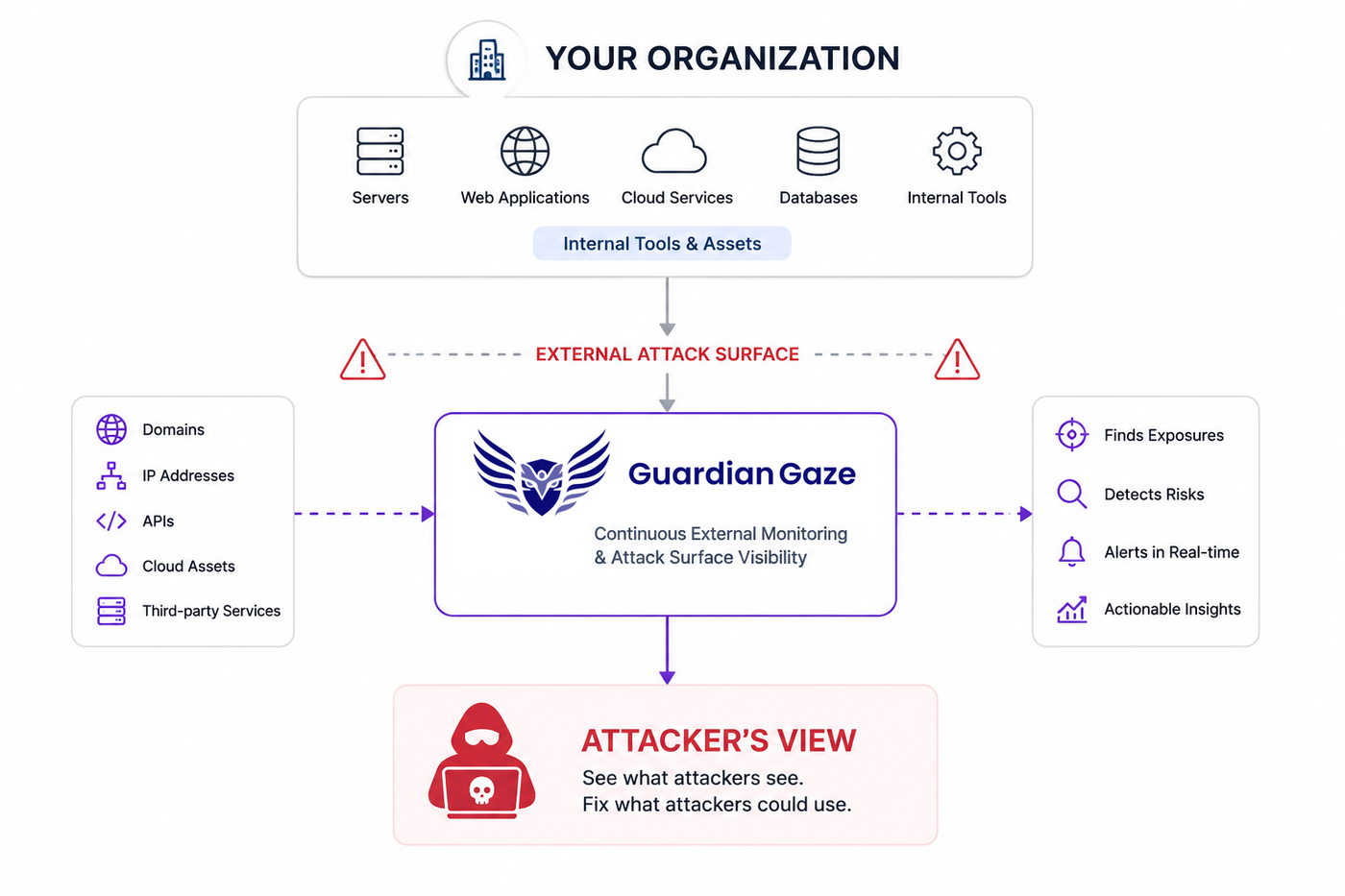
Traditional security doesn’t show you everything.
Attackers don’t see your organization the way your internal security tools do. Guardian Gaze looks from the outside, identifying exposed assets, vulnerabilities, suspicious activity and risks before attackers can exploit them.
One security philosophy. Two products.
Choose the protection that matches what you’re trying to secure.
Protect your organization
Monitor your external attack surface, brand, network, cloud, compliance and supply-chain risk.
Rate any company (your own, or any vendor) from its public footprint alone. Domains, subdomains, exposed services, mail records, cloud posture and leaked credentials become one 0–100 risk score where lower is safer, updated continuously. The company being assessed installs nothing, and need not agree.
- Six scored modules: brand, domain, application, network, cloud, compliance
- Findings mapped to ISO 27001, NIST, PCI DSS and GDPR, and to MITRE ATT&CK
- Alerts with SLA tracking when a score or a critical finding appears
- Industry benchmark so you can see how a score compares to peers
- Assisted takedowns: impersonating domains are identified, the evidence is packaged, and removal is driven with the registrar
Built for
Security Teams · IT Leaders ·
Enterprises
Protect my Website
Find malware, backdoors and suspicious changes hiding inside your WordPress environment.
A plugin that scans your files and your database, grades the site across four areas, and explains every finding in plain English. The heavy scanning runs off your server, so malware that already owns the site cannot switch the scanner off.
- Finds backdoors signature-only scanners miss, by reasoning about what the code does
- Database scanning that reasons about intent, not only known signatures
- Virtual patching covers zero-days before an official fix ships
- One-click removal included, not sold on as a separate cleanup service
- Free tier on the WordPress plugin directory, one dashboard for every site
Built for
Website Owners · Developers ·
Agencies
How Guardian Gaze Works
From outside the perimeter to real protection.
Guardian Gaze continuously looks at what attackers see, analyzes the risk, and helps you take action before threats turn into breaches.
Discover
Find What’s Exposed
We scan the internet the way attackers do, to find your exposed assets, vulnerabilities and misconfigurations.
Analyze
Identify Real Risks
We analyze the findings, correlate threats, and prioritize what matters most to your security.
Understand
See the Full Picture
Get clear insight, risk scores and actionable recommendations in a simple, easy-to-understand format.
Act
Fix, Monitor, Protect
Take action, reduce risk, and monitor continuously to stay protected as threats evolve.
See what your organization’s security looks like
Continuous external visibility across your digital footprint
See what your website security looks like
Built for the people responsible for security


Which Guardian Gaze is right for you?
Different products for different layers of security. Use one or both depending on what you need to protect.
Protect what’s inside your WordPress site.
Use it when you need to:
- Find malware and backdoors
- Scan files and database content
- Detect unauthorized file changes
- Harden WordPress security
- Monitor changes continuously
- Remove malware with Pro
See your organization from the outside.
Use it when you need to:
- Discover internet-facing assets
- Assess web application exposure
- Monitor domains and email security
- Understand network & cloud risk
- Protect your brand
- Assess vendors and supply-chain risk
- Track organization-wide security posture
Using WordPress in your organization? You may benefit from both.
Guardian Gaze for WordPress protects the site itself, while Guardian Gaze Enterprise assesses the broader external exposure around your organization.
See how the products work together →When teams buy both
The two products are sold and used independently, you never need one to use the other. But they share a philosophy, and three kinds of customer end up running both because the pair covers something neither does alone.
Client sites, plus the clients themselves
The plugin scans the forty sites you build and host. Enterprise scores each client company, which is what their auditors and insurers actually ask about. One is delivery quality; the other is what your client gets asked in their own supply-chain review.
Your sites, plus your suppliers
The plugin keeps your own WordPress estate clean. Enterprise watches the payment provider, the hosting company and the twenty other vendors a breach would actually arrive through. Most incidents do not start on the marketing site.
Check your work from outside
Run the plugin on your sites, then rate your own organisation with Enterprise. If the outside-in scan still finds an exposed staging subdomain or a spoofable mail domain, the plugin was never going to catch it, different surface, different tool.
Separate products, separate billing. There is no bundle you have to buy into, and no dependency between them.
Security isn’t a promise. It’s something you verify.

Security expertise
Offensive security experience

Research
Threat intelligence & security research

Transparency
Responsible disclosure

Customer proof
Real customer logos, testimonials and measurable results
Common questions
Which product do I need if I just run a WordPress site?
The plugin. Enterprise assesses companies from the outside and is built for CISOs reviewing vendors: it would tell you about your domain and infrastructure, but it cannot see inside WordPress, so it would never find a backdoor in a plugin file. For a WordPress site the plugin is the right tool, and the free tier is a real product rather than a trial.
Is the free WordPress plan actually free?
Permanently, with no expiry, and it needs no account or registration. The free plugin includes signature and heuristic malware scanning, the database scanner with one-click cleanup, file integrity monitoring, targeted scan modes, scheduled daily or weekly scans, three on-demand scans a day, IP block and allow lists, country-level blocking, and the security score with its A–D grade.
How is Enterprise different from a vulnerability scanner?
A vulnerability scanner tests hosts you already know about, and usually needs credentials or network access. External attack surface management starts by discovering the assets you did not know were exposed and then assesses them. Enterprise needs no access to your environment at all.
Can you rate a company without their permission?
Yes, and that is the point. Assessment observes only what an organisation publishes to the public internet, the same vantage point any visitor or attacker has. Nothing is exploited and no system is accessed. That is what makes vendor and supply-chain review workable without a questionnaire round.
Do you need access to our systems?
No, for either product. The plugin installs into WordPress and sends security metadata to our infrastructure; Enterprise touches nothing at all. The single optional exception is Enterprise cloud posture, which uses read-only scoped access to a cloud account you choose to connect.
Why does the scanning run off my server?
Two reasons. Your site carries no scanning load, so there is no front-end performance cost. More importantly, malware that has already compromised a site cannot disable a scanner that is not running inside it.
What is database scanning, and why does it matter?
A large share of modern WordPress malware persists in the database rather than on disk: serialised payloads, fake transients, hidden admin users, injected SEO spam and persistence hooks. Guardian Gaze reads those tables directly and reasons about what an entry is doing, rather than only whether it matches a pattern.
Who is behind Guardian Gaze?
Guardian Gaze Limited, a London company registered in England and Wales and a subsidiary of RedSecLabs, a security research practice with a background in offensive security and incident response.