

Two of the most common entry points for WordPress compromises aren’t exotic zero-days or sophisticated attacks. They’re plugins that stopped receiving updates years ago and commercial plugins downloaded for free from sites that had no right to distribute them. Both are common. Both are routinely underestimated. And both create vulnerabilities that sit on sites indefinitely because nobody thinks to check them.
This guide covers what makes abandoned and nulled plugins dangerous, how to identify them on your site, and what to do about them.
Table of Contents
- The abandoned plugin problem
- The nulled plugin problem
- How attackers find and exploit both
- How to audit your plugins right now
- What to do with what you find
- Choosing replacements
- FAQ
1. The Abandoned Plugin Problem
A WordPress plugin becomes abandoned when its developer stops maintaining it. No more updates, no more security patches, no response to vulnerability reports. The plugin continues working often for years, while its codebase falls progressively further behind the security practices and WordPress APIs it depends on.
Abandoned plugins are dangerous for three reasons that compound over time.
Reason 1: Unpatched vulnerabilities accumulate
Every WordPress plugin of any complexity has vulnerabilities. An active plugin with a responsible developer fixes a reported SQL injection within days or weeks. An abandoned plugin never fixes it. The vulnerability sits in the codebase, publicly documented in the WPScan database, exploitable by anyone running an automated scan.
The longer a plugin has been abandoned, the more unpatched vulnerabilities have accumulated. A plugin last updated in 2019, now has years of disclosed, unpatched CVEs. Some of those vulnerabilities were discovered and disclosed publicly. Each disclosure is a permanent entry in the attack database that automated scanners use.
Reason 2: WordPress core changes break security assumptions
WordPress core evolves. Security functions get deprecated and replaced with more secure alternatives. API behaviors change. Authentication flows are updated. A plugin written in 2018 may rely on functions, patterns, or assumptions that WordPress has since changed, not breaking the plugin’s visible functionality, but undermining the security logic the plugin depended on.
This is particularly acute for plugins that handle authentication, file operations, or database queries. The security context those operations depend on may have changed substantially since the plugin was last updated.
Reason 3: Nobody is watching
An active plugin has a developer paying attention. When a security researcher finds a vulnerability and reports it responsibly, there’s someone to receive the report and issue a patch. When a vulnerability is discovered being actively exploited, there’s someone who can push an emergency update.
An abandoned plugin has nobody watching. A critical vulnerability can be publicly known, actively exploited at scale, and completely unaddressed because there’s no developer to address it. The WordPress.org team will eventually remove severely vulnerable abandoned plugins from the repository, but that process takes time, and removal doesn’t update or remove plugins already installed on sites.
What “abandoned” actually means in numbers
The WordPress.org plugin repository contains over 65,000 plugins. The repository shows a “Tested up to” version for each plugin, the WordPress version the developer last verified the plugin against. Plugins showing “Tested up to 5.x” when the current WordPress version is 7 are effectively abandoned even if they’re still in the repository.
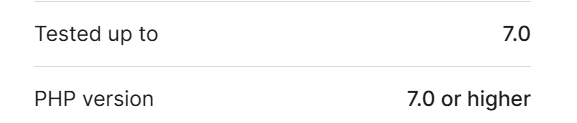
Signals that a WordPress plugin is abandoned:
- Last updated more than 12 months ago
- “Tested up to” version two or more major versions behind current WordPress
- Open support threads with no developer response
- No response to reported security issues
- Developer account inactive or deleted
Any one of these is a yellow flag. Two or more is a strong indicator the plugin is no longer maintained.
2. The Nulled Plugin Problem
Nulled plugins are commercial WordPress plugins or themes distributed without a valid license, typically with the license verification code removed or bypassed. They’re available through gray-market download sites, Telegram channels, and forums that present themselves as deal-sharing communities.
The appeal is obvious: a premium plugin that costs $99 per year, available for free. The reality is that nulled plugins are one of the most reliable ways to intentionally introduce malware to a WordPress site.
Why nulled plugins almost always contain malware
The economics of nulled plugin distribution make malware insertion near-universal. Running a site that distributes commercial software for free, at scale, is not a charitable operation. The people doing it are monetizing somehow.
The most common monetization methods are:
- Backdoor insertion: A hidden web shell or remote access function is added to the plugin code, giving the distributor persistent access to every site that installs it. The backdoor connects to their infrastructure, registers the site, and executes commands or payloads.
- SEO spam injection: The plugin inserts hidden links to pharmaceutical, gambling, or spam sites across pages. Site owners do not see them, but search engines index them. The distributor sells links while the victim site risks penalties or blacklisting.
- Credential harvesting: The plugin silently collects WordPress admin credentials, WooCommerce customer data, or payment details and sends them to an external server without the site owner noticing.
- Cryptomining: The plugin injects JavaScript that uses visitors’ browsers to mine cryptocurrency. Visitors unknowingly provide the computing power while the attacker collects the profits.
The trust problem with nulled plugins
When you install a plugin from WordPress.org, you’re installing code that has been reviewed and that has a developer with a public identity attached to it. When you install a nulled plugin, you’re installing code from an anonymous source with no accountability, whose business model depends on you not understanding what their code does.
There is no legitimate reason to use nulled plugins. The risk is asymmetric: you save a license fee; they get persistent access to your site, your customers, and potentially your payment flows. The cost of a plugin license is never worth the risk of what nulled distribution entails.
3. How Attackers Find and Exploit Both
Understanding the attack mechanics matters because it explains why “it probably won’t happen to me” is not a reasonable risk assessment.
Automated scanning at scale
The WPScan vulnerability database is public. It lists every known vulnerability for every WordPress plugin version, including the plugin name, the vulnerable version range, the CVE identifier, and the attack type.
Attackers run automated scanners that:
- Check which plugins are installed by requesting predictable plugin file paths (/wp-content/plugins/plugin-name/readme.txt exposes the version for most plugins)
- Cross-reference installed versions against the vulnerability database
- Automatically queue exploitation attempts for any site with a known-vulnerable plugin
This process runs continuously, at scale, against every WordPress site on the internet. Your site is being checked. The question is whether what the scanner finds is exploitable.
The readme.txt version disclosure
Most WordPress plugins include a readme.txt file with a Stable tag line showing the current version. This file is publicly accessible by default:
curl -s https://yoursite.com/wp-content/plugins/plugin-name/readme.txt \
  | grep -i "stable tag"
Attackers use this to enumerate not just which plugins are installed but exactly which versions, enabling precise vulnerability matching without guessing.
Exploitation timelines
When a vulnerability is disclosed for a popular plugin, automated exploitation attempts typically begin within 24–48 hours. For high-severity vulnerabilities in widely-installed plugins, exploitation has been observed within hours of public disclosure.
An abandoned plugin’s vulnerabilities were disclosed and the exploitation window opened months or years ago. Every day the plugin stays installed is another day of active exposure to attacks that have been running continuously since the disclosure.
4. How to Audit Your Plugins Right Now
Check 1: Identify abandoned plugins
Go to Plugins → Installed Plugins. For each plugin, click View Details and check:
- Last Updated date
- Tested up to version
- Active installations (low and declining indicates abandonment)
For a faster bulk view via WP-CLI:
wp plugin list --fields=name,version,update,statusThen cross-reference each plugin against its WordPress.org page. Any plugin last updated more than 12 months ago goes on your investigation list.
Check 2: Cross-reference against the vulnerability database
Run WPScan with a vulnerability API key against your full plugin list:
wpscan --url https://yoursite.com \
  --enumerate vp,vt \
  --api-token YOUR_TOKEN \
  --output plugin-vuln-report.txt
This returns every installed plugin and theme with known vulnerabilities, the CVE identifiers, severity ratings, and whether a patched version exists.
Guardian Gaze runs this check continuously. When a new CVE is disclosed for a plugin you have installed, you get an instant email alert without waiting for a scheduled scan.
Check 3: Identify nulled plugins
Nulled plugins are harder to identify because they’re designed to look legitimate.
Signs to look for:
Provenance you can’t verify: if you can’t point to the official developer site or WordPress.org as the source of the plugin, treat it as suspect.
License verification code removed: commercial plugins typically include license checks. A “premium” plugin that installs and runs without ever asking for a license key has had that check bypassed, that’s the definition of a nulled plugin.
Unexpected network calls: install a network monitoring tool and check what domains your plugins communicate with. A plugin making outbound calls to domains unrelated to its stated function is a red flag.
Obfuscated code in plugin files: scan installed plugin files for obfuscation patterns:
find /var/www/yoursite/wp-content/plugins/ -name "*.php" \
  | xargs grep -lE "eval\s*\(base64_decode|str_rot13|gzinflate|assert\s*\(" \
  2>/dev/null
Any result warrants investigation. Legitimate plugin code doesn’t need multiple layers of obfuscation.
Check 4: Verify plugin file integrity
For plugins installed from WordPress.org, you can compare the installed files against the official repository version:
# Download the official version
wp plugin install plugin-name --version=X.X.X --dry-run

diff -r /var/www/yoursite/wp-content/plugins/plugin-name/ \
        /tmp/official-plugin-name/
Any file present in your installation that isn’t in the official repository, or any file with modified contents, is a potential indicator of compromise.
5. What to Do With What You Find
Abandoned plugin with no known vulnerability:
Still replace it. An abandoned plugin with no current CVE is an abandoned plugin that hasn’t had its vulnerability discovered yet. The absence of a known vulnerability isn’t the same as the absence of a vulnerability. Remove it and find an actively maintained alternative.
Abandoned plugin with a known vulnerability and available patch:
If the vulnerability was patched in a version still available, update immediately. If the vulnerability is in the current version with no patch, meaning the plugin was abandoned after the vulnerability was disclosed, remove it now. No traffic dip, no functionality loss justifies running a plugin with a publicly documented, unpatched vulnerability.
Active plugin with a disclosed vulnerability and available patch:
Update immediately. This is the easiest case, the fix exists. The only question is how quickly you apply it.
Confirmed nulled plugin:
Remove it immediately. Don’t just deactivate, delete it. Then treat the site as potentially compromised: run a full malware scan, audit your file system for modifications, check your database for rogue admin accounts and unexpected cron jobs, review recently modified files. A nulled plugin may have been present for months before you identified it.
Check for recently modified files across the site
find /var/www/yoursite/ -name "*.php" -mtime -90 \
  | xargs grep -lE "eval\s*\(|base64_decode|str_rot13" 2>/dev/null
Check uploads for PHP files (always malicious)
find /var/www/yoursite/wp-content/uploads/ -name "*.php"# Audit admin accounts
SELECT user_login, user_email, user_registered
FROM wp_users u
INNER JOIN wp_usermeta m ON u.ID = m.user_id
WHERE m.meta_key = 'wp_capabilities'
AND m.meta_value LIKE '%administrator%'
ORDER BY user_registered DESC;
Suspected nulled plugin (can’t confirm provenance):
Apply the same treatment as a confirmed nulled plugin. The provenance uncertainty is itself the problem, you can’t trust code from an unknown source. Remove it, audit the site, replace it with a licensed copy from the official developer.
6. Choosing Replacements
When removing an abandoned or nulled plugin, the replacement criteria matter. Evaluate replacements against these criteria:
Active development: the plugin has been updated within the last three months. Check the changelog, are updates security patches and genuine improvements, or cosmetic version bumps?
Responsive security track record: search the WPScan database and Patchstack for the plugin’s vulnerability history. A plugin with ten CVEs over five years that were all patched within a week is better than a plugin with two CVEs that took six months to patch. The question isn’t whether vulnerabilities exist, it’s how the developer responds to them.
Official distribution only: install from WordPress.org or the developer’s official site. Never from third-party repositories, forums, or any site offering commercial plugins for free.
Active support forum: a developer who responds to support threads is a developer who’s paying attention to their plugin.
7. FAQ
How do I know if a plugin I installed is nulled if it looks legitimate?
Check three things: license activation with the official developer, presence of obfuscated or unusual code in files, and unexpected outbound network requests. If you can’t confirm its source, replace it.
My abandoned plugin has no known vulnerabilities in WPScan. Is it really a problem?
Yes. WPScan only shows known issues. Abandoned plugins can still have unknown or unreported vulnerabilities. No updates means no security review.
Can I keep an abandoned plugin if I really need its functionality?
Only if the risk is acceptable. For non-critical features it’s better to remove it. For core functions, migrate to a maintained alternative instead of relying on unpatched code.
How often should I audit my plugins for abandonment?
At least once a month. Check update history and remove anything that is no longer maintained.
Does GuardianGaze detect nulled plugin malware?
Yes. It looks for obfuscated code and suspicious outbound connections, which are common signs of nulled plugin backdoors.
Are free plugins less trustworthy than premium ones?
Not necessarily. Trust depends on maintenance and developer activity, not price. Free well-maintained plugins are often safer than neglected premium ones.
Continue Reading
- WordPress Security 2026: The Complete Defense Guide – Part 1: broader architectural picture.
- WordPress Security 2026: Part 2 – Advanced Implementation & Hardening: server-level hardening beyond brute force.
- Website Hacked? 17 Signs Your WordPress Site Is Compromised: early-warning signs.
- WordPress Malware Removal 2026: Complete Detection & Removal Protocols: if a brute force succeeded.
Abandoned plugins don’t announce themselves. Nulled plugins don’t either. By the time a vulnerability is being actively exploited, the window to act quietly has already closed. GuardianGaze monitors your installed plugins continuously, the moment a new CVE is disclosed for anything on your site, you’re alerted. No waiting for a scheduled scan. No finding out after the breach.