
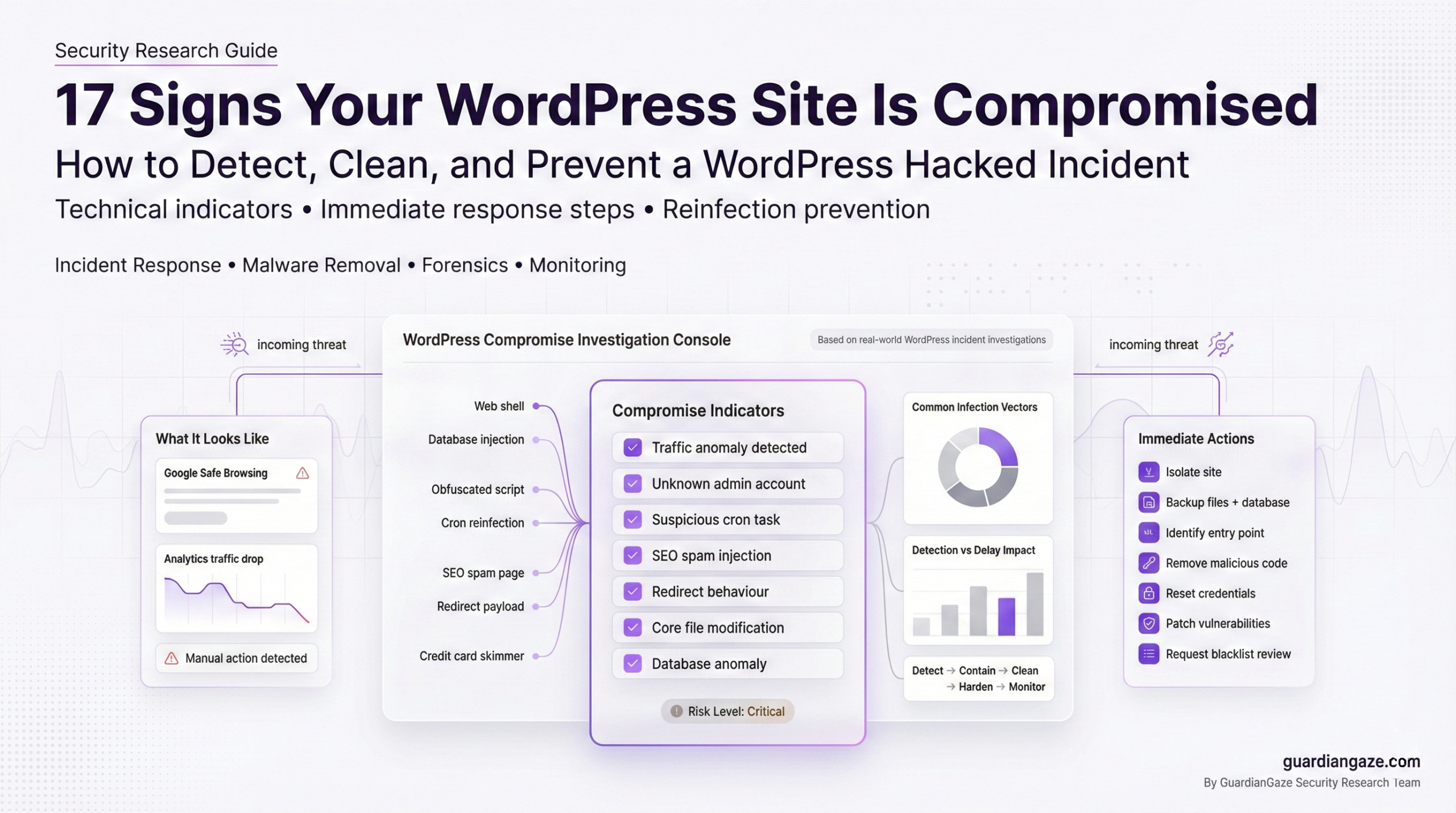
Discovering your WordPress hacked is one of the most stressful moments for any business owner, developer, or agency. Traffic drops overnight. Customers report strange redirects. Google flags your domain. Your inbox fills with abuse complaints.
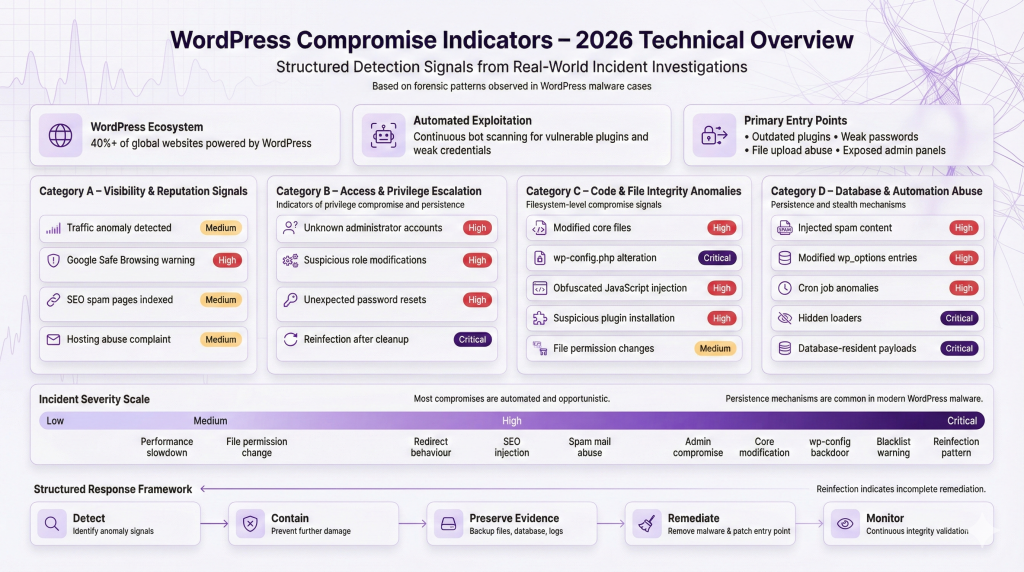
In 2026, WordPress still powers more than 40 percent of the web. Its popularity makes it a prime target. Automated bots scan the internet continuously for vulnerable plugins, weak passwords, exposed admin panels, and outdated installations.
Most compromises are not sophisticated nation-state operations. They are opportunistic, automated, and scalable. But the damage can be severe:
-
Search engine blacklisting
-
SEO spam injections
-
Customer data exposure
-
Payment skimming
-
Persistent reinfection
The key difference between a minor incident and a major breach is early detection and correct response.
This guide explains:
-
17 clear signs your WordPress site is compromised
-
What each sign means technically
-
Immediate actions to take
-
How to properly clean a hacked WordPress site
-
How to prevent reinfection
If your WordPress hacked scenario is unfolding right now, stay calm. Follow the steps systematically. Panic causes mistakes. Structure reduces damage.
17 Signs Your WordPress Site Is Compromised
Below are 17 technically accurate indicators I repeatedly see during real-world investigations.
Each section includes:
-
What it looks like
-
Why it happens
-
Likely technical cause
-
Immediate actions
-
Risk level
1. Sudden Traffic Drop in Google Analytics
What It Looks Like
-
Organic traffic drops sharply overnight
-
Pages disappear from search results
-
Google Search Console shows manual actions
Why It Happens
Google detected malicious behavior or spam content. This often follows malware injection.
Likely Technical Cause
-
SEO spam pages injected into database
-
Cloaked redirects
-
Hidden doorway pages
-
JavaScript payloads flagged by Safe Browsing
Immediate Actions
-
Check Google Search Console for security issues.
-
Run a full WordPress security scan.
-
Search Google using:
site:yourdomain.com miningsite:yourdomain.com casino -
Review indexed pages.
Risk Level
High. Traffic loss directly affects revenue.
Example Scenario
An outdated plugin allowed file upload abuse. Attackers injected 5,000 spam pages targeting pharma keywords.
2. Google Safe Browsing Warning or Blacklisting
What It Looks Like
-
“This site may harm your computer”
-
Red warning screen before page loads
Why It Happens
Google detected malware distribution, phishing, or malicious redirects.
Likely Technical Cause
-
Injected JavaScript loaders
-
Drive-by download scripts
-
Credit card skimmers
-
Hidden iframe injections
Immediate Actions
-
Confirm blacklist status in Search Console.
-
Disable public access temporarily.
-
Begin forensic analysis.
-
Prepare for a review request after cleanup.
Risk Level
Critical. User trust collapses instantly.
If your WordPress hacked site is blacklisted, recovery time depends on cleanup quality.
3. Unknown Admin Users
What It Looks Like
-
New administrator accounts
-
Suspicious usernames
-
Modified existing roles
Why It Happens
Attackers escalate privileges after initial access.
Likely Technical Cause
-
Brute force attack
-
Stolen credentials
-
Privilege escalation vulnerability
-
Database injection
Immediate Actions
-
Export user list.
-
Remove unauthorized accounts.
-
Reset all passwords.
-
Force logout sessions.
Risk Level
Critical. Admin access equals full site control.
4. Suspicious Plugins or Themes Installed
What It Looks Like
-
Unknown plugins
-
Nulled premium themes
-
Plugins with random names
Why It Happens
Attackers install backdoor plugins for persistence.
Likely Technical Cause
-
File upload vulnerability
-
Compromised admin account
-
Supply chain compromise
Immediate Actions
-
Audit all installed plugins.
-
Remove anything unrecognized.
-
Compare file hashes with official versions.
-
Review modification timestamps.
Risk Level
High.
5. Redirects to Spam or Malicious Sites
What It Looks Like
-
Visitors redirected to gambling or pharma sites
-
Redirect triggers only on mobile
-
Redirect appears only for search engine users
Why It Happens
Attackers monetize traffic via malicious redirects.
Likely Technical Cause
-
Injected JavaScript in header.php
-
Compromised .htaccess
-
Conditional redirect code
Immediate Actions
-
Inspect theme files.
-
Check .htaccess for unknown rules.
-
Disable plugins one by one.
-
Test site from clean browser.
Risk Level
High.
Redirects are one of the clearest signs WordPress is hacked.
6. SEO Spam Pages Indexed in Google
What It Looks Like
-
Thousands of pages that you never created
-
URLs containing pharma or casino terms
Why It Happens
Attackers inject spam directly into database.
Likely Technical Cause
-
SQL injection
-
Compromised admin access
-
Hidden custom post types
Immediate Actions
-
Query database for suspicious posts.
-
Check wp_posts table for anomalies.
-
Remove malicious entries.
-
Rebuild clean sitemap.
Risk Level
High.
7. Strange JavaScript in Header or Footer
What It Looks Like
-
Long obfuscated code blocks
-
Base64 encoded strings
-
eval() functions
Why It Happens
Malware loads external payloads.
Likely Technical Cause
-
Compromised theme files
-
Compromised wp_options entries
-
Injected tracking scripts
Immediate Actions
-
Search codebase for “eval(” or “base64_decode”.
-
Compare theme files with original versions.
-
Scan wp_options table.
Risk Level
Critical if exfiltration is involved.
8. Modified Core WordPress Files
What It Looks Like
-
wp-includes files changed
-
Unexpected code in core PHP files
Why It Happens
Attackers modify core files to avoid detection.
Likely Technical Cause
-
Direct filesystem access
-
Compromised hosting credentials
Immediate Actions
-
Replace all core files from official download.
-
Verify checksums.
-
Review server logs.
Risk Level
Critical.
9. wp-config.php Changes
What It Looks Like
-
Extra includes at bottom of file
-
Encoded code blocks
Why It Happens
wp-config.php executes on every request.
Likely Technical Cause
-
File write vulnerability
-
FTP compromise
Immediate Actions
-
Compare against known good backup.
-
Remove suspicious includes.
-
Rotate database credentials.
Risk Level
Critical.
10. Unknown Scheduled Tasks or Cron Jobs
What It Looks Like
-
Suspicious wp-cron entries
-
System cron jobs calling PHP files
Why It Happens
Attackers schedule reinfection.
Likely Technical Cause
-
Backdoor script registering tasks
Immediate Actions
-
Inspect cron via hosting panel.
-
Review wp_options cron array.
-
Remove malicious tasks.
Risk Level
High.
11. Hosting Provider Abuse Complaint
What It Looks Like
-
Hosting sends spam alert
-
Server flagged for malware
Why It Happens
Your server is sending spam or hosting malware.
Likely Technical Cause
-
Compromised mail script
-
Web shell exploitation
Immediate Actions
-
Review mail logs.
-
Scan for PHP mailer abuse.
-
Disable mail temporarily.
Risk Level
High.
12. Emails Sending Spam From Your Server
What It Looks Like
-
Outbound spam surge
-
Blacklisted IP
Likely Technical Cause
-
Injected mailer script
-
Compromised contact form
Immediate Actions
-
Suspend outbound email.
-
Search for mail() usage.
-
Clean infected files.
Risk Level
High.
13. Unexpected Database Changes
What It Looks Like
-
Modified wp_options entries
-
Unknown admin emails
Likely Technical Cause
-
SQL injection
-
Stolen DB credentials
Immediate Actions
-
Export database snapshot.
-
Review recent changes.
-
Rotate DB password.
Risk Level
High.
14. File Permission Changes
What It Looks Like
-
Files set to 777
-
Writable core directories
Why It Happens
Attackers weaken permissions for persistence.
Immediate Actions
-
Reset correct permissions.
-
Audit file ownership.
-
Harden server configuration.
Risk Level
Medium to High.
15. Website Defacement
What It Looks Like
-
Homepage replaced
-
Political or hacker message
Likely Technical Cause
-
Admin compromise
-
File write access
Immediate Actions
-
Take site offline.
-
Restore clean version.
-
Investigate entry point.
Risk Level
Critical.
16. Performance Slowdown Without Explanation
What It Looks Like
-
High CPU usage
-
Server timeouts
Likely Technical Cause
-
Crypto miners
-
Spam generation
-
Bot traffic
Immediate Actions
-
Review server processes.
-
Scan for suspicious scripts.
-
Check resource logs.
Risk Level
Medium to High.
17. Reinfection After “Cleanup”
What It Looks Like
-
Malware returns within days
-
Same files reinfected
Why It Happens
Backdoor was never removed.
Likely Technical Cause
-
Hidden loader
-
Scheduled cron reinjection
-
Database-based payload
Immediate Actions
-
Perform full forensic review.
-
Remove all unknown PHP files.
-
Audit scheduled tasks.
-
Consider professional WordPress malware removal.
Risk Level
Critical.
Reinfection is one of the strongest indicators your WordPress site is compromised at a deeper level.
What To Do Immediately If Your WordPress Site Is Hacked
If your WordPress hacked situation is confirmed, follow this structured checklist.
Step 1: Isolate the Site
-
Put site in maintenance mode
-
Restrict admin access by IP
-
Prevent further damage
Step 2: Backup Everything
-
Files
-
Database
-
Logs
Do not skip this. Forensics depend on evidence.
Step 3: Identify Point of Entry
Check:
-
Outdated plugins
-
Weak passwords
-
File upload points
-
Access logs
Step 4: Remove Malicious Code
-
Replace core files
-
Remove backdoors
-
Clean infected database entries
-
Delete unauthorized users
Step 5: Reset Credentials
Reset:
-
Admin passwords
-
Hosting account
-
FTP
-
Database
-
API keys
Step 6: Patch Vulnerabilities
-
Update WordPress
-
Update plugins
-
Remove unused extensions
-
Fix insecure permissions
Step 7: Request Blacklist Review
-
Submit to Google Search Console
-
Document cleanup steps
Step 8: Monitor for Persistence
-
Daily file integrity scans
-
Log review
-
Traffic anomaly monitoring
This structured approach reduces reinfection risk significantly.
Why Most DIY Malware Removals Fail
Many site owners attempt to clean a hacked WordPress site themselves. Some succeed. Many do not.
Here is why.
1. Backdoor Persistence
Attackers rarely leave one file. They leave multiple loaders.
Common patterns:
-
Randomly named PHP files
-
Hidden in uploads directory
-
Conditional execution based on user agent
2. Obfuscated Code
Modern WordPress malware uses:
-
Base64 encoding
-
Gzip compression
-
String concatenation
-
Variable variables
It looks harmless unless decoded.
3. Database Injections
Even if files are clean, database entries may reinject payloads.
Common targets:
-
wp_options
-
wp_posts
-
Scheduled cron array
4. Scheduled Reinfection Scripts
Malicious cron jobs restore deleted payloads.
5. Fileless Malware
Injected into:
-
Memory
-
Database options
-
Autoloaded configuration entries
6. Supply Chain Vulnerabilities
Compromised plugins distribute infected updates.
Without forensic analysis, you are guessing.
How To Properly Clean and Secure a Hacked WordPress Site
A professional WordPress malware removal process includes:
1. File Integrity Validation
-
Compare files against official hashes
-
Replace modified core files
-
Remove unknown PHP files
2. Database Scanning
-
Search for suspicious serialized payloads
-
Remove injected JavaScript
-
Audit admin accounts
3. Plugin Vulnerability Review
-
Identify outdated plugins
-
Remove abandoned software
-
Validate plugin integrity
4. Log Analysis
Review:
-
Access logs
-
Error logs
-
Authentication logs
Identify initial compromise timestamp.
5. Least Privilege Hardening
-
Restrict file permissions
-
Disable file editing in wp-admin
-
Limit admin roles
6. Ongoing Monitoring
-
Continuous WordPress security scan
-
File change alerts
-
Malware signature updates
This is how you properly fix hacked WordPress environments.
Preventing Future WordPress Compromises
Security is not a one-time event.
Apply Principle of Least Privilege
-
Only necessary admin accounts
-
No shared credentials
Vet Plugins Carefully
-
Active development
-
Strong reviews
-
Minimal install count risk
Update Management
-
Core updates enabled
-
Plugin updates monitored
Use a Web Application Firewall
Blocks automated exploitation attempts.
Choose Secure Hosting
-
Isolated accounts
-
Malware scanning
-
Proper logging
Continuous Monitoring
-
File integrity checks
-
Scheduled security audits
-
Periodic penetration testing
Prevention is cheaper than incident response.
How GuardianGaze Helps Detect and Prevent WordPress Malware
GuardianGaze was built from real-world malware investigations, not theoretical models.
It focuses on:
-
Detecting modern obfuscation patterns
-
Identifying suspicious file modifications
-
Monitoring wp-config and core changes
-
Tracking persistence mechanisms
Unlike signature-only scanners, it evaluates behavior and structural anomalies.
It is particularly useful after a WordPress hacked cleanup to monitor:
-
Unexpected file changes
-
New admin creation
-
Cron manipulation
-
Hidden loaders
Agencies managing multiple client sites benefit from centralized monitoring.
If you suspect compromise, start with a comprehensive WordPress security scan to establish baseline integrity.
Need Professional WordPress Incident Response or Penetration Testing?
When internal teams lack forensic capability, escalation is responsible.
RedSecLabs provides:
-
Deep malware investigations
-
Forensic log analysis
-
WordPress security audits
-
Penetration testing
-
Compliance-focused security assessments
We work with:
-
Agencies
-
Ecommerce businesses
-
SaaS providers
-
Enterprise WordPress environments
If your WordPress site is compromised, professional incident response can reduce downtime, prevent reinfection, and restore search trust faster.
Request a structured security assessment if risk tolerance is low or regulatory obligations apply.
FAQs
How do I know if my WordPress site is hacked?
Look for traffic drops, unknown admin users, redirects, SEO spam pages, modified files, and blacklist warnings. A professional WordPress security scan provides confirmation.
Can I clean a hacked WordPress site myself?
Yes, if you understand file systems, databases, and log analysis. However, incomplete removal often leads to reinfection.
How much does WordPress malware removal cost?
Costs vary depending on severity, persistence, and blacklist impact. Basic cleanup may be a few hundred dollars. Deep forensic remediation costs more.
How long does it take to fix a compromised WordPress site?
Minor infections can be resolved in hours. Persistent or blacklisted cases may take several days including review processing.
Will Google remove my site from blacklist automatically?
No. You must clean the infection and submit a review request in Search Console.
Conclusion
If you suspect your WordPress hacked, act quickly but methodically. Early detection reduces damage. Proper forensic cleanup prevents reinfection. Ongoing monitoring protects your reputation.
WordPress compromises are common, but they are manageable when approached with technical discipline.
If your WordPress site is compromised, treat it as a security incident, not a minor inconvenience.