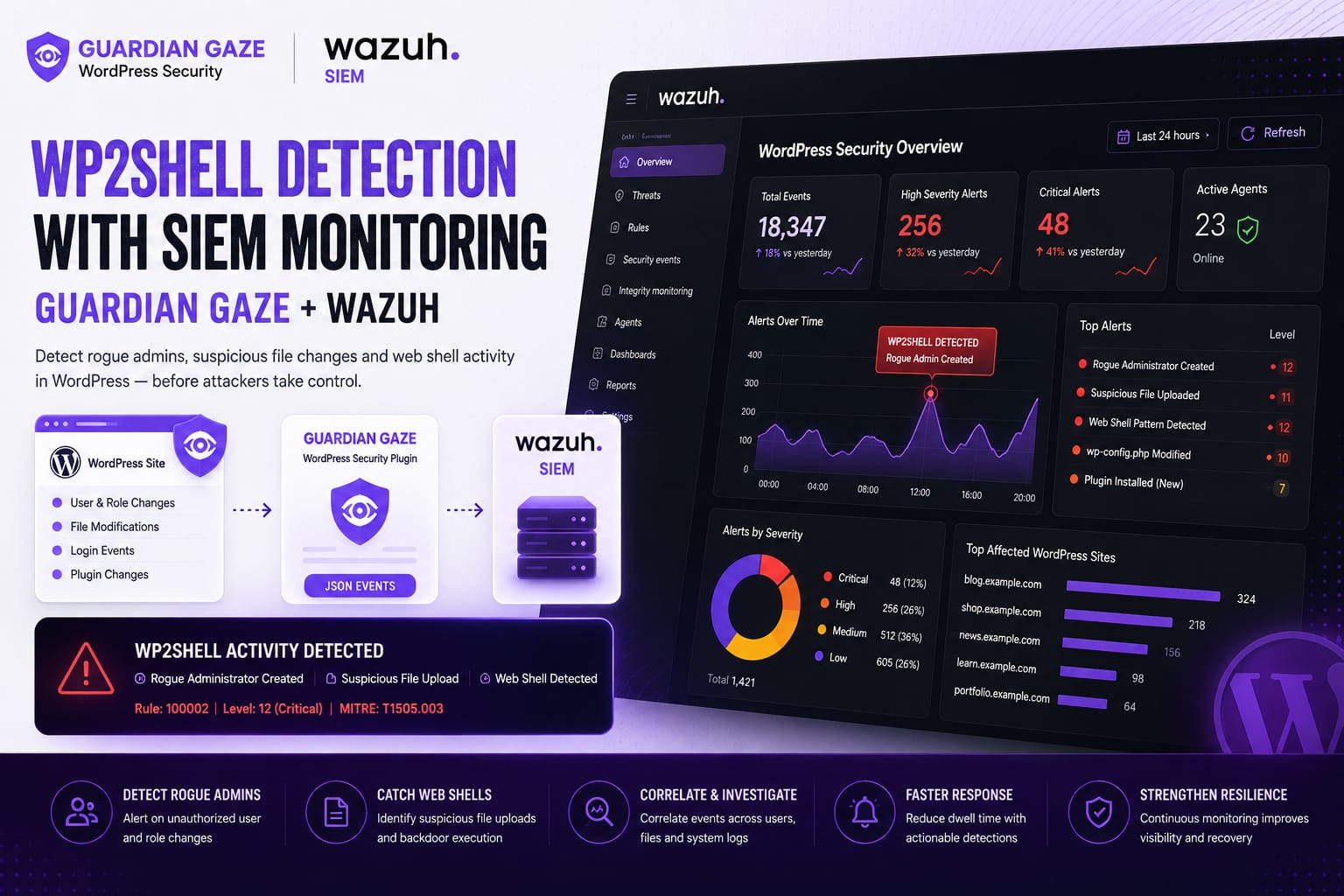
Series Context
Article 1 covers the incident-response case: multiple unauthorised administrators, wp2shell exposure analysis, backdoor checks and recovery. This article begins where the clean-up ended: how to make WordPress security activity visible, durable and actionable in Wazuh.
Read the case first: Inside a wp2shell WordPress Hack: Rogue Admin Accounts, Backdoors and Incident Response.
Contents
- Why WordPress is often invisible to the SOC
- What events should leave WordPress
- Guardian Gaze as the WordPress-aware sensor
- Designing a useful JSON event
- Collection models for servers and managed hosting
- Illustrative Wazuh rules and correlation
- File integrity and host context
- SOC triage, tuning and telemetry health
- A 90-day operating model
- Frequently asked questions
Why WordPress is often invisible to the SOC
Security operations teams routinely ingest firewall, endpoint, cloud and identity logs. WordPress is often treated as a marketing system, so its users, roles, plugin activity, malware findings and integrity events remain inside the dashboard or disappear when local logs rotate.
That creates a blind spot exactly where an attacker can turn a web request into durable access. A WAF may record a request to an administrative path. The operating system may record that PHP wrote a file. Neither source necessarily explains which WordPress user initiated the action, whether the account was created minutes earlier, whether the plugin was approved or whether a security scan had already flagged the file.
Application context and host context need to meet in the same investigation. Off-site retention matters as well. An attacker with administrator or server access may disable a plugin, clear local records or remove the account used for the intrusion. Events that have already left the website remain available after the local environment is altered.
What WordPress security events should reach the SIEM?
The goal is not to forward every page view or routine content edit. Start with events that change access, execute code, alter security controls or provide evidence of persistence.
| Event family | Examples | Why the SOC needs it |
| Identity | User created; role promoted; administrator email changed; application password added | Detects unexplained privilege and persistence through legitimate accounts. |
| Authentication | Failed and successful admin login; new source; session invalidation | Shows whether a newly created or privileged account was actually used. |
| Plugin and theme | Upload, install, activation, editor use, mu-plugin creation, security plugin disabled | Connects administrator access to executable code or defence impairment. |
| Integrity | Core change; new PHP; modified plugin; wp-config.php or .htaccess change | Provides durable behaviour when filenames and hashes change. |
| Malware and database | Signature or contextual finding; obfuscated code; injected option or post | Adds threat context to raw file and database changes. |
| Request and edge | REST batch-route activity; unusual admin route; suspicious source | Links the initial web request to later application and host actions. |
| Telemetry health | Event forwarding stopped; agent disconnected; scan overdue | Detects silence caused by failure or tampering. |
A single event may be benign. The value comes from the relationship between events: a suspicious request, a new administrator, a first login, a plugin upload and a new PHP file within the same site and time window.
Guardian Gaze as the WordPress-aware sensor
Guardian Gaze operates inside WordPress, where it can see application-specific security context that infrastructure controls do not naturally have. Its public WordPress.org description includes malware scanning across Core, plugins and themes, AI-assisted backdoor analysis, file-integrity monitoring, login protection, IP controls and security alerts.
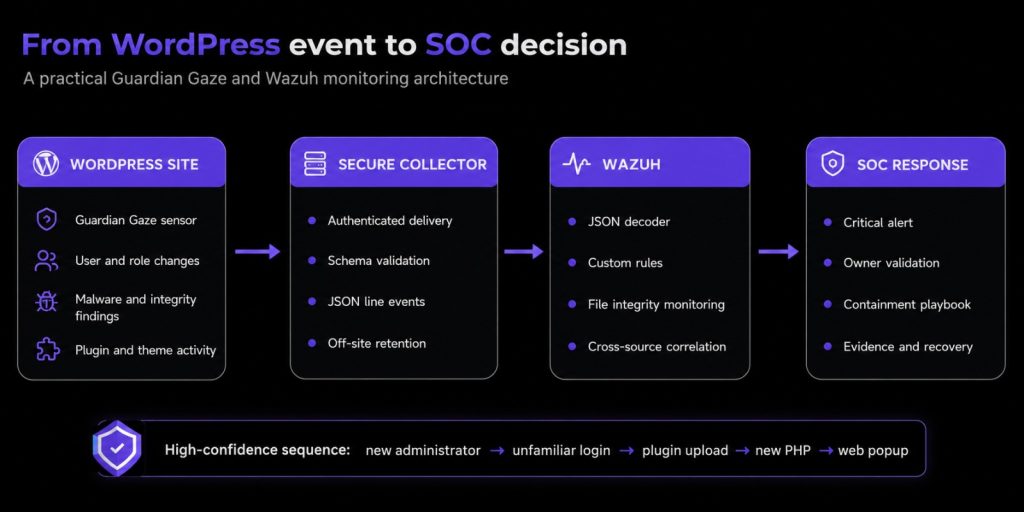
For a Wazuh integration, the architectural principle is to forward selected security metadata rather than treat the WordPress dashboard as the final destination. A secure integration layer can serialise high-value events as JSON and deliver them to a collector or protected log file monitored by Wazuh.
This is an implementation pattern, not a claim that every hosting environment has a native one-click connector. The event source, transport, authentication and retention design must match the actual Guardian Gaze deployment and hosting model.
Design a JSON event an analyst can use
A useful event should let an analyst understand what changed without logging sensitive content unnecessarily. At minimum, preserve the site, event type, severity, timestamp, actor where known, target object, source address, request path, plugin version and a correlation identifier. Unknown fields should be omitted or marked unknown rather than invented.
| Field | Purpose | Example |
| event_source | Identifies the producing integration | guardian_gaze |
| event_type | Stable machine-readable action | wordpress_user_created |
| site_id / domain | Separates tenants and assets | pharma-web-01 / example.invalid |
| severity | Initial application assessment | critical |
| actor / target | Who acted and what changed | unknown / redacted-admin |
| source_ip / request_path | Connects application and edge evidence | 203.0.113.25 / /wp-json/batch/v1 |
| correlation_id | Groups related records | gg-20260805-000184 |
| timestamp | Provides an unambiguous UTC time | 2026-08-05T03:14:22Z |
| { “event_source”: “guardian_gaze”, “event_type”: “wordpress_user_created”, “severity”: “critical”, “site_id”: “pharma-web-01”, “site_domain”: “example.invalid”, “actor_user”: “unknown”, “target_user”: “redacted-admin”, “target_role”: “administrator”, “source_ip”: “203.0.113.25”, “request_path”: “/wp-json/batch/v1”, “correlation_id”: “gg-20260805-000184”, “timestamp”: “2026-08-05T03:14:22Z” } |
The example is defensive and anonymised. The exact fields should reflect what the integration can reliably capture and the organisation’s privacy obligations. A correlation ID becomes particularly useful when one activity generates several records: request, user creation, first login, plugin upload and file-integrity change.
Choose the collection model that fits the hosting environment
Model 1: local protected JSON file and Wazuh agent
Where a Wazuh agent can run on the WordPress host or a dedicated integration server, write one JSON object per line to a protected file and configure log collection. Wazuh has a built-in JSON decoder that extracts fields for use in rules.
| <localfile> <log_format>json</log_format> <location>/var/log/guardiangaze/security-events.json</location> </localfile> |
The receiving process should authenticate submissions, validate the schema, reject oversized events, rate-limit senders, use TLS in transit and prevent the public web process from rewriting historical records. Security logs are themselves a target.
Model 2: external collector for managed or shared hosting
Many managed WordPress platforms do not permit a local Wazuh agent or direct access to operating-system logs. In that case, send selected Guardian Gaze events to a central HTTPS collector, queue or logging service under the organisation’s control. The collector can write the one-line JSON records to a system monitored by Wazuh.
This model also avoids relying on local disk persistence inside containers that may be redeployed or scaled. The design should define retry behaviour, deduplication, clock handling, tenant authentication and what happens when the collector is unavailable.
Model 3: provider telemetry plus application events
If the host is fully managed, combine Guardian Gaze events with the provider’s access, WAF, deployment and audit data. The contract should specify retention and incident access. Application events cannot prove there is no server-level backdoor; provider or host telemetry is the nearest available evidence.
Create Wazuh rules for high-value WordPress events
After Wazuh extracts the JSON fields, custom rules can convert raw events into prioritised alerts. Wazuh recommends custom rule IDs between 100000 and 120000, storing larger rule sets under /var/ossec/etc/rules/ and testing them with wazuh-logtest before production use.
| <group name=”guardiangaze,wordpress,identity,”> <rule id=”100500″ level=”12″> <decoded_as>json</decoded_as> <field name=”event_source”>guardian_gaze</field> <field name=”event_type”>wordpress_user_created</field> <field name=”target_role”>administrator</field> <description>Guardian Gaze: new WordPress administrator created</description> <group>account_creation,wordpress_security,</group> </rule> <rule id=”100501″ level=”15″> <if_sid>100500</if_sid> <field name=”request_path” type=”pcre2″>batch/v1</field> <description>Guardian Gaze: administrator creation near wp2shell batch route</description> <group>wp2shell,wordpress_rce,incident_response,</group> </rule> </group> |
These fragments are illustrative. Test them against the exact one-line event generated by the integration, use non-conflicting IDs, and restart the Wazuh manager after validated rule changes. Production logic should account for approved service accounts, change windows, source networks and ticket references.
Administrator creation should remain rare, attributable and visible. The objective is not to suppress authorised work. It is to make unexplained privilege impossible to ignore.
Correlate the attack sequence, not isolated alerts
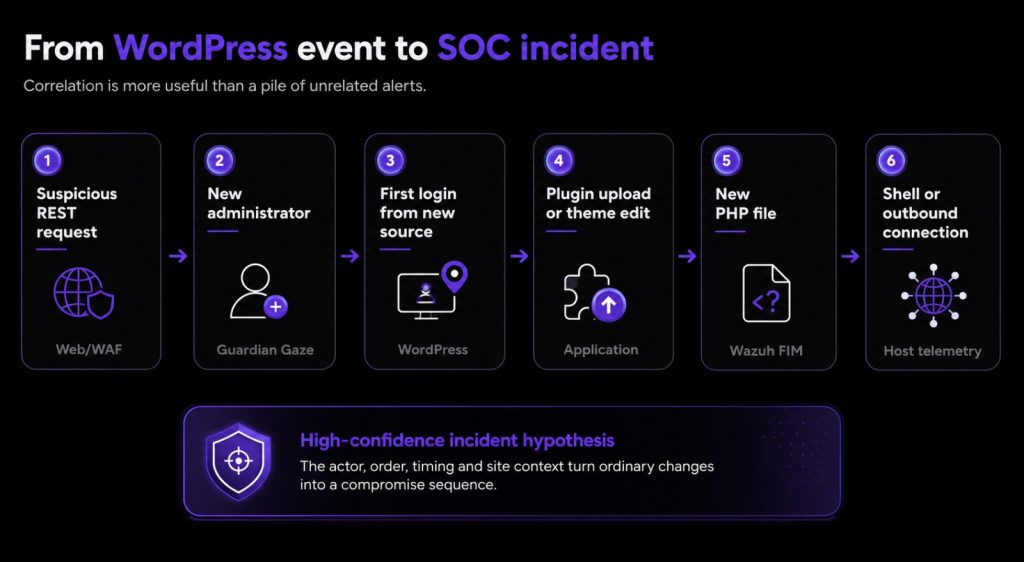
The highest-value detection is not “someone requested an API route” or “a plugin was installed”. It is the relationship between events. A useful investigation sequence is:
- Suspicious REST or administrative request.
- New administrator or role promotion with no approved owner.
- Successful login from unfamiliar infrastructure.
- Plugin upload, theme edit or must-use plugin creation.
- New or modified executable PHP under wp-content.
- Web-server process launches a shell or makes an unexplained outbound connection.
Each event can have a legitimate explanation in isolation. Administrators install plugins. File-integrity monitoring sees changes during updates. Web servers create temporary files. The actor, order, timing and site context turn those ordinary changes into an incident hypothesis.
Recurrence after remediation is another high-value pattern. If a rogue administrator is removed and the same account or file returns, treat it as unresolved persistence. Defence impairment also deserves immediate escalation: a new administrator logs in and then disables Guardian Gaze, changes audit settings or stops event forwarding.
Add Wazuh file integrity and host context
Application telemetry is necessary but not sufficient. Wazuh File Integrity Monitoring baselines files and directories, then reports creation, modification and deletion. High-value WordPress paths include wp-content/plugins, wp-content/mu-plugins, wp-content/themes, wp-content/uploads, wp-content/cache, wp-config.php and .htaccess.
Real-time monitoring should be balanced against performance and normal deployment volume. The finding becomes stronger when FIM is combined with process or audit data. A PHP file written during an approved deployment may be expected. A PHP file written at 03:14 by the web-server account, followed by a shell and an outbound connection, is not.
Where a local agent is impossible, request the nearest provider evidence. The absence of host telemetry should remain visible as a coverage limitation rather than being treated as assurance.
A practical SOC triage playbook
When a new WordPress administrator alert arrives, the analyst should first validate the site, timestamp and target account, then check for an approved owner or change record. An unexplained administrator is already high severity. The same event near suspicious batch-route activity is critical. Add a plugin upload, malware finding or web-process child and the case approaches confirmed compromise.
The analyst should preserve the alert and surrounding events, establish the historical WordPress version, identify the first login, and search for plugin, file, database and process activity. Containment should be coordinated with the website owner so that evidence is not destroyed and business impact is understood.
| Stage | SOC action | Escalation test |
| Validate | Confirm site, user, time, source and approved change | No accountable owner = high severity |
| Enrich | Pull WordPress, WAF, access, FIM and host events | Suspicious route plus admin creation = critical |
| Contain | Restrict admin, invalidate sessions, preserve snapshot | Plugin upload or executable PHP = likely compromise |
| Investigate | Build actor and event timeline | Shell, outbound connection or recurrence = confirmed persistence risk |
| Recover | Verify authorised state and telemetry health | Site remains monitored after restoration |
Clear ownership prevents a common failure mode: the SOC blocks addresses, the web team deletes users, the provider restores a backup and nobody retains a reliable timeline. The playbook should identify who preserves evidence, approves downtime, rotates credentials and declares the site trustworthy again.
Reduce noise without hiding risk
Agency-managed WordPress sites generate legitimate administrative changes. The answer is enrichment, not blindness. Maintain approved administrator and service-account baselines, plugin inventories, deployment identities, maintenance windows and trusted source ranges. Add change-ticket references where the workflow supports them.
Severity should also reflect asset value. The same administrator event has different business impact on a personal blog and a pharmaceutical corporate site. Wazuh can combine the application event with site criticality, internet exposure, environment and compliance context.
Review the rules after every incident and detection test. A real investigation may show that a field was missing, an event arrived too late or retention was insufficient. Convert those lessons into schema changes, new correlations and updated response steps.
Monitor the monitoring
The most overlooked security event may be silence. If a high-value site stops sending Guardian Gaze events, a collector queue stalls or the Wazuh agent disconnects, the SOC should know. An empty dashboard after compromise can mean tampering, failure or lost connectivity, not safety.
Track the last event time for every site, scan freshness, collector errors, rejected schemas and agent status. Telemetry-health alerts should be routed to an owner who can distinguish planned maintenance from unexplained loss of visibility.
A 90-day WordPress SIEM monitoring model
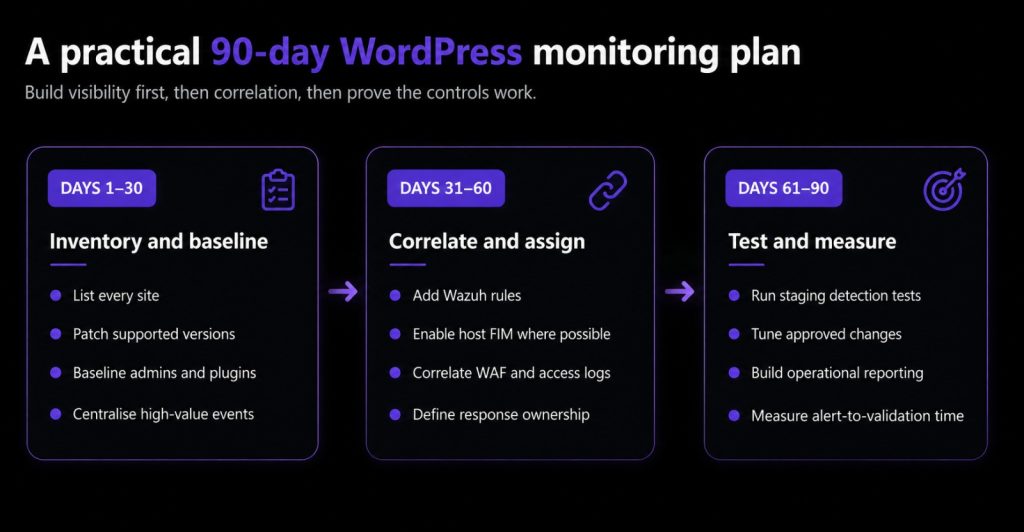
| Phase | Focus | Outcome |
| Days 1–30 | Inventory sites; patch supported versions; deploy Guardian Gaze where appropriate; baseline administrators and approved plugins; centralise high-value events. | Immediate visibility into new administrators, scan findings and integrity changes. |
| Days 31–60 | Add Wazuh rules, host FIM, WAF and access logs, severity mapping, telemetry-health alerts and response ownership. | Correlated alerts with enough context for consistent triage. |
| Days 61–90 | Test in staging; tune approved changes; build reporting; measure alert-to-validation time and recurrence. | A repeatable process with verified coverage rather than untested alerts. |
Testing does not require running an exploit. In staging, create a temporary authorised administrator, perform a controlled plugin installation, modify a test file and verify that the expected Guardian Gaze and Wazuh events arrive with the right site, timestamp, fields and severity. Document the exercise as a detection test.
Useful metrics include the percentage of sites inventoried, percentage on supported versions, event-forwarding coverage, time from administrator creation to alert, time from alert to owner validation, unexplained integrity changes, telemetry outages and recurrence after remediation. Raw alert counts alone reward noise.
SOC Dashboard: Measuring WordPress Security Operations
Building a WordPress SIEM integration is only the first step. The long-term objective is to measure whether monitoring improves visibility, investigation speed, and incident response quality. A practical operational dashboard should focus on coverage, detection effectiveness, telemetry reliability, and response performance instead of simply counting alerts.
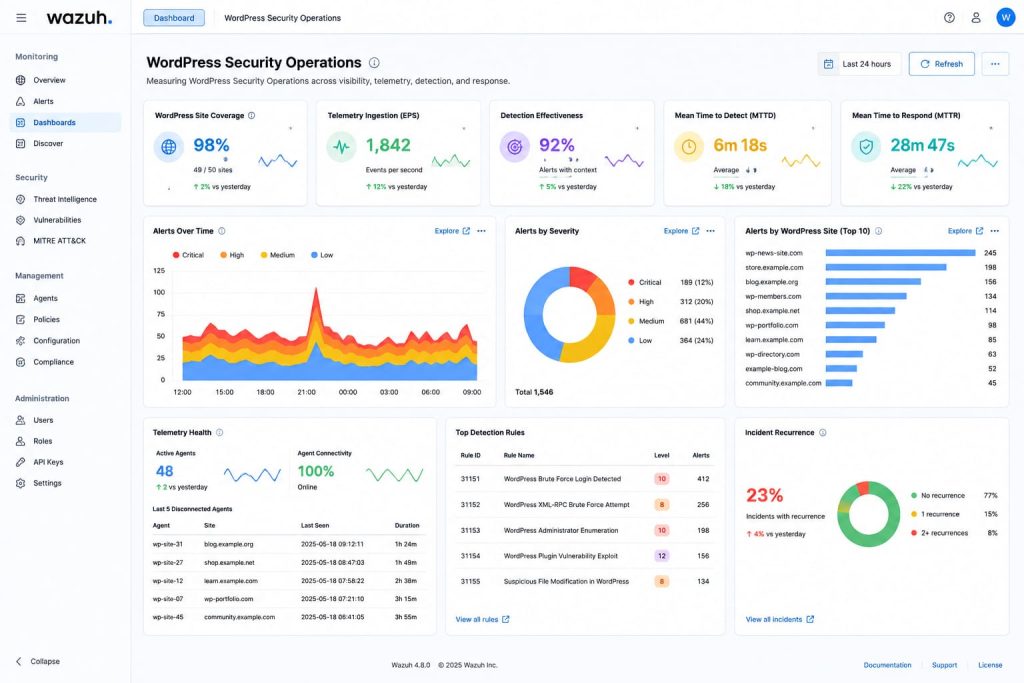
An effective WordPress SIEM monitoring deployment should be measured by visibility, telemetry reliability, detection quality, and response speed rather than by the number of alerts generated. Executive dashboards should therefore emphasise coverage, latency, telemetry health, and recurrence because these indicators demonstrate whether the organisation can reliably detect, investigate, and recover from compromise while maintaining confidence in the monitoring process itself.
Layer the controls
No single control solves the WordPress problem. Automatic updates reduce exposure, but can fail. A WAF can block known patterns, but cannot explain every database or role change. A malware scanner can identify suspicious code, but may be disabled. A SIEM can correlate events only when the application supplies useful context.
A resilient design layers supported software, strong administrator authentication, least privilege, restricted plugin installation, file and database scanning, integrity monitoring, WAF protection, host telemetry, off-site logs, tested backups and an incident-response playbook. Guardian Gaze supplies WordPress-aware visibility; Wazuh provides central retention, rule evaluation and cross-source investigation.
For broader preventive controls, see WordPress Security 2026 — Part 1 and advanced WordPress hardening — Part 2.
Frequently asked questions
Does Wazuh have a native WordPress integration?
Wazuh can collect files, syslog and JSON and apply custom rules, but a useful WordPress integration still needs an event source and transport. This article describes a secure Guardian Gaze-to-collector-to-Wazuh pattern rather than claiming a universal one-click connector.
Can Wazuh monitor WordPress files?
Yes. Wazuh File Integrity Monitoring can report file creation, modification and deletion on paths available to the agent. Monitor high-value WordPress directories and configuration files, then tune for legitimate deployments.
What WordPress events should be sent to a SIEM?
Prioritise administrator creation and promotion, privileged logins, application passwords, plugin and theme changes, must-use plugin creation, integrity findings, malware or database findings, suspicious administrative routes and telemetry-health events.
Should every WordPress event create an alert?
No. Forward enough context for investigation, but reserve high-severity alerts for privilege, executable-code, persistence, defence-impairment and correlated sequences. Routine content edits should not page the SOC.
How do I test custom Wazuh WordPress rules?
Use a one-line sample JSON event with wazuh-logtest, confirm the JSON decoder and extracted fields, then verify the rule ID and level. Test in staging before production and restart the manager after validated rule changes.
Can this work on managed WordPress hosting?
Yes, but the collection model changes. Send application events to an external authenticated collector and combine them with provider access, WAF, audit and deployment data. Document any host-level visibility that the provider cannot supply.
Conclusion: WordPress security has to leave WordPress
The wp2shell case showed that infrastructure telemetry alone could not explain the application sequence. The SOC needed to know that an administrator was created, whether it logged in, what code changed and whether the website stopped sending evidence afterwards.
A practical Wazuh WordPress integration starts with a small set of high-value, structured events. It retains them away from the site, enriches them with WAF, file and host evidence, and tests the response before the next real compromise. The result is not another dashboard. It is a defensible timeline and a faster decision.
Build continuous WordPress security visibility
Use Guardian Gaze to surface malware, hidden backdoors, file-integrity changes and suspicious login activity in WordPress context. Forward selected high-value events to your monitoring layer, validate the schema and test every custom detection before relying on it in production