
Case-study Boundary
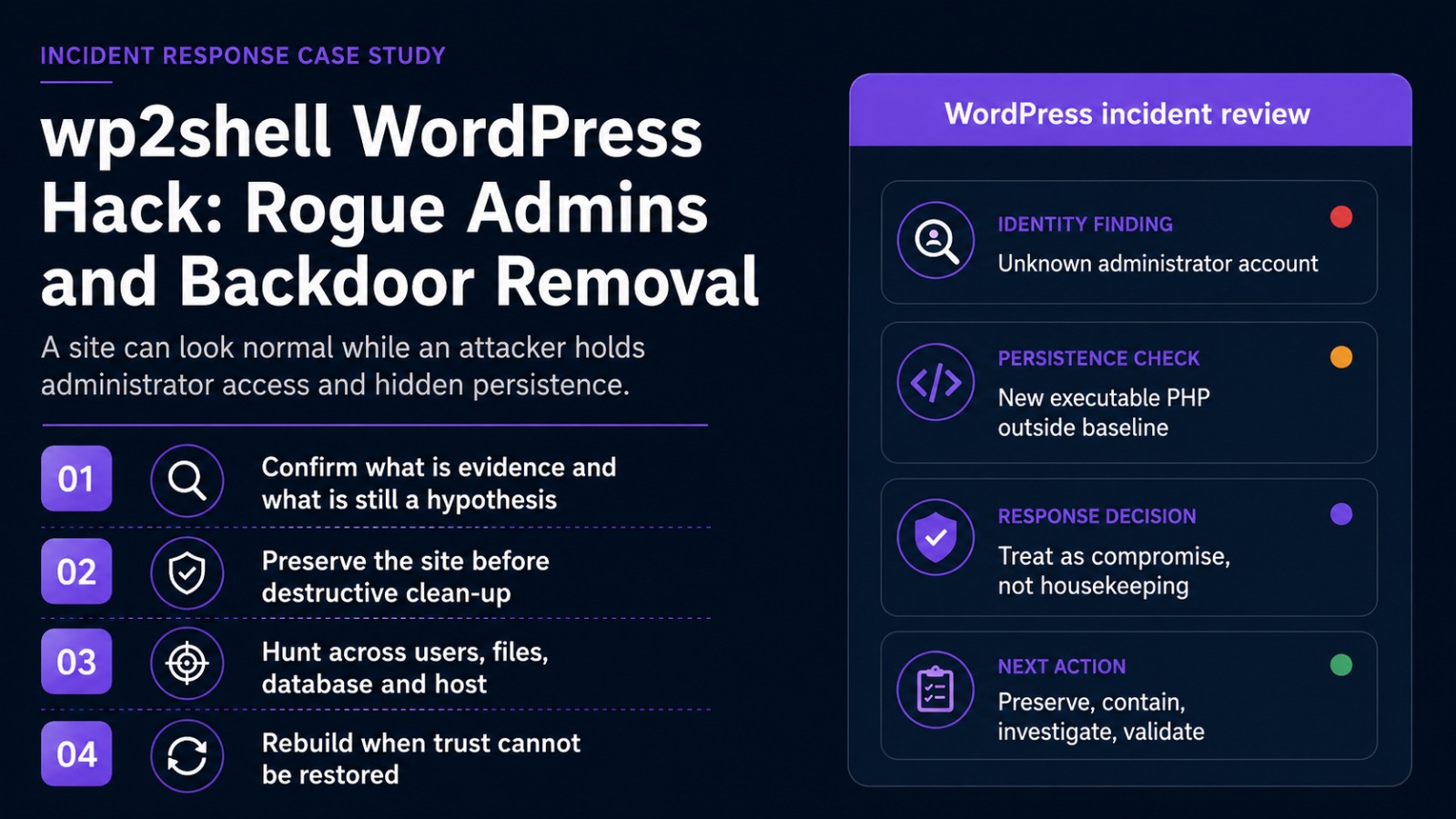
The affected pharmaceutical organisation is anonymised. The investigation confirmed multiple unauthorised WordPress administrator accounts. The circumstances were consistent with the wp2shell exploitation pattern. Where the retained evidence did not prove a specific step, this article presents it as a hypothesis to validate rather than a confirmed attacker action.
Table of Contents
- The incident began with identity, not malware
- What wp2shell is and which versions were exposed
- Why a rogue administrator can mean a hidden backdoor
- How to preserve evidence and build the timeline
- How to check the site for malware and persistence
- The hacked WordPress fix that restores trust
- Frequently asked questions
The Incident Began With Identity, Not Malware
The first sign was not a defaced homepage, a ransom note or an outage. The public site remained available, and a casual visitor would not have known anything was wrong. The anomaly appeared in the WordPress Users screen: several accounts held the administrator role, yet the organisation, its web team and its known service providers could not identify their owners.
That finding changed the response immediately. An unknown subscriber may be an abandoned test account. An unknown administrator may be able to create users, install plugins, alter themes, add application passwords, change security settings and execute attacker-controlled PHP through normal administrative workflows. The question was no longer whether the accounts could be deleted. It was whether the site, its database and its server-side code could still be trusted.
This is the operational danger of a rogue WordPress admin account: later attacker activity can resemble ordinary administration. A plugin upload may return a successful status. A theme edit may occur through an authenticated session. A second administrator may look like a service account. Controls that see only URLs and status codes can miss the difference between authorised maintenance and an intrusion.
Names do not establish legitimacy. A username such as “hosting-support” or “wp-service” still needs an accountable owner, a change record, a recognised email domain and an explainable login history. In this case, the organisation could not provide that explanation.
What is the wp2shell WordPress vulnerability?
wp2shell is the commonly used name for a WordPress Core vulnerability chain disclosed and patched on 17 July 2026. WordPress described a REST API batch-route confusion issue which, when combined with SQL injection involving the author__not_in parameter of WP_Query, could lead to remote code execution on affected WordPress 6.9 and 7.0 releases.
The full chain did not depend on a vulnerable third-party plugin or an existing login. That made the historical Core version central to triage. WordPress enabled forced automatic updates because of the severity, but an incident responder should verify which version was running during the exposure window rather than assume every site updated successfully.
| WordPress branch | Exposure described by WordPress | Minimum fixed release |
| 6.8.0–6.8.5 | Affected by the related SQL injection issue; not the complete RCE chain described for 6.9 and later | 6.8.6 |
| 6.9.0–6.9.4 | Affected by both issues; complete pre-authentication RCE chain | 6.9.5 |
| 7.0.0–7.0.1 | Affected by both issues; complete pre-authentication RCE chain | 7.0.2 |
These versions are useful for establishing historical exposure. They are not a recommendation to remain on an older branch. Production sites should run the latest supported WordPress release after compatibility testing.
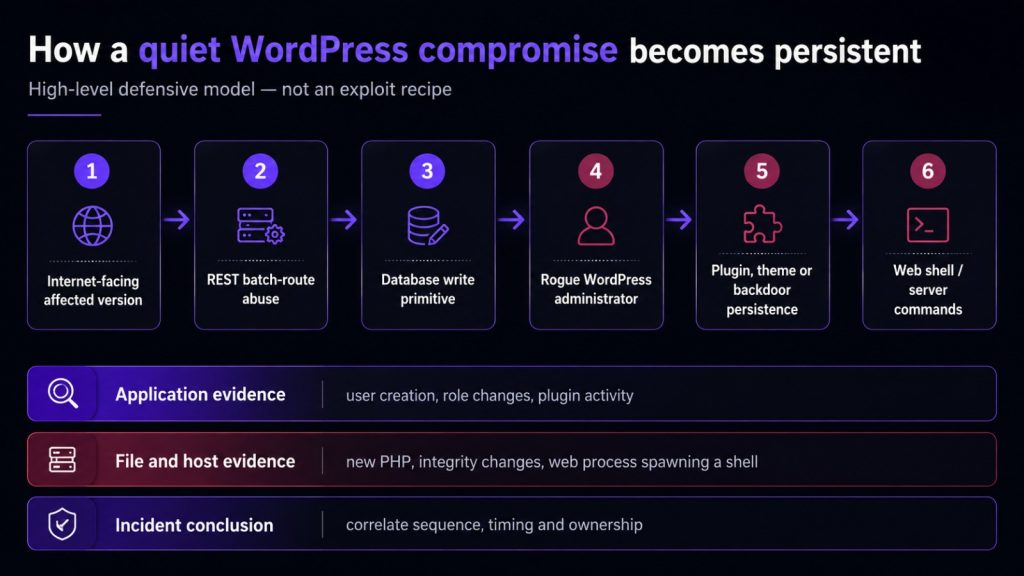
For defenders, the sequence is more valuable than a public exploit filename. Suspicious batch-route activity, an unexplained administrator creation, a first login from unfamiliar infrastructure, a plugin upload, new executable PHP and a web process launching commands form a much stronger case together than any single indicator.
What the case confirmed, and what still needed proof
The confirmed starting point was multiple unauthorised administrators. That fact alone justified critical severity and a full WordPress incident-response process. It was consistent with administrator creation associated with current wp2shell reporting, but consistency is not attribution.
A defensible conclusion should be built from several artefacts: the WordPress version during the suspected compromise window; requests to /wp-json/batch/v1 or the rest_route equivalent; account registration times; role changes; subsequent logins; plugin, theme or application-password activity; suspicious PHP files; database modifications; and host-level process evidence.
Where those logs are absent, the conclusion is not “nothing happened”. The correct statement is that the organisation cannot prove or disprove the sequence with the telemetry retained. That visibility gap is itself an incident finding and becomes the starting point for Article 2 of this series.
Why a Rogue WordPress Admin May Signal a Backdoor
wp2shell is not itself a backdoor. It is an access path. A backdoor is persistence left after access: a route that allows the attacker to return after the obvious account or file has been removed.
Deleting the visible account therefore does not prove the attacker is gone. During even a short administrative session, an attacker may create another account, add an application password, upload a plugin, modify a theme, place a must-use plugin, alter scheduled events or write a web shell. Common persistence locations include:
- Modified or malicious plugins that blend into the approved inventory.
- Must-use plugins under wp-content/mu-plugins, which load automatically and may be overlooked in routine plugin reviews.
- Executable PHP inside uploads, cache, temporary upgrade or old backup directories.
- Small loaders hidden inside legitimate themes or plugins that retrieve or decode a second payload.
- Database persistence in wp_options, posts, post metadata, widgets, comments, transients or scheduled events.
- Application passwords, altered administrator emails or additional privileged accounts.
- Host-level cron, .user.ini or php.ini directives such as auto_prepend_file, unexpected SSH keys or control-panel persistence.
If the same user, redirect or malicious file returns after removal, reinfection is not bad luck. A persistence mechanism is still active.
A 2026 Wordfence forensic case illustrates the scope problem. A WordPress-level review found clean Core files, no rogue administrators and no database injection, yet the site kept being reinfected because the persistence sat in the hosting control-plane environment. The lesson is not that every WordPress incident has a server-level backdoor. It is that a clean application review cannot, by itself, prove the surrounding host is trustworthy.
For a pharmaceutical organisation, the potential impact is broader than website downtime. A trusted corporate domain can be abused to publish false product information, host phishing pages, redirect patients or healthcare professionals, steal form submissions or distribute malware. Even if the site is separated from clinical and manufacturing systems, its integrity remains a business and public-trust concern.
Preserve evidence before WordPress malware removal
The instinct to delete suspicious accounts and files is understandable. It can also destroy the evidence needed to identify the entry point, explain the breach and show that a second backdoor was removed. Before destructive changes, create a defensible copy of the environment wherever the hosting model permits it.
- Record the current date, time and timezone, and start an incident action log.
- Export the administrator list with user IDs, emails, registration times, roles and application passwords where visible.
- Preserve WordPress audit events, access and error logs, WAF records, CDN logs, hosting activity and authentication data.
- Take a database backup and a hosting, container or virtual-machine snapshot.
- Copy suspicious files without executing them, calculate hashes and record original paths and timestamps.
- Document the installed WordPress, plugin and theme versions before updating or replacing them.
Evidence preservation does not require leaving the attacker active. Administrative access can be restricted, sessions invalidated and public exposure reduced while the preserved copy is secured. The point is to separate containment from evidence destruction.
The action log matters more than it sounds. Record who performed each step, when, why and with what result. Without it, responders can later confuse their own file changes, password resets and updates with attacker activity.
Build the timeline across identity, application and server evidence
Begin with each suspicious administrator. Record the user ID, username, email, registration time, role assignment, application passwords, known login sources and first administrative action. Several accounts created within minutes of unusual REST activity tell a different story from an old test account that was simply forgotten.
Next, establish the Core version that was running at the probable compromise time. The version visible during the investigation may already be patched. Hosting snapshots, deployment history, update logs, backups and file timestamps can show whether the site was exposed before the fixed release arrived. Patching closes the vulnerable path; it does not reverse actions already taken through it.
Then search web-server and WAF logs for the REST batch route, the rest_route equivalent, unusual POST bursts, multi-request responses, user-management calls and follow-on access to plugin upload, theme editing or administrative routes. A path alone is not proof because legitimate software may use WordPress APIs. The order, timing and actor are what create confidence.
Finally, align file and host activity with the identity timeline. New PHP under plugins, mu-plugins, themes, uploads, cache or temporary upgrade directories deserves review. Changes to wp-config.php, .htaccess, active theme files and server configuration must be explained. Where process telemetry exists, Apache, Nginx or PHP-FPM launching sh, bash, curl, wget, Python or another interpreter is a high-value signal that the web application crossed into command execution.
How to check the site for malware after suspected wp2shell exploitation
A remote scanner that visits the public URL can reveal redirects, visible injections and blacklist status. It cannot prove that the WordPress installation is clean after an issue capable of creating administrators and executing code. A meaningful review has five layers.
1. Verify WordPress Core integrity
Compare Core files with a trusted copy of the exact installed release, then update to the latest supported release. Do not assume that clean Core files mean a clean site: attackers usually prefer writable content directories because updates are less likely to overwrite them.
2. Inspect plugins, themes and writable directories
Review every active, inactive and must-use plugin. Reinstall approved extensions from trusted packages rather than accepting a familiar folder name as proof. Inspect themes, uploads, cache, temporary upgrade folders, old staging copies and backup archives under the web root. Executable PHP in uploads should have a documented reason or be treated as suspicious.
3. Inspect the database
Review administrator capabilities, wp_options, posts, post metadata, widgets, comments, transients and scheduled events for injected scripts, iframes, redirect domains, encoded payloads and unfamiliar autoloaded values. File-only clean-up misses database persistence that can restore malicious code later.
4. Audit identity and authentication
Validate every administrator, role promotion, email change and application password. Reset legitimate administrator credentials, invalidate active sessions and review the source and timing of recent logins. Shared administrator accounts make attribution much harder and should be removed after recovery.
5. Validate the host and surrounding infrastructure
Review cron, .user.ini, php.ini, SSH keys, operating-system users, control-panel activity, outbound connections and child processes launched by the web stack. On managed hosting, request the closest available evidence from the provider. If the provider cannot supply logs or snapshots, document that limitation rather than assuming the layer is clean.
For the broader clean-up checklist, use Guardian Gaze’s complete WordPress malware removal protocol. This case study stays focused on the decisions created by rogue administrators and remote-code-execution risk.
The hacked WordPress fix that actually restores trust
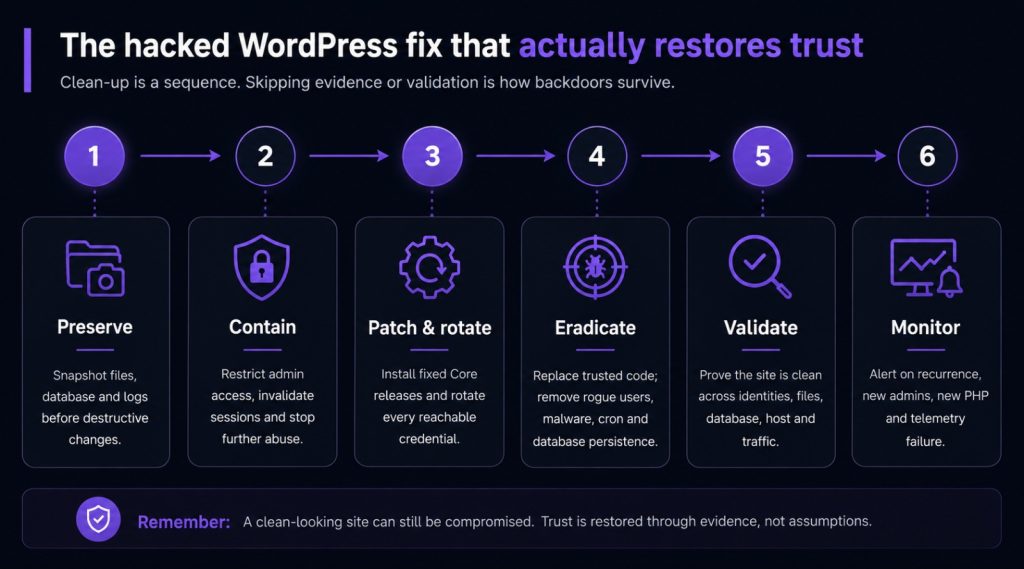
A reliable recovery sequence is preserve, contain, patch, eradicate, rotate, validate and monitor. Changing the order can destroy evidence or allow persistence to survive.
Contain without erasing the story
Restrict wp-admin, invalidate sessions by rotating WordPress salts, disable unapproved application passwords, block confirmed malicious sources and place the site in a controlled maintenance state if business impact permits. Temporary filtering of the batch route may reduce exposure, but it is an emergency control and can affect legitimate REST functionality. It does not replace updating.
Patch every instance and rotate reachable secrets
Update every production, staging and forgotten instance to the latest supported WordPress release. Then rotate legitimate administrator passwords, hosting and control-panel credentials, SFTP or SSH keys, database credentials, SMTP secrets, CDN and WAF tokens, deployment credentials and any API key stored where the attacker may have read it.
Prefer trusted replacement over selective editing
Replace WordPress Core with a clean official copy. Reinstall approved plugins and themes from verified packages. Remove abandoned extensions, unused themes, old ZIP archives and obsolete staging copies. Clean database persistence and scheduled tasks separately. Selectively deleting the visible payload is faster, but it leaves the responder guessing about what was missed.
Rebuild when trust cannot be restored
A clean rebuild is safer when the compromise window is unknown, logs are missing, privileged host access is suspected, malware repeatedly returns or the team cannot explain file and configuration changes. Start from a known-good hosting image, trusted packages, reviewed database content and fresh credentials. A backup is safe only if it predates compromise and has been checked for the same persistence mechanisms.
Why updating alone is not incident response
An update changes the code path that allowed access. It does not delete an administrator already created, remove a plugin already uploaded, erase a web shell, reverse a database injection or invalidate a credential already stolen. The green “updated” status is therefore not evidence that the incident is over.
The correct post-patch question is whether the site was exposed while vulnerable. If it was internet-facing on an affected version, hunt that window even when the homepage looks normal and no known malicious IP appears in the logs. Static indicators can change quickly; integrity, identity and process behaviour have a longer shelf life.
Recovery means proving the website is trustworthy again
Recovery is a validation phase, not the moment the homepage returns. Confirm that only authorised administrators remain, sessions and secrets have been rotated, Core and extensions are supported, file and database findings are resolved, scheduled tasks are understood, and there are no unexplained web-process children or outbound connections.
Increase monitoring after restoration. New administrator creation, plugin installation, wp-config.php changes, executable PHP in writable directories, security plugin deactivation and recurrence of removed files should trigger immediate review. A returning account or payload means the persistence path was not removed.
For broader warning signs during this period, see 17 signs your WordPress site is compromised.
The organisation in this case operated in pharmaceuticals, but that does not make this the classic pharma hack. The classic term describes SEO spam that injects pharmaceutical pages or links into an unrelated site. Here, the defining evidence was unauthorised administrator access. The compromised site could later have been used for SEO spam, redirects or phishing, but those are possible post-compromise outcomes, not the entry point.
Guardian Gaze has a separate guide to the classic WordPress pharma hack so the two incidents are not conflated.
What this case changed operationally
The clean-up exposed a monitoring weakness: key identity and application events were trapped inside WordPress or not retained long enough to support the investigation. Firewall and operating-system data could not fully explain which WordPress user acted, whether the account was newly created or what changed after login.
The next step was therefore not another one-off scanner. It was to make WordPress observable to the SOC: forward high-value application events, retain them off-site and correlate them with WAF, file integrity, and host telemetry.
Continue with Part 2: WordPress SIEM Monitoring with Guardian Gaze and Wazuh. It covers the event schema, collection architecture, illustrative Wazuh rules, correlation logic and a 90-day operating plan.
Frequently asked questions
Is wp2shell itself a WordPress backdoor?
No. wp2shell describes the vulnerability chain used to gain access. A backdoor is persistence left afterwards, such as a rogue administrator, application password, malicious plugin, must-use plugin, database loader, scheduled task or web shell.
Is deleting an unknown WordPress administrator enough?
No. The account may have been used to upload code, alter a theme, create another account or plant server-side persistence. Preserve evidence, disable the account, patch, rotate credentials and inspect files, database and host activity.
Does updating WordPress remove malware?
No. Updating closes the vulnerable code path. It does not remove malware, a web shell, a rogue account or a stolen credential already present.
How do I remove a WordPress backdoor?
Preserve evidence and contain the site first. Replace Core, plugins and themes with trusted packages; remove unauthorised users and application passwords; inspect mu-plugins, uploads, cache, database content, scheduled tasks, configuration and the host; rotate reachable secrets; then monitor for recurrence. Rebuild when trust cannot be restored.
How do I check a WordPress site for malware?
Use more than a public URL scan. Compare Core with trusted files, inspect plugins, themes, uploads and mu-plugins, review database tables and scheduled events, audit administrators and application passwords, examine access and WAF logs, and look for web processes launching commands.
Which WordPress versions fixed wp2shell?
The minimum fixed releases were 6.9.5 and 7.0.2 for the complete chain, with 6.8.6 fixing the related SQL injection issue on the 6.8 branch. Use those versions to assess historical exposure, then move to the latest supported release.
Conclusion: The Unfamiliar Administrator Was The Beginning, Not the End
This incident remained visually quiet while the organisation lost confidence in who controlled WordPress. The unknown administrators were not a minor user-management problem. They were evidence that the website, database and server-side code might no longer be trustworthy.
The correct response required evidence preservation, a timeline across identity and infrastructure, comprehensive backdoor checks, credential rotation and proof that persistence had not returned. It also showed why WordPress must be treated as an enterprise application rather than a marketing platform outside security operations.