
A backdoor is built to survive the obvious cleanup. This guide explains what local WordPress scanners, remote analysis, host-level tools and checksum verification can actually see, where each approach has blind spots, and how to combine them without trusting a single green scan.
A WordPress site can look clean and still belong to the attacker. You can remove the visible malware, reset passwords and patch the vulnerable plugin, yet one hidden persistence mechanism can reopen the site later. That mechanism may be a PHP web shell, a must-use plugin, a malicious scheduled task, a database payload that legitimate code later executes, a rogue administrator, or something outside the WordPress directory entirely.
That is why WordPress backdoor detection is not simply a question of which scanner has the longest signature list. The more useful question is: which layer is doing the looking, and what can that layer actually see?
Quick answer: use more than one independent view when the site has been genuinely compromised. A WordPress-aware scanner can inspect application files and database content with useful context. A host-level scanner can look beyond the install and remain independent of the site it is checking. WP-CLI checksum verification adds a precise integrity check for files that have an official reference. None of those layers, by itself, proves that every persistence mechanism is gone.
Why WordPress backdoors are harder to confirm than ordinary malware
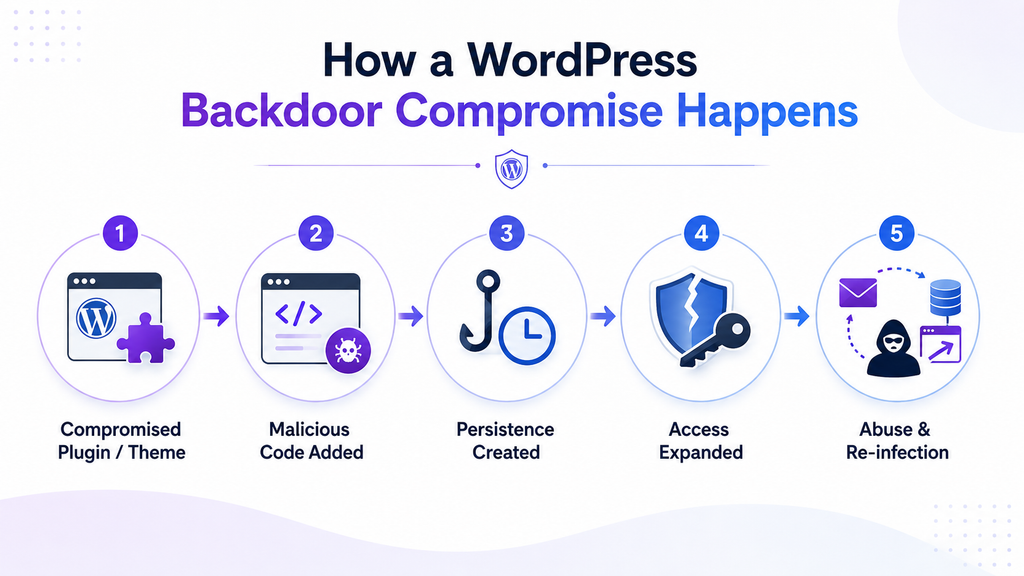
The defining feature of a backdoor is persistence. It is there to preserve access after the original entry point has been closed. Skilled attackers rarely need the backdoor to be obvious, and they may plant more than one route back in.
Common persistence locations include:
- WordPress plugin and theme files, including code that has been added to otherwise legitimate components.
- wp-content/mu-plugins, where must-use plugins are loaded automatically and are easy for an administrator to overlook.
- wp-content/uploads or other writable directories, particularly when PHP execution is possible there.
- wp-config.php, .htaccess, .user.ini or PHP configuration that loads another file automatically.
- Database records such as options, posts, postmeta or scheduled WordPress events that can store or trigger malicious behaviour.
- Rogue administrator accounts, application passwords or scheduled jobs that preserve access without a traditional malware file.
- Files and services outside the WordPress directory, including another compromised site or control-panel component on the same server.
In a 2026 forensic case, Wordfence reported a WordPress installation that kept being reinfected even after the application-level audit looked clean. The investigation had to move beyond WordPress before the team found a root-level persistence mechanism tied to a webmail log file. The case is a useful reminder that a scanner can be correct about the area it inspected and still miss the mechanism that keeps rebuilding the infection.
Why detection speed matters in 2026
The attack surface keeps moving. Patchstack recorded 11,334 new WordPress ecosystem vulnerabilities in 2025, a 42 percent increase from 2024. For the vulnerabilities that attracted the heaviest exploitation, Patchstack reported a weighted median of about five hours to mass exploitation. Those figures are about vulnerability exploitation, not backdoor prevalence, but they explain why an infection can move from initial access to persistence quickly.
A clean scan is therefore a point-in-time observation, not a permanent state. If an attacker can return through a second backdoor, a stolen credential, a malicious scheduled task or a compromised neighbouring service, the site can become infected again after a technically successful cleanup.
Plugin vs server-side scanning: the binary is too simple
Security products are often grouped into “plugin scanner” and “server scanner” buckets. In practice, there are at least four useful detection views. Understanding the difference is more valuable than treating every WordPress plugin or every hosting tool as if it used the same architecture.
1. Local WordPress scanning
A local scanner runs its inspection logic within the WordPress hosting environment and usually uses the same filesystem permissions available to PHP. Its biggest advantage is context. It can understand WordPress core, plugins, themes, uploads, users, options and other application structures. That makes findings easier to explain and easier for a site owner to act on.
The trade-off is trust. If malware has enough control over the same application environment, it may be able to interfere with local security code, alter what the scanner reads, disable scheduled jobs or hide itself from application-level checks. This is a risk model, not a claim that every local scanner is easy to defeat. Wordfence, for example, documents deep file, content, user and option checks, and local products differ substantially in what they inspect.
2. Remote or cloud-assisted analysis
Some products use a WordPress component to collect hashes, file contents or other evidence, then perform the heavier analysis elsewhere. Moving the analysis engine outside the site can make that engine harder for local malware to tamper with and can reduce resource pressure on the website.
But remote analysis does not magically create visibility. Coverage still depends on what the site-side component can read and what it sends for analysis. If the collection step is incomplete, or the malware lives outside the paths being collected, the remote service may never receive the evidence it needs.
3. Host-level or server-side scanning
Host-level scanning operates outside the individual WordPress application. Depending on its permissions and the hosting design, it can inspect a wider filesystem, watch file changes across multiple sites, and continue to function even if one WordPress dashboard or plugin has been compromised. This independence is the strongest argument for adding a hosting-level view after a serious incident.
The limitation is context. A generic filesystem scanner may be excellent at finding malicious binaries, PHP shells or suspicious changes while knowing relatively little about WordPress users, options, postmeta, plugin state or the business meaning of a database record. Server-side does not automatically mean complete.
4. Checksum and integrity verification
Checksum verification answers a narrower question with high precision: does this file match a trusted reference? WP-CLI can compare WordPress core and WordPress.org-hosted plugin files with the checksums published for the installed versions. The core command runs before WordPress loads, which is useful when you do not want the application to validate itself.
wp core verify-checksums –include-root
wp plugin verify-checksums –all
Checksums are not a malware verdict. They do not inspect database content, they do not detect a backdoor stored outside the verified paths, and they cannot provide the same reference check for custom or privately distributed code when no trusted checksum is available. WP-CLI core checksum documentation and plugin checksum documentation explain the scope and options.
What each detection layer can and cannot see
| Detection layer | Best at | Main blind spot | Best use |
| Local WordPress scanner | WordPress-aware file, user, option and database checks; easy admin visibility | Shares the site’s execution environment and permissions; cannot automatically see beyond accessible paths | Routine monitoring, triage and WordPress-specific investigation |
| Remote or cloud-assisted analysis | Off-site analysis, larger detection engines, lower on-site compute for heavy analysis | Still depends on the evidence collected from the site | Deep analysis without placing all detection logic inside WordPress |
| Host-level or server-side scanner | Broader filesystem visibility and independence from a single WordPress install | May lack WordPress database and application context unless specifically integrated | Independent verification, cross-site scanning and incident response |
| WP-CLI checksums | Precise comparison of supported core and repository plugin files against trusted references | No database coverage; limited value for custom or privately distributed code | Fast integrity verification after updates or compromise |
Two incidents that show why one layer is not enough
A trusted plugin can become the backdoor
The 2026 EssentialPlugin supply-chain compromise is a useful example because the malicious code did not arrive through an obviously suspicious download. A previously legitimate plugin portfolio changed ownership, backdoor-capable code was introduced, and the dormant mechanism was later activated. Patchstack documented the compromise across more than 20 plugins, while WordPress.com described identifying and cleaning affected hosted sites and blocking the attacker-controlled domain.
The lesson is not “never trust updates”. It is that trust changes over time. Integrity monitoring, repeat scanning and post-update visibility matter because a component that was safe last month can become unsafe later.
A clean WordPress audit can still miss the reinfection source
The Wordfence webmail case shows the opposite blind spot. The WordPress installation itself was repeatedly cleaned, but the reinfection source sat outside the application. Only a server-level investigation exposed the persistence mechanism. This is exactly why a serious incident should be verified from an independent layer when the hosting environment gives you that option.
How to verify a WordPress site after backdoor removal
There is no single “clean site” command. High confidence comes from several checks agreeing with one another and from the site remaining stable afterwards. A practical sequence looks like this:
1. Run an application-aware scan across both files and database content. Do not stop at themes and plugins. Include core, uploads, must-use plugins, options, posts, postmeta and other locations your scanner supports.
2. Verify known-good files independently. Run WP-CLI checksum verification for WordPress core and repository plugins. Investigate mismatches rather than automatically deleting them, because legitimate customisations can also change files.
3. Review persistence points that are easy to miss. Check mu-plugins, executable files in uploads, wp-config.php, .htaccess, .user.ini, WordPress cron, administrator accounts and application passwords. If the incident involved server access, include system cron and neighbouring sites in the investigation.
4. Use a host-level or server-side scan where available. This is particularly important when malware returns after WordPress-level cleanup, when multiple sites share the same account, or when the original entry point is still uncertain.
5. Close the entry point before declaring victory. Patch or remove the vulnerable component, revoke unnecessary access, rotate compromised credentials and WordPress salts, and review access logs where available. Cleaning malware without fixing the route in simply starts the clock on the next infection.
6. Monitor for recurrence. File changes, new administrator logins, update activity and scheduled scan results provide the evidence that the cleanup is holding. A site that stays clean under observation gives you more confidence than a single scan taken five minutes after remediation.
If you are already dealing with an active compromise, our WordPress malware removal guide covers the broader cleanup process. This article stays focused on the narrower question of how to verify backdoor detection across different layers.
Where Guardian Gaze fits in a layered backdoor detection strategy
Guardian Gaze is most useful as the WordPress-aware layer. Its current WordPress.org listing describes scanning across WordPress core, plugins, themes and uploads, plus database checks across wp_options, wp_posts, wp_postmeta and wp_comments. It also includes file-integrity monitoring and detection for suspicious or known backdoor-style code.
That application context matters because a generic host scanner and a WordPress scanner do not answer exactly the same questions. Guardian Gaze can help surface suspicious changes and injected database content in places that an infrastructure-only tool may not understand semantically. A hosting-level scanner, where your provider offers one, adds the independent filesystem view that WordPress itself cannot provide. The strongest arrangement is not one product replacing the other. It is overlapping visibility with different failure modes.
For teams that want deeper analysis and more automated hardening, the optional Guardian Gaze Pro add-on includes AI-assisted backdoor analysis, real-time file monitoring and additional login-protection controls according to the current plugin listing.
| Run a free WordPress security scan Install Guardian Gaze from WordPress.org and scan your files and database for suspicious changes, malware and hidden backdoor patterns. | Need more monitoring and analysis? Explore the Pro features for additional backdoor analysis, real-time monitoring and advanced protection controls. |
WordPress backdoor detection FAQ
Can a WordPress security plugin detect a backdoor?
Yes, many can detect common web shells, modified files, malicious patterns and suspicious database content. The exact coverage depends on the product. After a confirmed compromise, a plugin scan is best treated as one layer of evidence rather than the only proof that the site is clean.
Is server-side malware scanning better than a WordPress plugin?
It is better at different things. Host-level scanning is independent of a single WordPress install and can have broader filesystem visibility. A WordPress-aware scanner can understand application files, users, options and database content more precisely. Use both where practical.
Does a successful WP-CLI checksum check mean the site is clean?
No. It means the supported files checked against official references match those references. It does not inspect the database, custom code, privately distributed plugins, server-level persistence or stolen credentials.
How do I know a WordPress backdoor is completely gone?
You cannot prove that with one scan. Confidence comes from independent file and database checks, checksum verification, review of persistence points, server-level inspection when warranted, closing the original entry point and monitoring the site for recurrence.
The goal is confidence, not a green badge
Backdoor detection is strongest when independent views agree. A WordPress-aware scanner can tell you what looks wrong inside the application. A remote analysis engine can add deeper inspection without keeping every detection component on the site. A host-level scanner can look beyond WordPress. Checksums can confirm that supported files still match trusted originals.
No single layer sees everything, and that is the point. When a site has been compromised, the right question is not “which scanner should I trust completely?” It is “which independent checks would have to agree before I am comfortable calling this site clean?”