How poisoned dependencies, compromised build pipelines and trusted plugin updates reach WordPress sites, what the 2026 incidents teach us, and how to detect the damage before it becomes persistence.
| 48% of breaches in Verizon’s 2026 DBIR involved a third party, up from 30% a year earlier. | 21% of cases in Google Cloud’s H1 2026 report involved compromised trusted third-party relationships. A separate 3% were software supply chain compromises. | 1.8M+ malicious open source packages had been logged by Sonatype by the end of Q2 2026, with npm accounting for 96.6% of Q2 malicious package counts. |
Supply chain security has become a mainstream breach problem, not a specialist concern. Verizon’s 2026 Data Breach Investigations Report found third-party involvement in 48% of breaches, up from 30% a year earlier. Google Cloud’s H1 2026 Threat Horizons report found that 21% of investigated cases involved compromised trusted relationships with third parties, while a separate 3% were software supply chain compromises. Sonatype’s Q2 2026 Open Source Malware Index reported more than 1.8 million malicious packages logged by the end of the quarter.
Those figures measure different populations, so they should not be combined into one headline percentage. What they do show is the same direction of travel: attackers are putting more effort into the software, vendors, packages and release paths that organisations already trust.
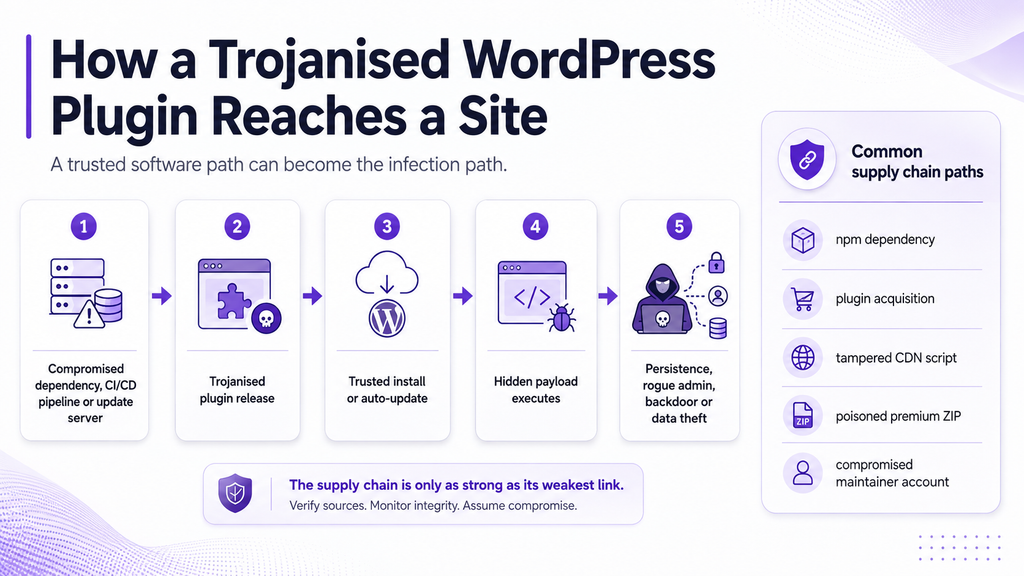
WordPress sits directly inside that trust model. A plugin can be legitimate for years, then change ownership, lose control of a maintainer account, inherit a poisoned dependency, suffer a compromised build pipeline, or load a tampered script from a vendor CDN. To the site owner, the dangerous code may arrive through the same update process that has always looked routine.
Quick answer
A WordPress supply chain attack happens when malicious code reaches a site through a trusted software relationship rather than through a direct exploit against that site. A trojanised plugin may continue to work normally while quietly adding a backdoor, rogue administrator, injected JavaScript, credential theft or remote command execution. Detection is strongest when file integrity, malware scanning, database inspection, account review and post-update monitoring are used together. Development teams also need controls around dependencies and CI/CD before a plugin release ever reaches WordPress.
Why supply chain attacks work so well
Traditional attacks try to break trust. Supply chain attacks borrow it. A login from an unfamiliar IP address may look suspicious. An update from a plugin vendor you have used for three years usually does not. That difference is the attacker’s advantage.
Software ecosystems amplify that advantage. A compromised maintainer, package, release server or CDN can put malicious code in front of thousands of downstream users without attacking those users one by one. The ecosystem’s own automation then becomes part of the distribution mechanism.
This is why supply chain incidents can catch careful administrators off guard. Strong passwords, prompt patching and avoiding pirated plugins are still important, but none of them can guarantee that a trusted publisher will remain uncompromised forever.
What the 2026 npm attacks are telling defenders
The JavaScript ecosystem has been one of the clearest warning signs in 2026. Sonatype reported that npm accounted for 96.6% of malicious package counts in Q2. More importantly, the recent campaigns show attackers moving beyond simple typosquatting into credential theft, maintainer compromise, self-propagation and abuse of trusted build workflows.
Mini Shai-Hulud turned stolen credentials into new poisoned releases
On 4 August 2026, a new Shai-Hulud wave spread through the Keyv and Cacheable ecosystems and into additional npm packages. Sonatype counted 2,225 affected component versions. The malicious releases used a preinstall hook to steal npm, GitHub, cloud, Kubernetes, Vault and CI/CD credentials, then used available publishing access to compromise further packages.
That is the supply chain problem in its clearest form: the first victim can become the next distribution channel.
NullReceiver linked package compromise with a DPRK campaign
Another August campaign used Trojanized npm packages to discover command-and-control infrastructure through Ethereum transactions. The technique, named NullReceiver, decoded IP addresses from transaction destination data instead of hardcoding a normal C2 URL. Sonatype tied the observed wallet and tradecraft to activity associated with the DPRK-linked Contagious Interview campaign.
The packages were only the delivery layer. The wider reporting connected related activity across npm, Go and PHP ecosystems, showing how a developer compromise can move across languages and build environments rather than staying inside one package manager.
Flooding Dropper showed how scale can bury malicious packages in noise
A separate August campaign, which Sonatype named Flooding Dropper, involved 846 malicious npm components. The campaign automated package and account creation and used slightly varied code to download and execute a second-stage payload. Those small variations can frustrate detections that rely too heavily on exact signatures.
The lesson for WordPress teams is not that npm itself is unsafe. It is that modern software inherits risk from upstream components, developer identities and build systems, and attackers increasingly know how to turn that trust into distribution.
How an npm compromise can reach a WordPress plugin
A normal WordPress site does not usually run npm when you click Install Plugin. npm is commonly used earlier, on a developer workstation or CI/CD runner, while a plugin is being built.
The WordPress developer ecosystem itself uses JavaScript build tooling. The official documentation for @wordpress/scripts describes npm-based workflows that compile source into production assets. That means a malicious package can influence what eventually ships even though the customer’s WordPress server never runs npm.
| Supply chain route | What is compromised | How it can reach WordPress |
| Malicious npm dependency | A dependency executes during install or build on a developer workstation or CI runner. | It can steal publishing credentials, modify source, or contaminate the release before the plugin ZIP is produced. |
| Bundled JavaScript dependency | A compromised library becomes part of the compiled front-end or admin JavaScript. | The malicious code can ship inside the final plugin package and execute in browsers after installation. |
| Compromised CI/CD workflow | Build secrets, GitHub Actions, release jobs or signing credentials are abused. | An attacker can produce an apparently legitimate release from a trusted project or vendor account. |
| Compromised vendor CDN | A script loaded by the plugin is altered at the external source. | Sites can receive malicious JavaScript even when the installed plugin files have not changed. |
That distinction is important for detection. A WordPress scanner can inspect code and persistence that has reached the site. It cannot certify that a plugin publisher’s dependency graph, developer workstation or CI runner was clean before the release was built. That earlier layer needs dependency analysis, lockfile review, CI/CD hardening and strong secret management.
Recent WordPress incidents show several different supply chain paths
Smart Slider 3 Pro: the official update channel became the delivery path
In April 2026, an unauthorised party gained access to the update infrastructure for Smart Slider 3 Pro and distributed malicious version 3.5.1.35 through the official update channel. Patchstack reported that the compromised build was available for roughly six hours before it was detected and replaced.
The injected code preserved the legitimate plugin behaviour while adding a remote access toolkit. The analysed payload could execute commands, create a hidden administrator, write persistence into mu-plugins, modify the active theme and place additional code elsewhere in the WordPress installation.
That is what makes a trojanised plugin dangerous: the visible feature keeps working while a second purpose runs beside it.
EssentialPlugin: ownership changed, but historical trust remained
The EssentialPlugin incident followed a different route. A buyer acquired a portfolio of established plugins and malicious code known as wpos-analytics was added to the source. WordPress.com reported that the code remained dormant for a period before the backdoor was activated in April 2026. WordPress.org permanently closed the affected plugins, and WordPress.com identified more than 2,200 hosted sites running one or more affected plugin slugs.
The uncomfortable lesson is simple: plugin reputation is historical. Ownership, maintainers and release infrastructure can change after you install software.
OptinMonster, TrustPulse and PushEngage: the local plugin did not need to change
In June 2026, malicious JavaScript was served from vendor-controlled CDN infrastructure used by OptinMonster, TrustPulse and PushEngage. Sansec estimated that more than 1.2 million sites were potentially exposed. The payload waited for a logged-in WordPress administrator, used the administrator’s authenticated session to create rogue admin access, and installed a self-hiding backdoor plugin.
This case is especially useful because it exposes the limits of file integrity alone. A plugin can keep the same files and checksums while a trusted external script changes what the browser receives.
WowShipping Pro: a trojanised commercial plugin package
Patchstack also analysed a trojanised copy of WowShipping Pro 1.0.6 in April 2026. The modified package preserved legitimate plugin behaviour while adding a dropper that installed a second malware plugin with remote access capability.
Premium software can be harder to verify because privately distributed plugins do not have a universal WordPress.org checksum reference. For business-critical plugins, retain known-good release packages, hashes or another vendor-verification record where practical.
What a trojanised WordPress plugin may do
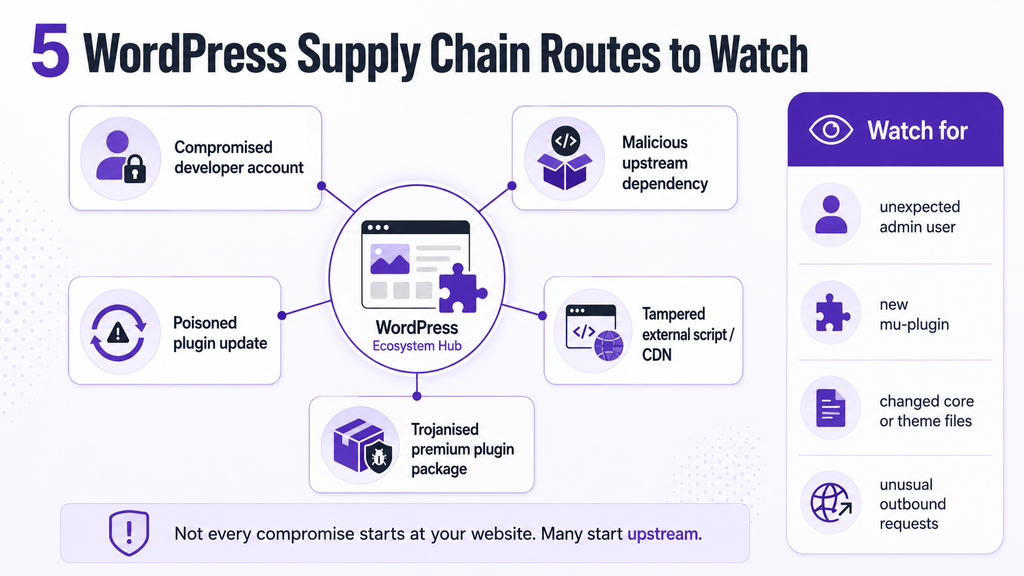
There is no single supply chain payload. Attackers choose the combination of access, persistence and stealth that best fits the opportunity. A compromised plugin may:
- Create a hidden or ordinary-looking WordPress administrator account.
- Drop PHP backdoors into mu-plugins, themes, uploads, wp-includes or another trusted-looking location.
- Add remote command execution behind a secret HTTP header, cookie or query parameter.
- Inject JavaScript that runs only for administrators, mobile users, search visitors or selected geographies.
- Write persistence or payloads into wp_options, wp_posts, wp_postmeta or other database tables.
- Exfiltrate site details, credentials, API keys or tokens to attacker-controlled infrastructure.
- Pull a second-stage payload from a remote server after the original plugin has executed.
- Wait days or months before activation so the malicious behaviour is harder to connect with the original update.
A clean-looking front end proves very little. The stronger supply chain attacks are designed to preserve expected functionality while keeping the malicious path out of normal sight.
How to detect a WordPress plugin supply chain compromise
Detection improves when the question changes from “Is this plugin vulnerable?” to “Did this software change in a way I expected, and what did it do afterwards?”
1. Establish exactly what changed
- Record the plugin name, version, update source and time of the last update.
- Check whether the vendor, ownership or maintainers changed recently.
- Compare the published changelog with the files that actually changed. A small feature release that unexpectedly rewrites unrelated PHP or JavaScript deserves attention.
- For agencies, maintain a plugin inventory across client sites so an advisory can be mapped to affected installations quickly.
2. Verify repository-hosted plugin integrity
For plugins hosted on WordPress.org, WP-CLI can compare installed files with published checksums.
wp plugin verify-checksums –all
WordPress core can also be checked, including unexpected root files.
wp core verify-checksums –include-root
There is an important caveat: a matching checksum proves that your local file matches the published reference. It does not prove the published release was trustworthy. If an attacker successfully compromises the official release process, the malicious build may still match the official checksum.
3. Monitor file integrity over time
Supply chain malware often writes beyond the plugin directory that introduced it. Monitor for new or modified files in core, plugins, themes, mu-plugins and uploads. Unexpected PHP in uploads, a new must-use plugin, unexplained changes to functions.php, or a lookalike file in wp-includes should be treated as high-priority findings.
4. Scan the database as well as the filesystem
A file-only scan can miss database persistence. Review wp_options, posts, postmeta, comments and scheduled tasks for encoded payloads, injected JavaScript, suspicious URLs, hidden redirects and unfamiliar autoloaded values.
5. Audit administrator accounts and persistence
Supply chain attacks frequently create administrator access because it can survive removal of the original plugin. Compare current administrators with your expected list, investigate unfamiliar users, and review account creation timing where logs allow it. Then inspect mu-plugins, the active theme, wp-config.php, .htaccess, cron events and other locations that continue to load after the compromised plugin is disabled.
6. Review outbound and browser-side behaviour
Unexpected DNS or HTTP connections to unrelated domains can expose command-and-control activity. Browser-side inspection is also important when a plugin loads remote scripts. The June CDN incident showed that malicious behaviour can reach logged-in administrators even though local plugin files have not changed.
7. If the plugin was malicious, assume execution may already have happened
Updating or deleting a trojanised plugin is not the same as incident response. Once malicious code has executed, it may have created users, files, scheduled tasks or stolen credentials. Treat the site as potentially compromised until persistence and follow-on activity have been checked.
What Protect the Shire changes for WordPress updates
WordPress.org changed the update model in June 2026 in direct response to the wider supply chain problem. On 5 June, WordPress launched Protect the Shire, introducing a temporary platform-wide cooldown of up to 24 hours before new plugin and theme releases are distributed through the WordPress.org update system. The announcement explicitly cited supply chain attacks across npm, PyPI, GitHub and RubyGems, as well as the Essential Plugins incident, as part of the motivation.
This supersedes the earlier opt-in phased-release model. It is not a setting that only participating plugin authors choose. The goal is to create time for additional review before a new release reaches the wider ecosystem.
There is an operational trade-off. Although the original announcement emphasised auto-updates, maintainers subsequently clarified that the hold also affects ordinary one-click dashboard updates because WordPress.org delays making the update available through the update system itself.
That can create tension for urgent security releases. A fix may be visible in source or a changelog while many sites are still waiting for the release to become available through the normal WordPress.org update path. WordPress has described the 24-hour period as temporary and expects the process to evolve.
For site owners, the practical conclusion is not to disable automatic updates across the board. Keep reliable backups, integrity monitoring and a tested response path, and use staging or canary deployment for business-critical plugins where your operating model allows it. Security updates still need to be applied promptly once they are available.
How site owners can reduce WordPress supply chain risk
- Use fewer plugins. Every plugin adds another maintainer, update path and dependency chain to the site’s trust model.
- Prefer actively maintained plugins from identifiable vendors with a consistent security and release history.
- Watch for ownership changes, acquisitions and unexplained maintainer changes in plugins that are important to your business.
- Avoid nulled, cracked or unofficial commercial plugins. They remove confidence in the distribution path before installation even begins.
- Keep tested, recoverable backups outside the live server.
- Require strong administrator authentication and remove unused administrator accounts.
- Use continuous file integrity monitoring instead of relying only on occasional manual scans.
- Scan the WordPress database as part of malware detection rather than treating it as an afterthought.
- For high-value sites, monitor outbound traffic and important external scripts loaded by critical plugins.
- Document an incident path for disabling a suspect plugin, preserving evidence, checking persistence and rotating credentials.
How plugin developers and agencies should secure the build chain
WordPress supply chain security starts before a ZIP file reaches a customer. If your team builds plugins, themes or custom JavaScript bundles, developer workstations and CI/CD runners are part of the production security boundary.
The WordPress Security Team made this point explicitly in July 2026 when it published Hardening GitHub Actions workflows across the WordPress organisation. The post highlighted how compromised or over-privileged workflows can lead to malicious releases, backdoors and secret theft, and documented WordPress’s own use of tighter permissions, Actionlint and Zizmor.
- Use phishing-resistant MFA or passkeys for GitHub, WordPress.org, npm and other publishing accounts.
- Keep lockfiles under version control and use reproducible dependency installation such as npm ci where appropriate.
- Run software composition analysis against direct and transitive dependencies before release.
- Generate and retain an SBOM when the development process supports it.
- Review package install scripts and restrict unnecessary lifecycle execution.
- Pin third-party GitHub Actions to trusted commits and keep workflow permissions to the minimum required.
- Prefer short-lived credentials or OIDC-based access for CI where possible instead of long-lived static secrets.
- Protect release branches and require review for changes to package manifests, lockfiles, workflows and build scripts.
- Retain signed or hashed release artefacts so a production plugin can later be compared with a known-good build.
- Use staged or canary deployment for important releases when your operating model allows it.
How Guardian Gaze helps once the supply chain compromise reaches WordPress
Guardian Gaze is most useful at the point where the compromised software reaches the WordPress environment. It does not replace software composition analysis, an SBOM or CI/CD controls, and it cannot certify that a plugin vendor’s npm pipeline was clean. No WordPress-side scanner can provide that guarantee.
The free Guardian Gaze WordPress plugin provides malware and backdoor scanning across WordPress files, database malware scanning, file integrity monitoring and scheduled scanning. Guardian Gaze Pro is the paid plan for the optional Premium add-on and adds deeper controls such as real-time SHA-256 file monitoring, AI-assisted review of suspicious files, quarantine and restore, audit logging and additional login hardening.
| Supply chain indicator | How Guardian Gaze can help |
| Injected or modified files in core, plugins, themes or uploads | Malware and backdoor scanning plus file integrity monitoring can surface suspicious or unauthorised changes. |
| Database-resident payloads or injected JavaScript | Database scanning checks key WordPress tables for suspicious content and backdoor-style patterns. |
| Changes that appear after a known clean state | Integrity monitoring highlights new and modified files. Pro adds real-time SHA-256 baseline monitoring. |
| Suspicious files that need deeper context | Pro adds AI-assisted review of suspicious files flagged during scanning. |
| Ongoing exposure after the first check | Scheduled scanning and reporting help turn a one-time check into a recurring control. |
| A confirmed malicious file that needs isolation | Pro adds quarantine and restore capabilities. |
The reason this matters is that a trojanised plugin rarely stays neatly inside its own folder. If it writes a must-use plugin, modifies a theme, creates a database payload or drops a second backdoor, scanning only the original package can miss the persistence that matters most.
What to do if you installed a suspected trojanised plugin
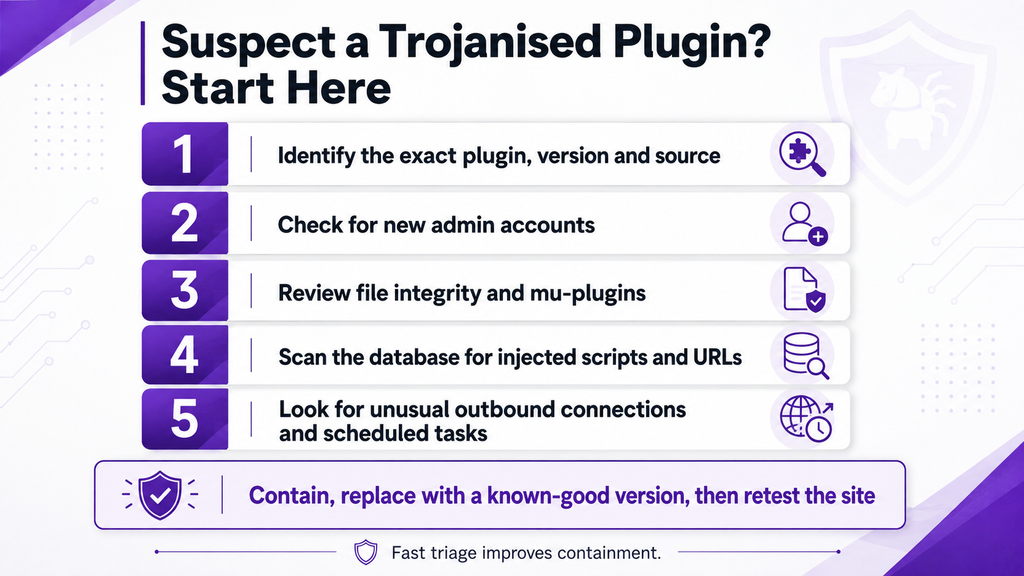
- Preserve evidence first. If practical, retain relevant logs and make a forensic or filesystem copy before destructive cleanup.
- Confirm the exact plugin version, installation source and update time. Record whether the suspicious version ever ran on the site.
- Replace the plugin with a verified clean release or remove it if the distribution path is no longer trusted. Do not assume deletion removes persistence.
- Run a full file and database malware scan, then review integrity changes outside the original plugin directory.
- Audit administrator accounts, mu-plugins, theme files, wp-config.php, cron events, uploads and other persistence locations.
- Review outbound connections and web server logs for attacker-controlled domains, unusual requests or other incident indicators.
- After containment, rotate WordPress administrator passwords, application passwords, API keys, hosting credentials and any other secrets that may have been accessible.
- If a developer or CI environment installed a malicious npm dependency, treat that environment separately. Isolate it, remove persistence, revoke exposed tokens and rebuild from known-good sources.
- Continue monitoring after recovery. One clean scan after deletion is useful, but it is not proof that the attacker left only one persistence mechanism.
The bigger lesson: trust needs monitoring
WordPress plugins are one of the platform’s greatest strengths. They are also executable software produced by organisations you do not control. That does not make plugins unsafe by default. It means the security question cannot end at “Is this plugin popular?” or “Did it come from the official source?”
The 2026 incidents show several different failure modes: npm packages abused for credential theft and propagation, an official commercial update channel compromised, a plugin portfolio weaponised after acquisition, a vendor CDN serving malicious JavaScript, and a trojanised premium plugin package carrying hidden remote access.
The common factor is not WordPress, npm or one vendor. It is inherited trust.
The practical defence is layered. Secure the build pipeline if you produce software. Control what reaches production. Monitor what changes after installation. Scan both files and the database. Watch administrator access and persistence points. And when a trusted update is found to be malicious, treat it as a compromise, not simply an update problem.
Check what changed before a trusted update becomes persistence
Guardian Gaze scans WordPress files and database content for malware, hidden backdoors and unauthorised changes, with file integrity monitoring and scheduled scanning available in the free plugin.
Start with the free plugin: Install Guardian Gaze from WordPress.org
Need real-time file monitoring, AI-assisted suspicious-file analysis, quarantine, audit logging and stronger hardening? Explore Guardian Gaze Pro
Frequently asked questions
What is a WordPress supply chain attack?
A WordPress supply chain attack compromises a trusted part of the software delivery path, such as a plugin developer account, update server, build pipeline, external dependency, CDN or plugin ownership relationship. The attacker then uses that trust to deliver malicious code to downstream sites.
Can a plugin from an official source still be malicious?
Yes. Official distribution reduces risk but does not make compromise impossible. Smart Slider 3 Pro showed how official vendor update infrastructure can be compromised, while EssentialPlugin showed how established plugins can become malicious after an ownership change. Source reputation is useful, but it should be paired with monitoring and integrity checks.
Can an npm supply chain attack infect WordPress?
Indirectly, yes. A normal WordPress plugin installation does not usually run npm, but plugin developers commonly use npm during development and build. A malicious dependency can steal publishing credentials, compromise a CI environment, alter source or become bundled into production JavaScript. The resulting plugin release can then reach WordPress users through ordinary installation or update paths.
Will a malware scanner always detect a trojanised plugin?
No single scanner can guarantee that. Detection depends on the payload, execution path and persistence technique. A strong workflow combines malware scanning, file integrity monitoring, database inspection, user-account review and, where available, server, network or browser-side telemetry.
Are premium WordPress plugins safer than free plugins?
Not automatically. Commercial vendors may have mature engineering and security processes, but private update infrastructure can also be compromised and privately distributed plugins do not have a universal WordPress.org checksum reference. Provenance, release controls and monitoring still matter.
Should I turn off automatic plugin updates because of supply chain attacks?
Usually not across the board. Automatic updates reduce exposure to known vulnerabilities, while supply chain compromise creates a smaller but serious risk that an update itself is malicious. For business-critical sites, use recoverable backups, monitoring, staging or canary deployment where practical, and respond quickly to trusted security advisories.