Your WordPress site has been hacked. Here is exactly how to confirm it, clean every infection point, and get your Google rankings back.
The fastest path:
- Confirm the hack using the checks in section 2. Some hacks are completely invisible when you visit your own site.
- Run the 12-step removal protocol in section 4, in order, without skipping steps. One missed component means reinfection within hours.
- Close the original entry point before going back online. This is the most common reason hacks return.
- Submit a recovery request to Google if your rankings have dropped.
Most “cleaned” WordPress sites get reinfected within 30 days. The reason is always the same: the cleanup removed visible files but left the database loader, the cron job, or the mu-plugins backdoor behind. This guide covers all of them.
Table of Contents
- How to tell if your WordPress site has been hacked
- The 17 signs of a hacked WordPress site
- The most common WordPress hack types in 2026
- Complete hack removal protocol (12 steps)
- How to recover your Google rankings after a hack
- How to stop it happening again
- FAQ
Most site owners find out from someone else. A customer emails. A Google search result looks wrong. The host suspends the account. Organic traffic drops overnight with no obvious cause.
Modern WordPress malware is built specifically to hide from the site owner while staying visible to Google’s crawler and to visitors arriving from search results. You can visit your own homepage a hundred times and see nothing wrong. Your customers are seeing something very different.
Here are the five fastest checks.
1. How to Tell if Your WordPress Site Has Been Hacked
Check 1: Search Google for your site with spam keywords
In any browser, type these searches one at a time:
site:yourdomain.com viagra

site:yourdomain.com casino

site:yourdomain.com "buy cheap"
If any spam result appears, the site is infected. Go straight to section 4.
Check 2: Fetch your site as Googlebot
# Fetch as Googlebot

curl -A "Mozilla/5.0 (compatible; Googlebot/2.1; +http://www.google.com/bot.html)" \

https://yourdomain.com/ | grep -i "viagra\|casino\|redirect\|location:"

# Fetch as a normal browser for comparison

curl -A "Mozilla/5.0 (Macintosh; Intel Mac OS X 10_15_7)" \

https://yourdomain.com/ | grep -i "viagra\|casino\|redirect\|location:"
If the Googlebot version returns content the browser version does not, your site is cloaking malware from you specifically.
Check 3: Check Google Search Console
Go to Search Console, then Security and Manual Actions, then Security Issues.
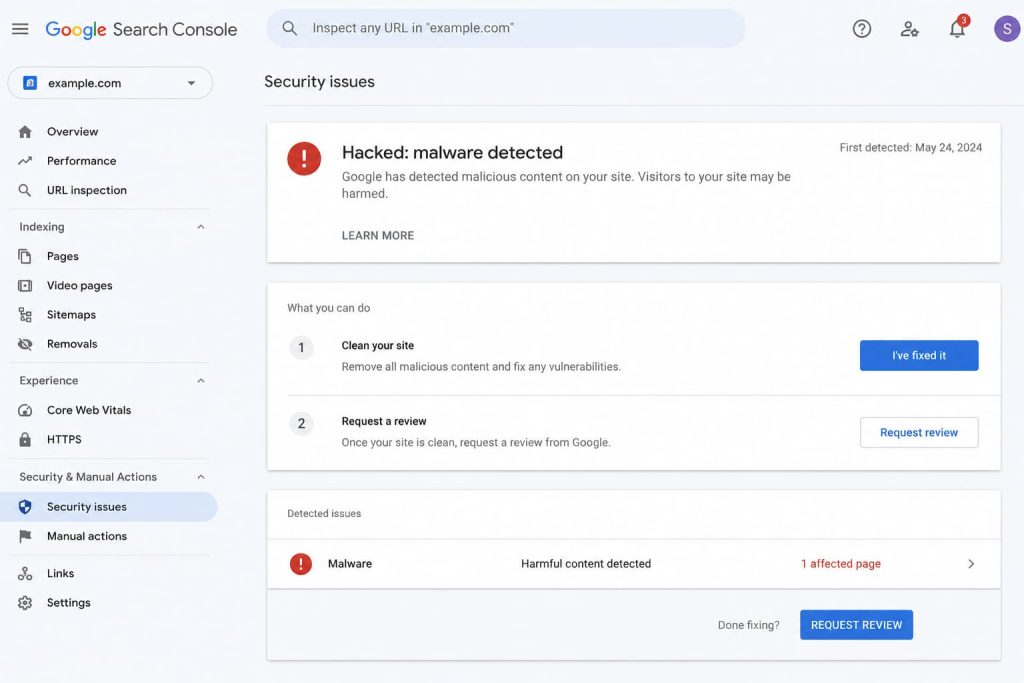
Any entry here, such as “Hacked: malware”, “Social engineering”, or “Harmful downloads”, confirms a hack.
Check 4: Check your server access logs
# Find suspicious POST requests to wp-login.php
grep "POST /wp-login.php" /var/log/nginx/access.log | tail -50

# Find recently modified PHP files
find /var/www/yoursite/ -name "*.php" -mtime -14 -not -path "*/wp-admin/*"
Check 5: Check for PHP files in uploads
find /var/www/yoursite/wp-content/uploads/ -name "*.php"There should be zero PHP files in your uploads folder. Any PHP file there is malware.
2. The 17 Signs of a Hacked WordPress Site
You do not need command-line access to spot most hacks. These are the observable symptoms.
In Google search results:
- Your site appears with spam titles (Viagra, casino, payday loans, fake brands)
- Clicking your Google result redirects visitors to a different site
- Google shows a “This site may be hacked” warning below your listing
- Search Console shows a Manual Action or Security Issue
- Your organic traffic dropped suddenly, 30% or more overnight, with no content changes
On the site itself:
- Mobile visitors get redirected, but desktop visitors do not
- Visitors arriving from Google get redirected, but direct visitors do not
- New pages or posts appeared that you did not create
- The homepage shows spam content, foreign language text, or pharmaceutical products
- A “Deceptive site ahead” warning appears in Chrome or Firefox
In the WordPress backend:
- Admin accounts you do not recognise appear in Users, then All Users
- Plugins or themes you did not install are present
- Email logs show spam being sent from your hosting account
- Your hosting provider suspended or flagged your account
In your analytics:
- A sudden spike in traffic from unusual countries
- Bounce rate went to 95% overnight
- Pages ranking for spam keywords you have never written about
If three or more of these match, you have a hack. If any of the Google or Search Console signs match, you definitely have one.
3. The Most Common WordPress Hack Types in 2026
Knowing which hack you are dealing with helps locate the malware faster.
WordPress Pharma Hack (Viagra or SEO Spam)
Injects pharmaceutical spam into your site but shows it only to Googlebot, never to you. Your Google snippets advertise cheap Viagra while your homepage looks clean. Full guide: WordPress Pharma Hack: Detection, Removal and Prevention
WordPress Redirect Hack
Sends some or all of your visitors to scam sites, fake pharmacies, or drive-by malware downloads. Usually conditional: only mobile, only first visit, or only visitors from Google. Full guide: WordPress Redirect Hack: Detect and Remove It
WordPress Japanese SEO Spam
Similar to the pharma hack but injects Japanese keyword spam. Your site starts ranking in Japanese search results for counterfeit product searches. Full guide: WordPress Japanese SEO Spam Hack
WordPress Backdoor
A hidden PHP file, usually disguised as a legitimate WordPress file, that lets the attacker regain access at any time. Without removing the backdoor, every cleanup is temporary.
Admin User Creation
Attackers create hidden administrator accounts, sometimes manipulating the user_status field so accounts do not appear in the WordPress Users list.
WooCommerce Credit Card Skimming
JavaScript injected into checkout pages that silently copies card details as customers type. The site functions normally, customers complete purchases, but their card data goes to the attacker.
4. Complete Hack Removal Protocol (12 Steps)
Do these in order. Do not skip any step. The most common reason hacked WordPress sites get reinfected within 30 days is an incomplete cleanup. One remaining persistence point is enough to rebuild the entire infection.
Step 0: Take a snapshot before touching anything
# Backup files

tar -czf infected-files-$(date +%Y%m%d-%H%M).tar.gz /var/www/yoursite/

# Backup database

mysqldump -u root -p yoursite_db > infected-db-$(date +%Y%m%d-%H%M).sql
Label this backup as INFECTED — DO NOT RESTORE. You need it for forensics, not recovery.
Step 1: Put the site into maintenance mode
wp maintenance-mode activateThis stops malware from being served to visitors while you work.
Step 2: Find every modified file
# PHP files modified in last 30 days

find /var/www/yoursite/ -name "*.php" -mtime -30 \

-not -path "*/wp-admin/*" \

-not -path "*/wp-includes/*" \

-printf "%TY-%Tm-%Td %p\n" | sort

# All PHP files in uploads (should be zero)

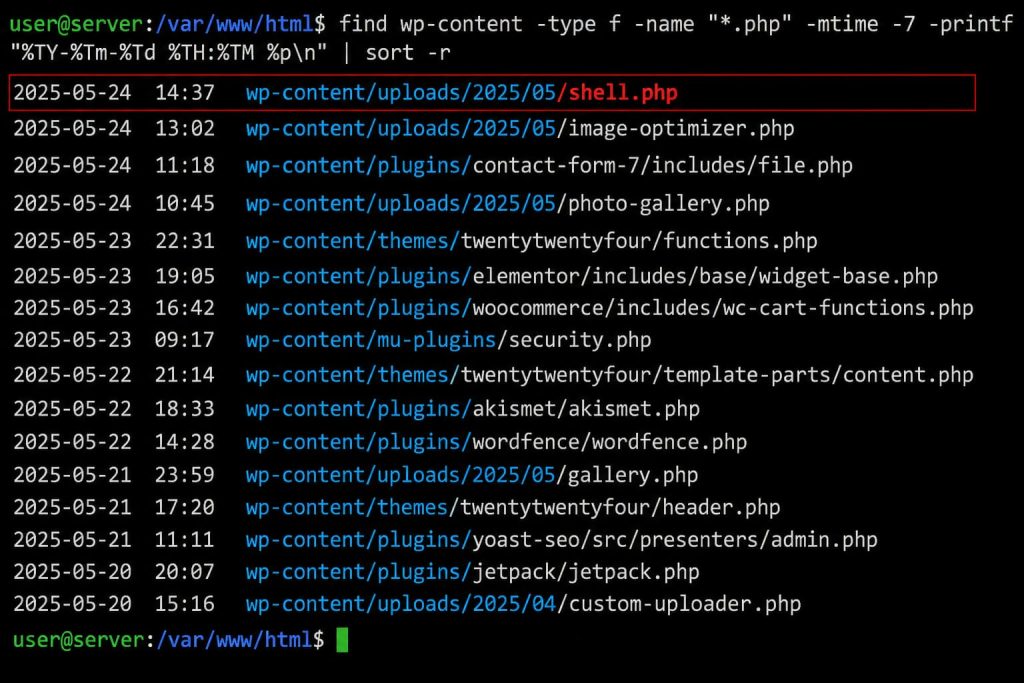
find /var/www/yoursite/wp-content/uploads/ -name "*.php"

# Obfuscated code patterns

grep -rEln "eval\s*\(|base64_decode|str_rot13|gzinflate" /var/www/yoursite/ \

| grep -v "vendor/" | grep -v "wp-includes/"
Every PHP file in /wp-content/uploads/ is malware. Delete it. Any file outside of /wp-admin/ and /wp-includes/ that contains eval(base64_decode( is malware.
Step 3: Check the mu-plugins folder
ls -la /var/www/yoursite/wp-content/mu-plugins/Most WordPress installs have an empty mu-plugins folder. Any file here you did not knowingly install is malware. Must-use plugins run on every page request and cannot be deactivated from the WordPress admin. They are a favourite persistence point for sophisticated attacks.
Step 4: Replace WordPress core, plugins, and themes
# Save wp-config.php and uploads

cp wp-config.php /tmp/wp-config.php.safe

cp -r wp-content/uploads /tmp/uploads.safe

# Replace core

wp core download --force --skip-content

# Reinstall all plugins from wordpress.org (clean copies)

wp plugin list --field=name | xargs -I {} wp plugin install {} --force

# Reinstall active theme

wp theme install $(wp theme list --status=active --field=name) --force

# Restore config and uploads

cp /tmp/wp-config.php.safe wp-config.php

cp -r /tmp/uploads.safe wp-content/uploads
If you have any nulled or pirated plugins or themes, delete them entirely. They are the original entry point in approximately 20% of hacks.
Step 5: Clean .htaccess
Open .htaccess at the WordPress root and delete anything you did not add. Replace it with the WordPress default:
# BEGIN WordPress

<IfModule mod_rewrite.c>

RewriteEngine On

RewriteRule .* - [E=HTTP_AUTHORIZATION:%{HTTP:Authorization}]

RewriteBase /

RewriteRule ^index\.php$ - [L]

RewriteCond %{REQUEST_FILENAME} !-f

RewriteCond %{REQUEST_FILENAME} !-d

RewriteRule . /index.php [L]

</IfModule>

# END WordPress
Check all .htaccess files, not just the root. Attackers often inject redirects into subdirectory .htaccess files:
find /var/www/yoursite/ -name ".htaccess" -exec grep -l "Rewrite\|Redirect" {} \;Step 6: Clean wp-config.php
Open wp-config.php. Anything between <?php and define(‘DB_NAME’ that you did not put there is malicious. Any eval(), base64_decode(), or gzinflate() outside of a comment is malicious. Delete it.
Step 7: Clean the database
This is the step most site owners skip, and the reason most cleaned sites get reinfected.
-- Find suspicious encoded options

SELECT option_name, LENGTH(option_value) AS size

FROM wp_options

WHERE LENGTH(option_value) > 10000

OR option_value LIKE '%eval(%'

OR option_value LIKE '%base64_decode%'

OR option_value LIKE '%str_rot13%'

OR option_value LIKE '%window.location%'

ORDER BY size DESC

LIMIT 30;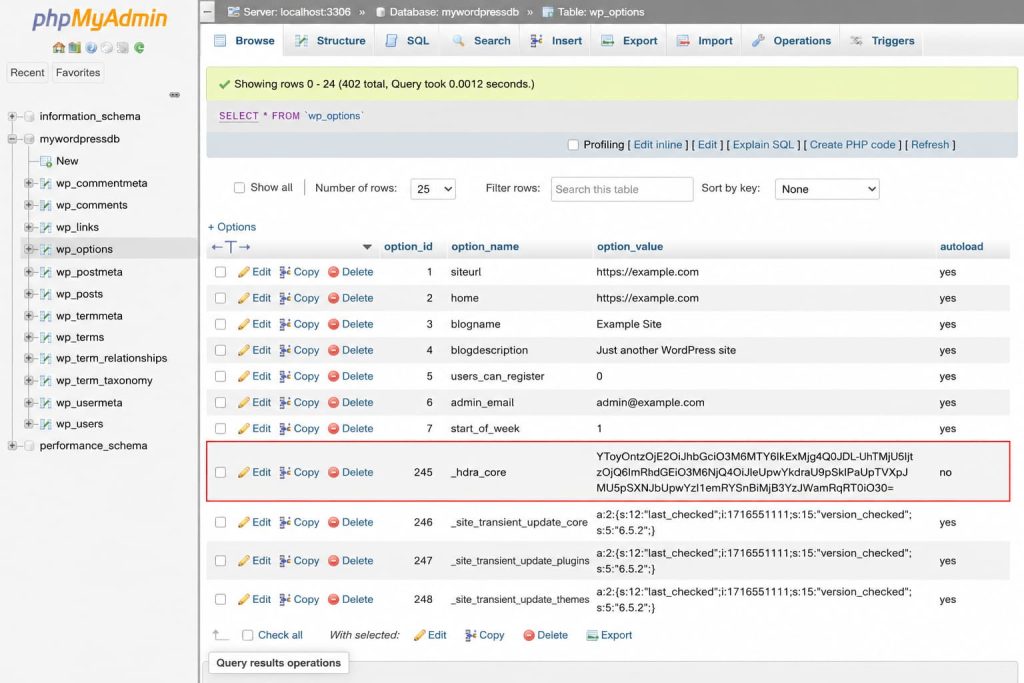
Common malicious option names seen in active 2025-2026 campaigns: _hdra_core, _wp_core_cache, widget_jquery_cache, theme_mod_optimization, _seo_meta_cache.
-- Delete confirmed malicious options (add your specific names)

DELETE FROM wp_options

WHERE option_name IN (

'_hdra_core',

'_wp_core_cache',

'widget_jquery_cache'

-- add any others found above

);

-- Remove injected scripts from posts

UPDATE wp_posts

SET post_content = REGEXP_REPLACE(

post_content,

'<script[^>]*src="https?://[^"]*\.(shop|click|xyz|top|fun|live)/[^"]*"[^>]*></script>',

''

)

WHERE post_content REGEXP '<script[^>]*\.(shop|click|xyz|top|fun|live)';
Test your UPDATE statements on a copy of the database before running against production.
Step 8: Remove unauthorized administrator accounts
-- List all administrator accounts

SELECT u.ID, u.user_login, u.user_email, u.user_registered

FROM wp_users u

INNER JOIN wp_usermeta m ON u.ID = m.user_id

WHERE m.meta_key = 'wp_capabilities'

AND m.meta_value LIKE '%administrator%'

ORDER BY u.user_registered DESC;
Any administrator you do not recognise, especially one created in the same timeframe as the hack, is the attacker’s persistent access.
DELETE FROM wp_users WHERE ID = <rogue_id>;

DELETE FROM wp_usermeta WHERE user_id = <rogue_id>;
Step 9: Remove malicious scheduled events
# List all cron events

wp cron event list

# Delete any hook you do not recognise

wp cron event delete <hook_name>
Attackers use WP-Cron to rebuild deleted malware hourly. A cron job named gg_pharma_reinstall, wp_check_remote, or theme_optimization_run was not created by WordPress or any legitimate plugin.
Step 10: Rotate every credential
# Reset all WordPress user passwords

wp user list --field=ID | xargs -I {} wp user reset-password {}

# Generate fresh authentication keys

curl https://api.wordpress.org/secret-key/1.1/salt/
Paste the output of the salt generator into wp-config.php, replacing the AUTH_KEY block. Also rotate: database password, SFTP/SSH keys, hosting control panel password, and any API keys the site uses.
Step 11: Verify the cleanup
# Check for remaining obfuscation

grep -rEln "eval\s*\(|base64_decode|str_rot13" /var/www/yoursite/ \

| grep -v "vendor/" | grep -v "wp-includes/"

# Confirm no PHP in uploads

find /var/www/yoursite/wp-content/uploads/ -name "*.php"

# Re-fetch as Googlebot to confirm malware is gone

curl -sA "Mozilla/5.0 (compatible; Googlebot/2.1)" https://yourdomain.com/ \

| grep -i "viagra\|casino\|redirect"
Any results from these checks mean you missed something. Repeat steps 2 through 9.
Step 12: Bring the site back online
wp maintenance-mode deactivate5. How to Recover Your Google Rankings After a Hack
Removing the malware is step one. Your Google rankings will not recover automatically. You need to work with Google directly to remove the warning and rebuild trust.
Submit a Security Review Request
In Search Console, go to Security and Manual Actions, then Security Issues, then Request Review.
Include:
- What the infection was (for example, “pharma SEO spam injected via outdated plugin”)
- The specific steps you took to remove it
- What you have done to prevent reinfection (server-side scanning, 2FA, plugin update policy)
Security review decisions typically arrive within 24 to 72 hours for malware, and up to 10 days for spam-related issues.
Force Re-Crawl of Your Most Important Pages
In the URL Inspection tool, paste each of your top 10 pages, then click Request Indexing. Do this after the security review is cleared.
Submit a Fresh Sitemap
Generate a clean sitemap from Yoast, RankMath, or wp sitemap generate, then resubmit it in Search Console under Sitemaps. This signals which URLs are legitimate and helps Google deindex spam URLs faster.
What to Expect
- Sites caught within 2 weeks: Most rankings recover within 4 to 6 weeks of the security review being cleared
- Sites infected for 1 to 3 months: Rankings recover over 2 to 4 months
- Sites infected for 3-plus months: Some keyword positions may not fully recover
6. How to Stop It Happening Again
A cleaned WordPress site has a 60% reinfection rate within 30 days without preventative measures. The root causes, in order of frequency:
The entry point was never closed. The vulnerability that let attackers in, whether an outdated plugin CVE, a nulled theme, or a weak admin password, is still present. Audit every plugin against the WPScan vulnerability database immediately after cleanup.
The cleanup was incomplete. One persistence point (a cron job, a database option, a mu-plugins file) was left behind. Follow steps 1 through 11 above without shortcuts.
No virtual patching. A new plugin vulnerability is exploited within 4 hours of public disclosure. The official patch typically arrives 7 to 14 days later. That gap is when reinfections happen.
Compromised hosting credentials. If your host password or SSH key is in any breach database, attackers can re-compromise at the server level regardless of WordPress hardening. Check at haveibeenpwned.com and rotate.
The prevention checklist:
- Server-side malware scanning (runs outside WordPress, malware cannot tamper with it)
- WAF with virtual patching for the top WordPress plugin CVEs
- 2FA on every administrator account, no exceptions
- Database scanning enabled (the part most plugins skip entirely)
- DISALLOW_FILE_EDIT and DISALLOW_FILE_MODS in wp-config.php
- PHP execution disabled in /wp-content/uploads/
- Daily off-server backups, tested by restore at least quarterly
- Quarterly plugin audit, remove anything not actively maintained
- Zero nulled or pirated plugins or themes
GuardianGaze ships all of these by default. Install the free plugin or see the paid plans.
7. Frequently Asked Questions
My site looks completely normal but a customer says it is hacked. Is that possible?
Yes. This is the standard presentation of cloaked WordPress malware. Modern attacks serve clean content to the site owner (logged-in users, direct visitors, familiar IP addresses) while serving malicious content to visitors arriving from search engines. Test using curl with a Googlebot User-Agent, or open your site in an incognito window on a mobile data connection you have not used before.
My security plugin says everything is clean but I am still seeing spam in Google. Why?
File-based security plugins scan PHP files against known malware signatures. The pharma hack and several redirect variants store their payload in the WordPress database, specifically wp_options, which file scanners never read. A clean scan result from a plugin that does not scan the database is not evidence that you are clean.
How did my site get hacked in the first place?
The most common entry points in 2025-2026: an outdated plugin with a known CVE (around 60% of cases), a nulled or pirated plugin or theme (20%), a brute-forced admin password (10%), and cross-site contamination from a neighbouring site on shared hosting (10%).
How long will it take for Google to remove the hacked warning?
After a successful security review, the warning is typically removed within 24 to 72 hours. Your search rankings then take a separate recovery period, usually 2 to 8 weeks for sites cleaned quickly, and 2 to 6 months for longer infections.
Should I just restore from a backup?
Only if you can verify the backup predates the infection. Pharma and redirect malware often sits dormant for 2 to 8 weeks before activating. If you restore, run the full cleanup protocol against the restored site as if it were a fresh infection.
Do I need to notify my customers about the hack?
If your site collected any personal data (names, emails, passwords, payment information) and attackers had file-system or database access, you may have a notification obligation under GDPR Article 33 (72-hour report to the ICO if you are in the UK or EU), CCPA, or PCI-DSS. The threshold is whether the attacker could have accessed personal data. On a typical compromised WordPress install, the answer is usually yes.
- WordPress Pharma Hack: Detection, Removal and Prevention
- WordPress Redirect Hack: Detect and Remove It
- WordPress Brute Force Attack Prevention
Stop the next hack before it starts. GuardianGaze’s server-side scanner catches malware that hides from ordinary plugins, including the database half most scanners miss. Install the free plugin or see the paid plans.